








About Server Waypoint
From ModrinthSync server waypoints to Xaero's maps and VoxelMap, and teleport to waypoints on other servers behind Velocity. Commands and navigation work without the client mod.
Server Waypoint







Make your world easier to explore.
Share useful places with your community and help players find their way around your world.
Server Waypoint provides shared destinations, cross-server teleportation, navigation and clickable chat commands. Players can use the server features with a vanilla client. The optional client mod adds in-world markers, a waypoint manager and map integrations.
Across servers, closer together
The optional Velocity integration lets players browse shared waypoints on connected servers and teleport between them when permitted. Cross-server browsing and teleportation are available through clickable chat without the client mod.
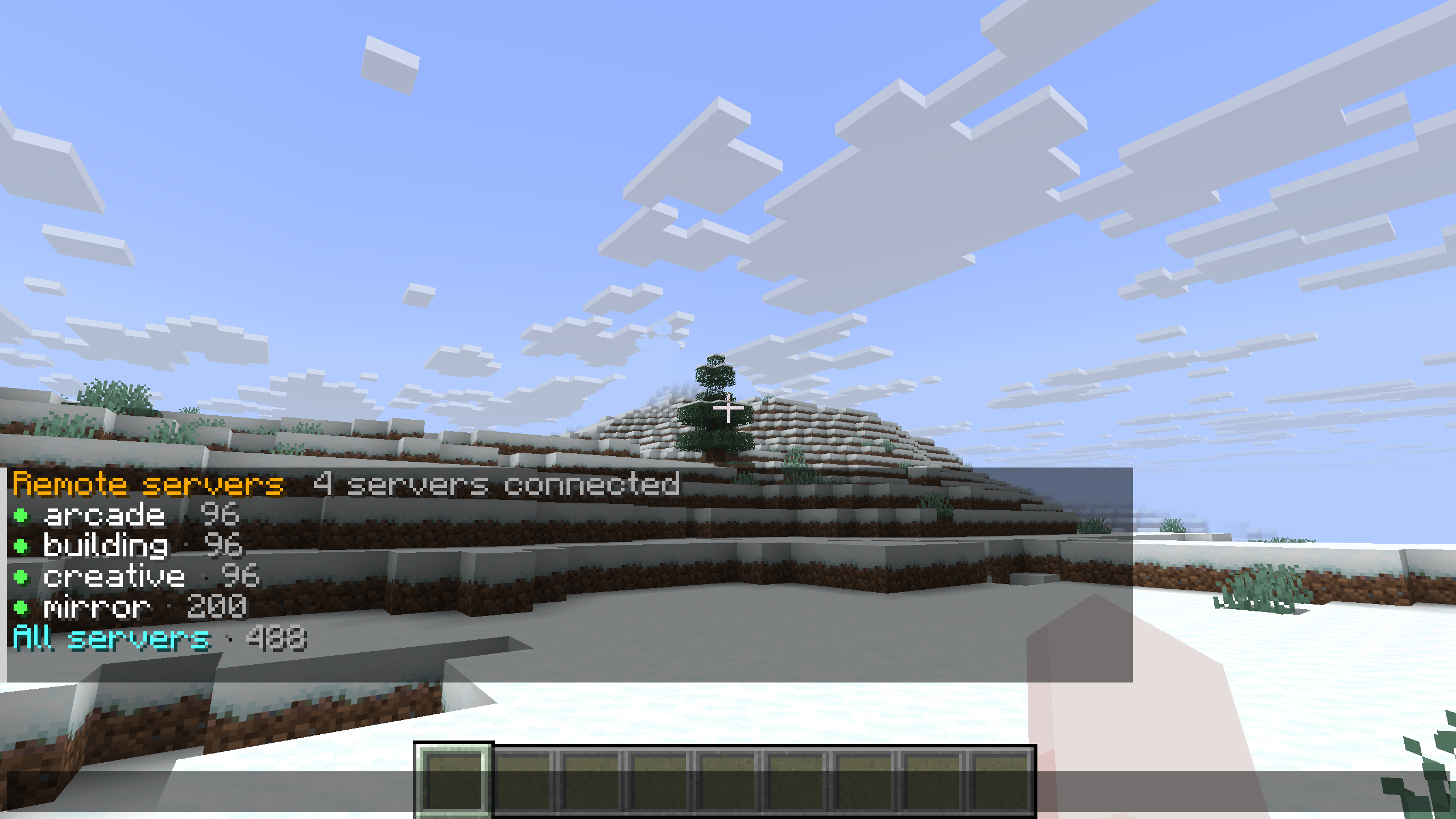
Use chat across the network. Run /wp remote to browse without the client mod. The chat view lists connected servers with availability indicators and waypoint counts, with an All servers option for browsing them together.
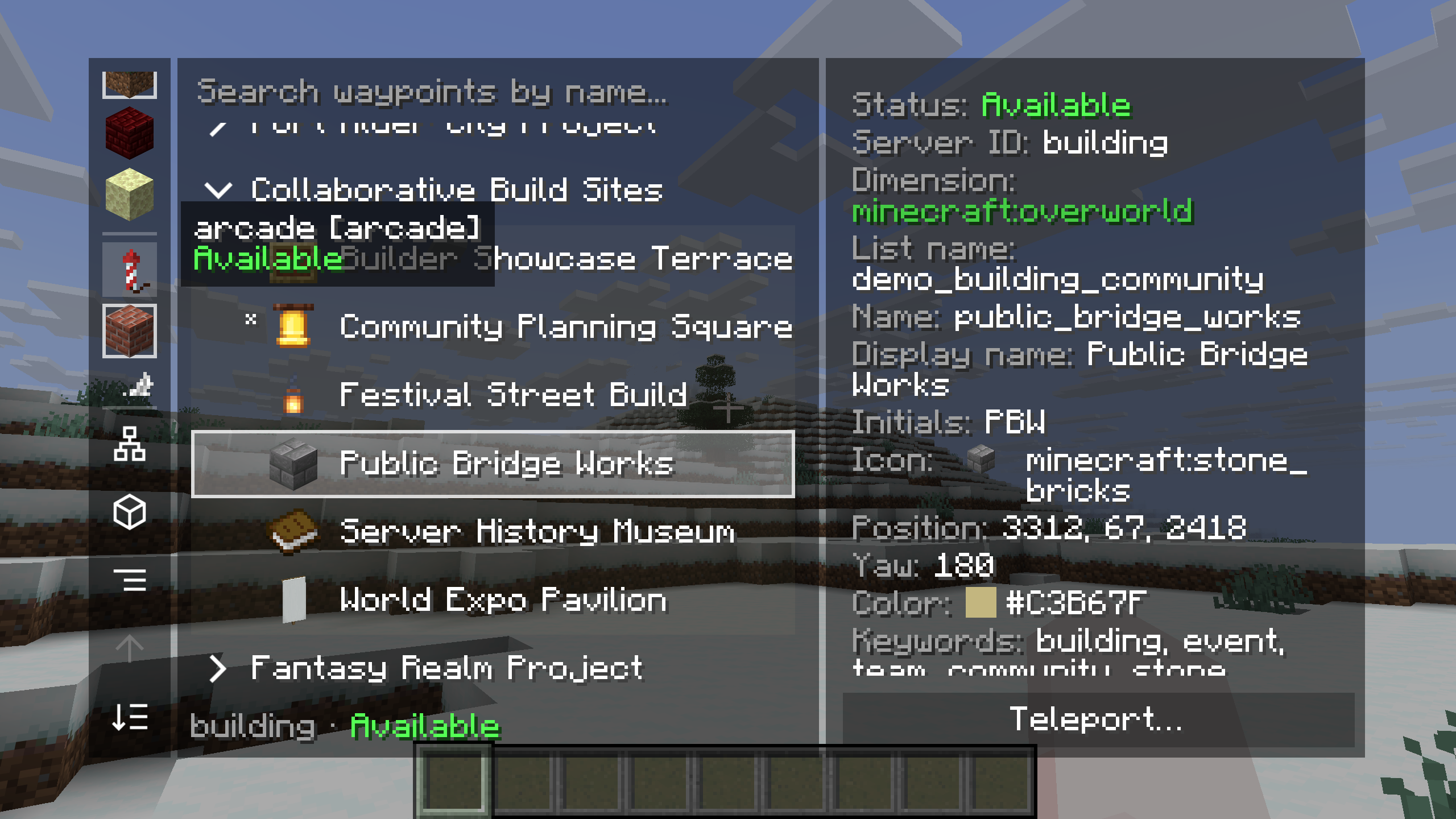
Browse another server's places. In the client manager, choose a remote server and explore its lists. Here, the building server's Collaborative Build Sites list contains Public Bridge Works. The details panel shows the server's availability, the destination's properties and a Teleport action.
Cross-server teleportation follows the server's permissions. To edit a remote waypoint, join the server that owns it.
Follow the route your way
Choose the guidance that feels comfortable as you travel. The labeled example shows all five server navigation methods pointing to Festival Green at the same time.
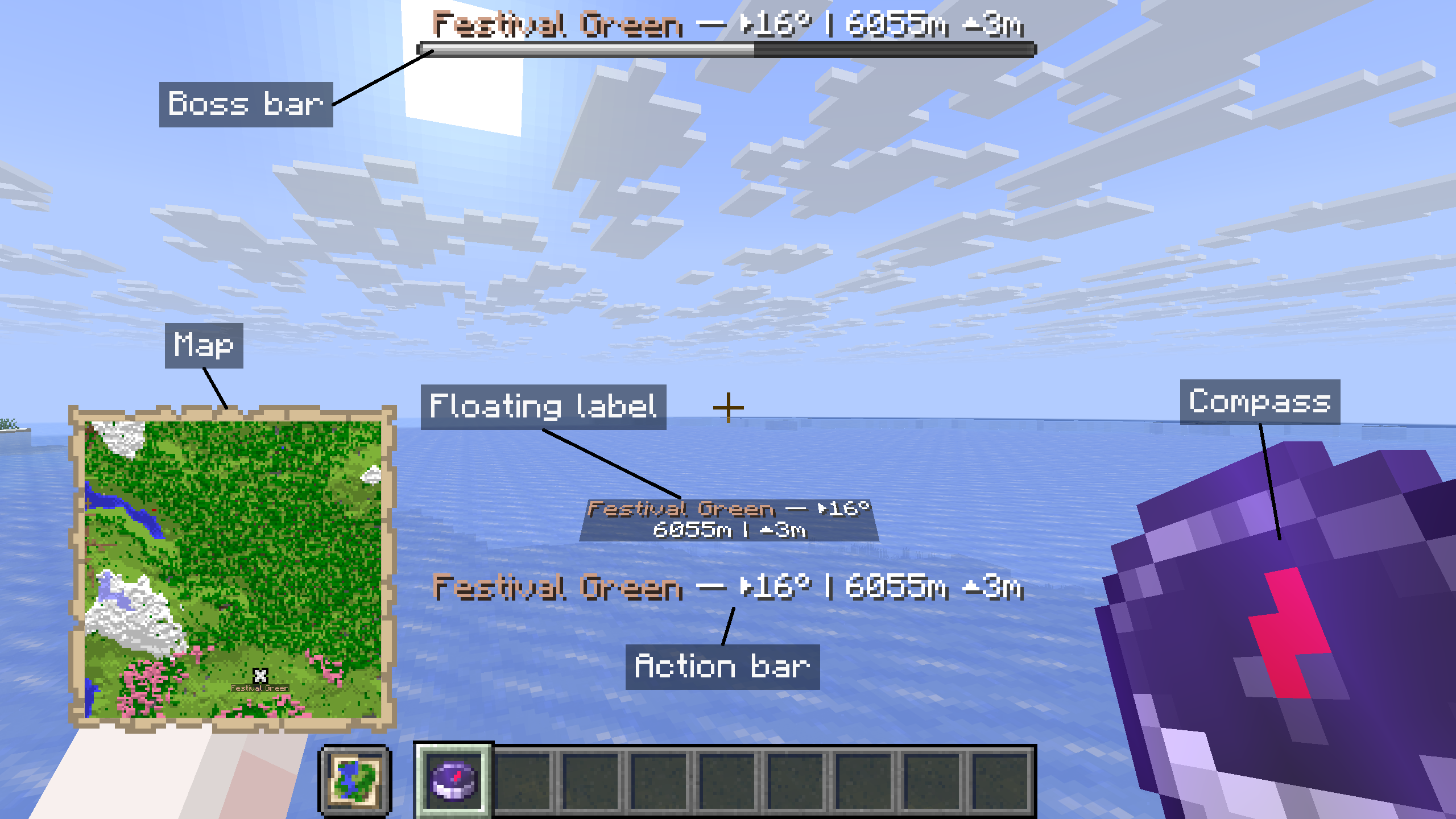
- Compass and map: follow the compass toward the destination or find its marker on the navigation map.
- Boss bar and action bar: keep the destination's name, direction, distance and height difference on screen.
- Floating label: see the destination's guidance within the world.
Use /wp navigate to change your navigation methods or stop navigation. All five methods are provided by the server and work without the client mod.
Browse and manage with clickable commands
Browse and manage waypoints from Minecraft's chat. The server provides clickable lists, hover details and waypoint actions, so players can get started with a vanilla client.
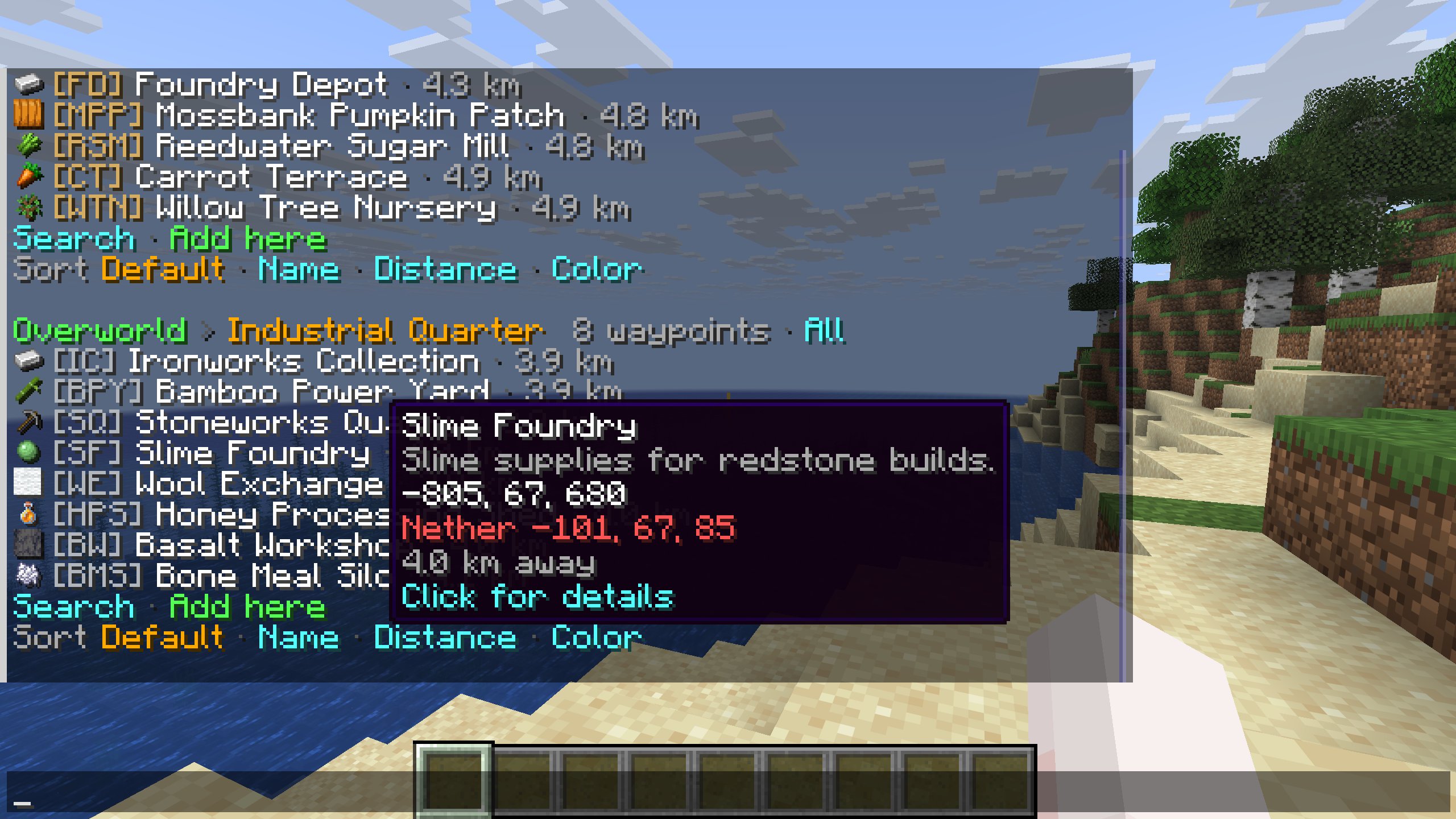
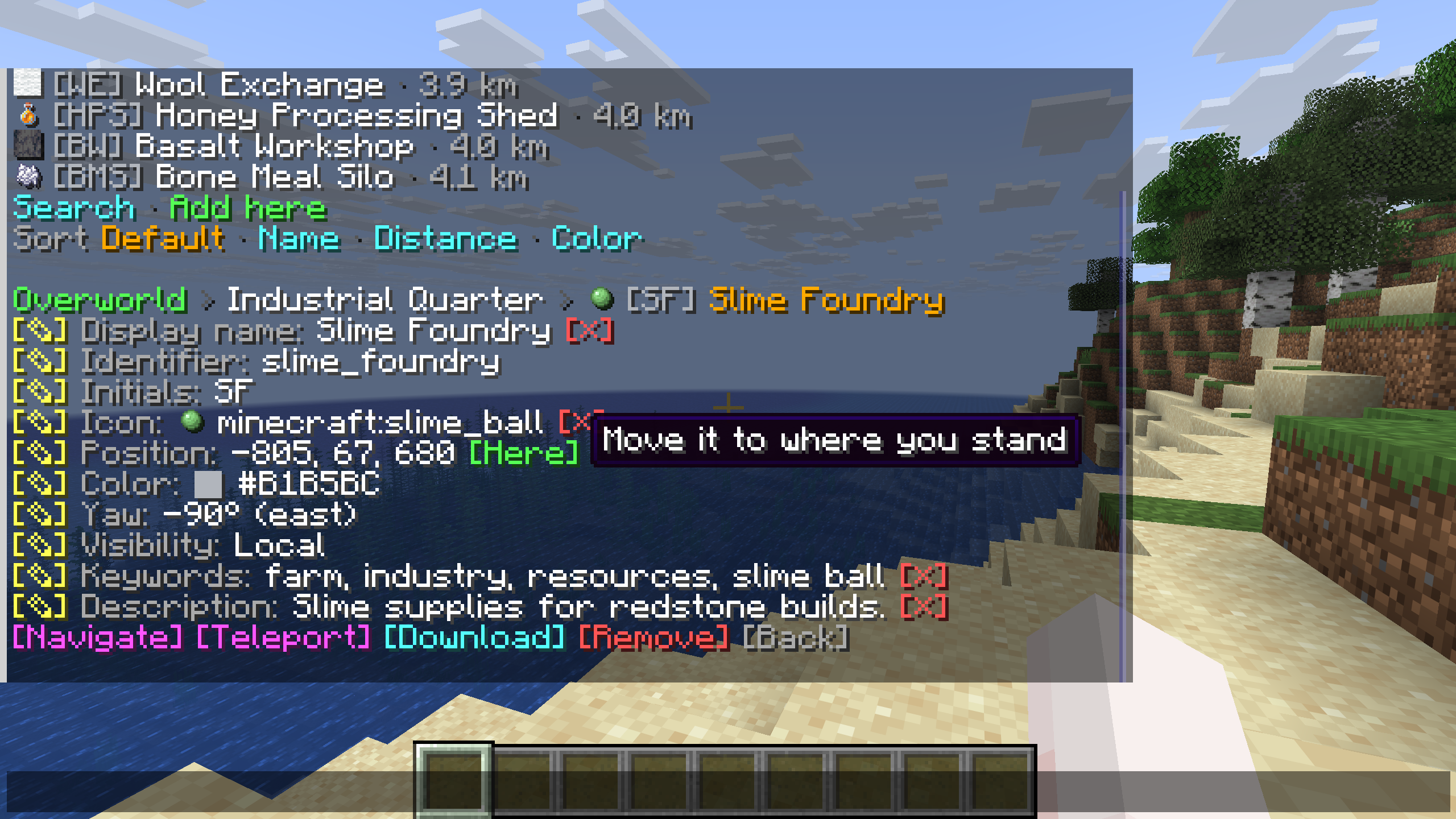
Browse before you travel. Open /wp to view waypoints grouped by dimension and list, with icons and distances beside their names. Search or change the sort order, and hover over a destination to read its description and coordinates. The example shows Slime Foundry in the Industrial Quarter list.
Details and actions in one place. Select a waypoint to see its properties and the available edit controls. The detail view includes actions to navigate, teleport, download or remove the waypoint. Hover hints explain controls such as Here, which moves the saved position to where you are standing.
The server's permissions determine which actions each player can use. Messages follow each player's Minecraft language setting.
Give every destination its own style
Shared waypoint display names and descriptions support JSON text components, so you can combine colors and text styles for each destination. The screenshots show how the client mod displays that shared formatting in the manager and in-world markers.
Highlights
From source dataGame versions
Supports 24 Minecraft versions, the newest being 26.3.
Loaders
Runs on Fabric, Folia, Forge, NeoForge, Paper, Purpur, Quilt and Velocity.
Footprint
Rated a light load on a server.
Server Waypoint on Nxeon
From our catalogue- One-click install
- Supported on Nxeon Minecraft servers. We download it from Modrinth, place it, and restart the server.
- Server side
- Optional on the server
- Server type needed
- Fabric, Folia, Forge, NeoForge, Paper, Purpur, Quilt, Velocity
- Server load
- light
- Smallest plan we suggest
- Minecraft — 2 GB (2 GB RAM). This follows our own load rating above, not a benchmark.
- Latest build
- 4.0.1, released 2026-10-28
Game versions by loader
| Loader | Game versions | Newest |
|---|---|---|
| Velocity | 1.20 to 26.3 (24 versions) | 26.3 |
| Folia | 1.21 to 26.3 (17 versions) | 26.3 |
| Paper | 1.21 to 26.3 (17 versions) | 26.3 |
| Purpur | 1.21 to 26.3 (17 versions) | 26.3 |
| NeoForge | 1.21.6 to 26.2 (9 versions) | 26.2 |
| Forge | 26.3 | 26.3 |
From 15 recorded builds of Server Waypoint.
Recent builds
| Build | Released | Game versions | Loaders |
|---|---|---|---|
| 4.0.1 | 2026-10-28 | 1.20 to 26.3 (24 versions) | Velocity |
| 4.0.1 | 2026-10-28 | 26.2 to 26.3 (2 versions) | Folia, Paper, Purpur |
| 4.0.1 | 2026-10-28 | 1.21.9 to 1.21.10 (2 versions) | Folia, Paper, Purpur |
| 4.0.1 | 2026-10-28 | 1.21.11 to 26.1.2 (4 versions) | Folia, Paper, Purpur |
| 4.0.1 | 2026-10-28 | 1.21 to 1.21.8 (9 versions) | Folia, Paper, Purpur |
| 4.0.0 | 2026-10-15 | 26.3 | Forge |
Dependencies
- Optional: modrinth project Vebnzrzj (modrinth, not in our catalogue)
Declared by the newest build that lists any. Required ones are installed with it on one-click installs.
Run Server Waypoint on a Minecraft server
Pick a server or deploy a new one above; it is installed in one click.
What kind of mod it is
From the catalogMaps & scenarios
Custom maps, arenas and scenarios to play on.
Works on a server
From source side supportModrinth lists server-side support for Server Waypoint as optional: it can run on a server, but isn’t required there.
Compatibility
- Game
- Minecraft
- Loaders
- FabricFoliaForgeNeoForgePaperPurpurQuiltVelocity
- Runs on
- Serveroptional on the server
- Game versions
- 26.3 and 23 earlier
Verified at the source
- ✓ModrinthOfficial listing, checked 2026-10-28Open ↗
- ✓Author2676959, as published on Modrinth
- ✓LicenseMITFree









