






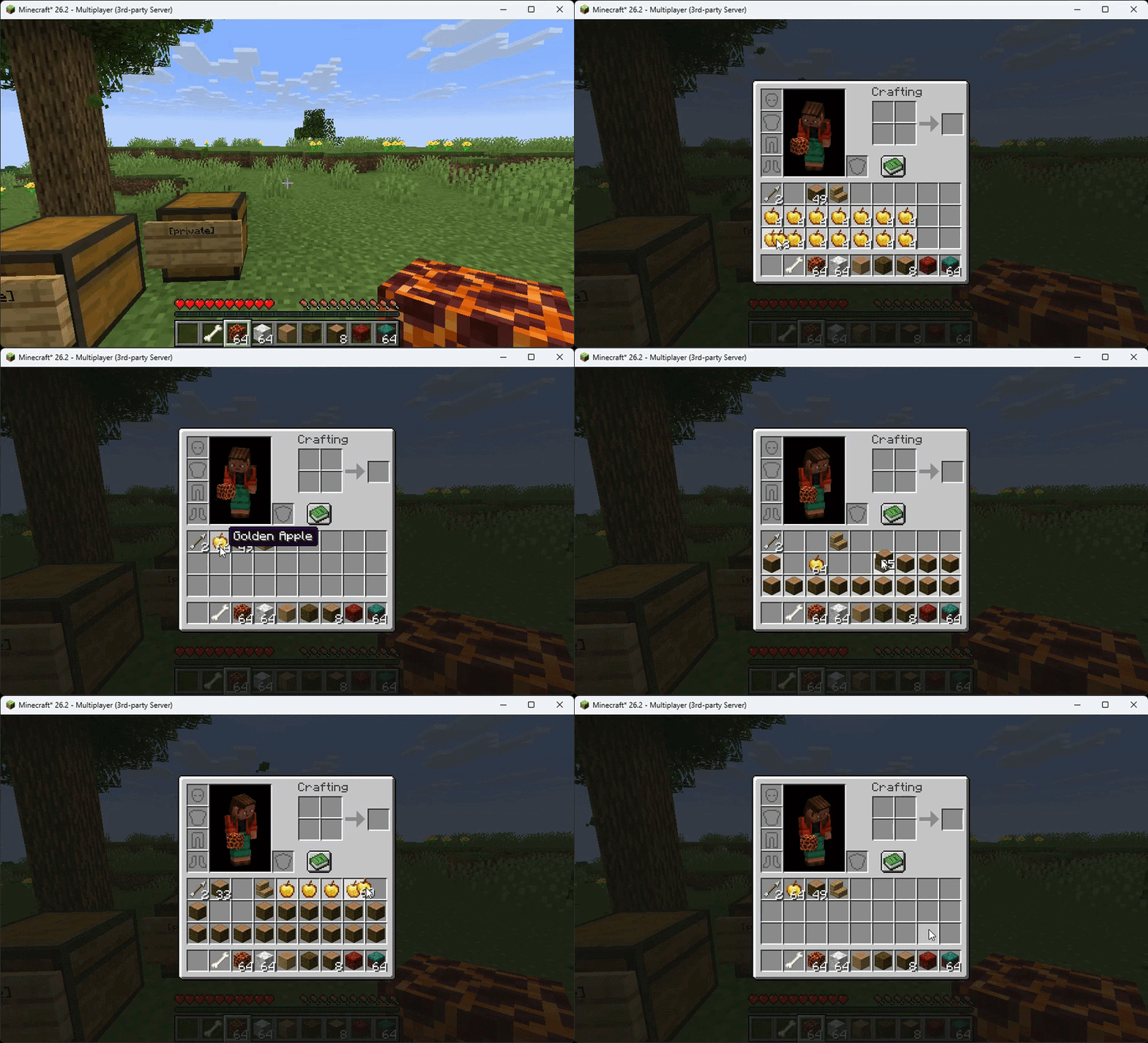

About Smart Inventory Sorter
From ModrinthSmart Inventory Sorter is a lightweight automatic inventory, chest, shulcker,barrel organization mod
Smart Inventory Sorter automatically organizes inventories in Minecraft. It sorts storage containers when players finish using them, sorts player inventories on close, merges partial stacks before sorting, and can run server-side only, in singleplayer, or with optional client controls. The client mod is never required: vanilla clients get full automatic sorting and commands when the mod is installed on the server.
What the mod does
- Sorts chests, double chests, ender chests, barrels, shulker boxes, hoppers, droppers, dispensers, and compatible storage menus when the player closes them (exact per-container toggles depend on version, see Configuration).
- Sorts the player inventory after it closes, with separate toggles for main inventory, hotbar, armor, and offhand sections (26.3 build; older builds sort the main inventory with hotbar lock).
- Merges compatible partial stacks before sorting to free up slots.
- Never touches specialized menus such as crafting tables, furnaces, blast furnaces, smokers, brewing stands, anvils, smithing tables, stonecutters, or enchanting tables.
- Adds an optional compact S button in supported container screens, an optional P keybind, and chat commands for manual sorting.
- Manual-only mode disables every automatic sort so nothing moves unless you press S, press P, or run a sort command.
- Per-item filtering lets you exclude specific items from sorting or restrict sorting to a specific item list using item IDs such as minecraft:elytra (26.3 build).
Supported versions
| Minecraft | Java | Modrinth version | File | |-----------|------|------------------|------| | 1.21 to 1.21.11 | 21 | 1.1.0 | smart-inventory-sorter-1.0.0-mc1.21-1.21.11.jar | | 26.1 to 26.1.2 | 25 | 1.1.0 | smart-inventory-sorter-1.0.0-mc26.1-26.1.2.jar | | 26.2 | 25 | 1.1.0 | smart-inventory-sorter-1.0.0.jar | | 26.3 | 25 | 1.1.0 | smart-inventory-sorter-1.0.0-mc26.3.jar |
Older 1.0.0 files are kept for reference. Use 1.1.0 for the latest fixes and options.
Installation
Server-side only (recommended for servers):
- Install Fabric Loader and Fabric API matching your Minecraft version.
- Place the matching JAR from the table above into the server mods folder.
- Restart the server. Vanilla clients can join with no client mod installed.
Singleplayer:
- Install Fabric Loader and Fabric API in your client instance.
- Place the matching JAR into the mods folder and launch the game.
Optional client features:
- Install the same JAR on the client to enable the S button and the P keybind.
- Set rawMode to true to hide both, or use showSortButton and enableKeybind independently (26.3 build).
- The client is never required. Automatic sorting and sort commands work for vanilla clients when the mod runs on the server.
How to use
- Automatic mode: open a supported container, move items normally, then close it. The server consolidates stacks and sorts the contents. Open and close your inventory to sort the enabled inventory parts.
- Button-only mode: set manualSortingOnly to true and reload with /sort reload (26.3) or restart. Nothing sorts on close anymore. Sort exactly when you want with the S button, the P key, or a sort command.
- The S button appears in the top corner of supported container screens when the client mod is installed and the button is enabled.
- The default sort key is P. It can be rebound in the controls screen.
Commands
| Command | Description | Availability | |---------|-------------|--------------| | /sort | Sorts the open storage container, or the player inventory when no container is open | All versions (1.1.0) | | /sort container | Sorts the currently open storage container | 26.3 build | | /sort inventory | Sorts the player inventory using the enabled part toggles | 26.3 build | | /sort main | Same as /sort inventory | 26.3 build | | /sort hotbar | Sorts only the hotbar, temporarily bypassing the hotbar lock | 26.3 build | | /sort reload | Reloads smart_sorter_config.json from disk (requires admin permission) | 26.3 build |
On older builds (1.21, 26.1, 26.2) only /sort is available: it sorts the open container, or the player inventory when no container is open.
Configuration
The file is config/smart_sorter_config.json. It is created with defaults on first run. Restart the game or server after editing, or run /sort reload on the 26.3 build.
Full option table (26.3 build):
| Setting | Description | Default | |---------|-------------|---------| | rawMode | Hides the client S button and P keybind; automatic sorting and commands keep working | false | | autoSortOnClose | Master switch for all automatic sorting on close | true | | manualSortingOnly | Disables all automatic sorting; sort only via S button, P key, or commands | false | | sortChests | Sort chest and double-chest storage | true | | sortEnderChests | Sort ender chests | true | | sortBarrels | Sort barrels | true | | sortShulkers | Sort shulker boxes | true | | sortHoppers | Sort hoppers | true | | sortDispensersDroppers | Sort dispensers and droppers | true | | sortOtherContainers | Sort other safe storage layouts (including compatible modded storage) | true | | sortPlayerInventoryOnClose | Sort the player inventory after it closes | true | | sortPlayerMain | Include main inventory slots 9-35 | true | | sortPlayerHotbar | Include hotbar slots 0-8 (ignored while lockHotbar is true) | false | | sortArmorSlots | Include armor slots 36-39 | false | | sortOffhandSlot | Include offhand handling | false | | lockHotbar | Preserves all nine hotbar slots during player inventory sorting | true | | showSortButton | Shows or hides the client-side S button | true | | enableKeybind | Enables or disables the client-side P key | true | | sortingMethod | Sort order: CREATIVE_TAB, ALPHABETICAL, or ID | CREATIVE_TAB | | excludedItems | Item IDs that are never moved, for example ["minecraft:elytra"] | [] | | onlySortItems | When non-empty, only these item IDs take part in sorting | [] |
Highlights
From source dataGame versions
Supports 17 Minecraft versions, the newest being 26.3.
Loaders
Runs on Fabric.
Footprint
Rated a light load on a server.
Smart Inventory Sorter on Nxeon
From our catalogue- One-click install
- Supported on Nxeon Minecraft servers. We download it from Modrinth, place it, and restart the server.
- Server side
- Required on the server
- Server type needed
- Fabric
- Server load
- light
- Smallest plan we suggest
- Minecraft — 2 GB (2 GB RAM). This follows our own load rating above, not a benchmark.
- Latest build
- 1.1.2, released 2026-10-14
Game versions by loader
| Loader | Game versions | Newest |
|---|---|---|
| Fabric | 1.21 to 26.3 (17 versions) | 26.3 |
From 10 recorded builds of Smart Inventory Sorter.
Recent builds
| Build | Released | Game versions | Loaders |
|---|---|---|---|
| 1.1.2 | 2026-10-14 | 26.3 | Fabric |
| 1.1.1 | 2026-10-13 | 26.3 | Fabric |
| 1.1.1 | 2026-10-13 | 26.2 | Fabric |
| 1.1.1 | 2026-10-13 | 26.1 to 26.1.2 (3 versions) | Fabric |
| 1.1.1 | 2026-10-13 | 1.21 to 1.21.11 (12 versions) | Fabric |
| 1.1.0 | 2026-09-25 | 26.2 | Fabric |
Dependencies
- Optional: modrinth project P7dR8mSH (modrinth, not in our catalogue)
Declared by the newest build that lists any. Required ones are installed with it on one-click installs.
Run Smart Inventory Sorter on a Minecraft server
Pick a server or deploy a new one above; it is installed in one click.
What kind of mod it is
From the catalogQuality of life & UI
Small conveniences, tweaks and interface improvements players notice straight away.
Runs on your server
From source side supportModrinth lists Smart Inventory Sorter as required on the server. Check its Modrinth page to see whether players need it too.
Compatibility
- Game
- Minecraft
- Loaders
- Fabric
- Runs on
- Serverrequired on the server
- Game versions
- 26.3 and 16 earlier
Verified at the source
- ✓ModrinthOfficial listing, checked 2026-10-14Open ↗
- ✓AuthorTOP_G2026, as published on Modrinth
- ✓LicenseLicenseRef-All-Rights-ReservedFree









