







About Superb Warfare: Perimeter
From ModrinthAdvanced drone swarm control and enemy tracking radar / Усовершенствованное управление роем беспилотных летательных аппаратов и радар слежения за противником
Description / Описание
EN:
Perimeter — is an addon that adds a tactical radar to the game, allowing you to equip standard drones from the Superb Warfare mod with advanced artificial intelligence. But that's only half of it. With the latest update, Perimeter also brings a full-featured network mode in the spirit of Battlefield: capture points A/B/C, match rounds with a timer, a Battlefield-style spawn screen, team pings and live drone cameras on the radar.
Requires Minecraft 1.21.1 / NeoForge, Superb Warfare and GeckoLib installed on the server and all clients (same version).
Swarm Control (Drone Binding)
You can create your own battle swarm of up to 16 drones per player (configurable — maxSwarmSize). Add a drone to the swarm: Take the tracking device in your hand, go to the installed drone and press Shift + RMB (right mouse button). Remove the drone from the swarm: Repeat the same procedure (Shift + RMB with the device in hand), and the drone will be excluded from the list. Swarm summary: Press Shift + RMB into the air to get a brief swarm report in the chat.
The drone remains a native Superb Warfare entity: health, sounds and vulnerability to weapons are unchanged. A drone linked to a monitor cannot be recruited — manual control is never broken. Swarm membership is stored on the drone itself and survives chunk unloading and server restarts.
How to open and use the radar
To access the radar interface, you don't have to hold the device in your hands — just have it in your inventory. To open the radar: Press the X key on your keyboard (or press RMB while holding the device in your hand).
Interface features:
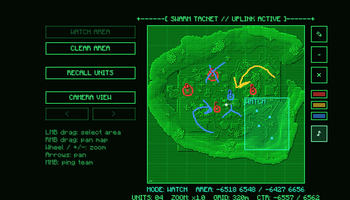
The radar screen is a monochrome green heightmap of the patrol area with a grid, sweep, scanlines and ASCII frames. It allows you to track positions of your drones, detected enemies, allies and capture zones in real time. Green dots: Your swarm drones. Red dot: The target in real time while there is visual contact. Yellow dot: The last known coordinates of a lost target during the 40-second search. Capture zones: Shown on the map with color fill — blue (yours), red (enemy), grey (neutral).
Radar map management:
LMB drag on the map: Define the patrol zone for your swarm ("WATCH HERE"). RMB + Drag: Move the map.
Mouse wheel / + -: Zoom in and out. Middle mouse click (MMB): Send a ping to your team — an orange "!" with your name appears for allies for 10 seconds with a soft sound (1 ping per second anti-spam). "Return Units" button: Orders the drones to fly to you immediately. Pressing it again resumes patrol. "Drone Cameras" button: Opens a live feed from a drone — no HUD, no hand, with analog noise. Switch between drones with < > or arrow keys. Signal cuts out beyond 128 blocks. Pencil tool (right side of map): Draw annotations visible only to your side — three colors (red / yellow / blue), eraser, clear all. Sound button (♪ / ∅): Toggle ping sounds on/off.
Live data is transmitted only while the radar screen is open, so the addon is easy on server performance.
Swarm AI
The drones are no longer just static turrets — each one is controlled by its own flight brain, and the whole swarm acts as a single organism. Patrolling: Drones pick random points within the patrol radius (default 160 blocks) and fly 6–20 blocks above the terrain. Shared target: The target is common for the entire swarm — as soon as one drone establishes visual contact, all drones know the coordinates. 80% of the swarm moves to engage, 20% continues patrolling. Shadowing: Drones circle around the target in orbital slots and never come closer than 5 blocks. Losing contact: The drones fly to the last known coordinates and sweep a 24-block radius. After 40 seconds without contact they forget the target and return to patrol. Smart building flight: In buildings and skyscrapers the swarm switches to indoor mode — real raycast altitudes instead of heightmap, lowering, wall-hugging and self-recovery from traps. Obstacle avoidance: Drones steer around terrain, gain altitude and push each other apart to prevent collisions. Dodging: When a projectile is flying at a drone, it has a chance to make a sharp strafe perpendicular to the trajectory (configurable — dodgeChance).
Detection and notification system
Drones actively conduct reconnaissance and transmit tactical data to both sides:
For the owner of the swarm:
When a drone spots an opponent, a [ ! ] CONTACT indicator appears in the top-right corner of the screen and a red dot appears on the radar map. When the target is lost and the search begins, the indicator changes to [ ? ] SEARCH. For the target ("victim"): A player who has been spotted by a drone sees a blinking red ASCII indicator <[O]> in the top-right corner, signaling they have been detected.
Losing the target and avoiding the chase:
If the "victim" escapes from sight, a yellow marker appears on the radar map marking their last known location. The "victim's" indicator <[O]> turns yellow, a melting bar |||||||||| and a 40-second timer appear. If the drones do not reacquire the player within 40 seconds, the swarm completely forgets them — the indicator turns green for 10 seconds and disappears, meaning the chase is over.
Capture Points
Perimeter adds tactical capture points A/B/C in the spirit of Battlefield — stand inside a zone to capture it, hold the most zones to win the round. The zone is a cylinder that spans the full world height. Both sides inside simultaneously — CONTESTED, progress freezes. Everyone leaves — progress rolls back. Zone colors: blue (yours), red (enemy's), grey (neutral) — each player sees colors from their own perspective. In the world: a dotted ring along the terrain, a light pillar and a letter above the flag mark each point. Active captures are shown at the top of the screen as HUD badges — a ring filling clockwise in the attacker's color.
Highlights
From source dataGame versions
Supports 3 Minecraft versions, the newest being 1.21.1.
Loaders
Runs on Forge and NeoForge.
Footprint
Rated a light load on a server.
Superb Warfare: Perimeter on Nxeon
From our catalogue- One-click install
- Supported on Nxeon Minecraft servers. We download it from Modrinth, place it, and restart the server.
- Server side
- Required on the server
- Server type needed
- Forge, NeoForge
- Server load
- light
- Smallest plan we suggest
- Minecraft — 2 GB (2 GB RAM). This follows our own load rating above, not a benchmark.
- Latest build
- 1.6.0, released 2026-07-17
Game versions by loader
| Loader | Game versions | Newest |
|---|---|---|
| Forge | 1.20.1 to 1.21.1 (3 versions) | 1.21.1 |
| NeoForge | 1.20.1 to 1.21.1 (3 versions) | 1.21.1 |
From 2 recorded builds of Superb Warfare: Perimeter.
Recent builds
| Build | Released | Game versions | Loaders |
|---|---|---|---|
| 1.6.0 | 2026-07-17 | 1.20.1 to 1.21.1 (3 versions) | Forge, NeoForge |
| 1.0.0 | 2026-07-11 | 1.21.1 | Forge, NeoForge |
Run Superb Warfare: Perimeter on a Minecraft server
Pick a server or deploy a new one above; it is installed in one click.
What kind of mod it is
From the catalogVehicles & ships
Cars, boats, aircraft, ships and other things to drive or fly.
Runs on your server
From source side supportModrinth lists Superb Warfare: Perimeter as required on the server. Check its Modrinth page to see whether players need it too.
Compatibility
- Game
- Minecraft
- Loaders
- ForgeNeoForge
- Runs on
- Serverrequired on the server
- Game versions
- 1.21.1 and 2 earlier
Verified at the source
- ✓ModrinthOfficial listing, checked 2026-10-02Open ↗
- ✓Authorseenmus, as published on Modrinth
- ✓LicenseLicenseRef-All-Rights-ReservedFree









