







About TexturesToMap
From ModrinthTurn block textures into maps for fake blocks, hidden bases, pranks, and illusion builds.
TextureToMap
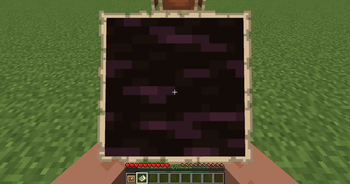
TextureToMap is a unique Minecraft utility mod that lets you turn block textures into maps with a simple right-click system.
Right-click a supported block while holding a map, choose one of the detected block textures, and instantly copy that texture onto the map. You can then place the map in an item frame to create fake blocks, hidden entrances, illusion builds, prank setups, and creative Minecraft tricks.
How it works
- Hold a map in your hand.
- Right-click a supported block.
- Choose the texture you want from the selection menu.
- The selected texture is copied onto your map.
- Place the map in an item frame to create a fake block effect.
TextureToMap makes map-based fake blocks much easier than building huge pixel art manually.
Features
- Block texture to map conversion – copy block textures directly onto maps.
- Texture selection menu – choose from detected block textures when right-clicking.
- Smooth map output – creates clean map versions of block textures.
- HD item frame rendering – improves fake block visuals when the mod is installed.
- Vanilla block support – works with many standard Minecraft blocks.
- Modded block support – can work with many modded blocks that use normal Minecraft block models.
- Invisible item frame utility – use an Invisibility Potion to hide nearby item frames without wasting the potion if none are nearby.
- Invisible Support Block – a solid, placeable, invisible block for survival-friendly map illusion setups.
- Survival crafting support – designed to be useful outside creative mode too.
- Vanilla-friendly utility design – adds powerful illusion tools without overcomplicating gameplay.
Invisible Item Frame Utility
Hold an Invisibility Potion and right-click to make nearby item frames invisible. If there are no item frames nearby, the potion will not be consumed.
This makes it easier to create clean fake block builds without commands.
Invisible Support Block
TextureToMap also adds an Invisible Support Block for map illusion setups.
It is invisible in the world, solid, placeable, and useful behind item frames when normal blocks would ruin the illusion. It is especially helpful for fake walls, hidden entrances, glass areas, open spaces, and survival-friendly illusion builds.
Modded Block Support
TextureToMap can work with many modded blocks as long as they use standard Minecraft block models and textures.
Some animated blocks, custom-rendered blocks, or special block entity models may not work perfectly yet, but support may improve in future updates.
Perfect for
- Fake block walls
- Hidden bases
- Secret entrances
- Prank videos
- Fake floors
- Trap builds
- Map illusions
- Creative builds
- Minecraft Shorts and TikTok content
Planned Future Updates
- Better modded block support
- Improved texture detection
- More accurate fake block rendering
- More survival tools
- More illusion-building features
- More configuration options
TextureToMap is made for players who want to create convincing fake blocks, hidden builds, pranks, and map illusions without manually building huge map pixel art.
Right-click. Choose texture. Create illusion.
Highlights
From source dataGame versions
Supports 3 Minecraft versions, the newest being 1.21.11.
Loaders
Runs on Fabric, Forge and NeoForge.
Footprint
Rated a light load on a server.
TexturesToMap on Nxeon
From our catalogue- One-click install
- Supported on Nxeon Minecraft servers. We download it from Modrinth, place it, and restart the server.
- Server side
- Required on the server
- Server type needed
- Fabric, Forge, NeoForge
- Server load
- light
- Smallest plan we suggest
- Minecraft — 2 GB (2 GB RAM). This follows our own load rating above, not a benchmark.
- Latest build
- texturetomap-fabric-1.21.11, released 2026-07-23
Game versions by loader
| Loader | Game versions | Newest |
|---|---|---|
| Fabric | 1.20.1 to 1.21.11 (2 versions) | 1.21.11 |
| Forge | 1.20.1 | 1.20.1 |
| NeoForge | 1.21.1 | 1.21.1 |
From 5 recorded builds of TexturesToMap.
Recent builds
| Build | Released | Game versions | Loaders |
|---|---|---|---|
| texturetomap-fabric-1.21.11 | 2026-07-23 | 1.21.11 | Fabric |
| texturetomap-1.21.1-neoforge | 2026-07-22 | 1.21.1 | NeoForge |
| texturetomap-fabric-1.20.1 | 2026-07-22 | 1.20.1 | Fabric |
| 2.0.0 | 2026-07-21 | 1.20.1 | Forge |
| 1.0.0 | 2026-06-15 | 1.20.1 | Forge |
Run TexturesToMap on a Minecraft server
Pick a server or deploy a new one above; it is installed in one click.
What kind of mod it is
From the catalogMaps & scenarios
Custom maps, arenas and scenarios to play on.
Runs on your server
From source side supportModrinth lists TexturesToMap as required on the server. Check its Modrinth page to see whether players need it too.
Compatibility
- Game
- Minecraft
- Loaders
- FabricForgeNeoForge
- Runs on
- Serverrequired on the server
- Game versions
- 1.21.11 and 2 earlier
Verified at the source
- ✓ModrinthOfficial listing, checked 2026-10-02Open ↗
- ✓Author01stev, as published on Modrinth
- ✓LicenseLicenseRef-All-Rights-ReservedFree









