






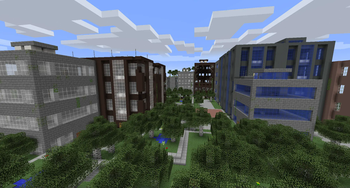

About The Lost Cities
From ModrinthAllows the player to play in an old abandoned city instead of the normal overworld
The Lost Cities
The Lost Cities transforms Minecraft's Overworld into a vast, abandoned civilization. Explore ruined skyscrapers, apartment blocks, factories, roads, highways, bridges, tunnels, subway systems, parks, flooded areas, and underground rooms filled with loot and dangers.
Cities are integrated into the normal terrain, so Lost Cities can be combined with other biome and terrain mods. Depending on the selected profile, the world can contain sprawling city regions, rare cities separated by wilderness, heavily damaged ruins, safer buildings, tall skylines, domed cities, or other specialized landscapes.
Features
- Large procedural cities with streets, buildings, parks, highways, bridges, railways, tunnels, and subways
- Detailed interiors with loot, spawners, cellars, lighting, and extensive damage and decay options
- Multiple built-in profiles for very different world-generation styles
- An in-game configuration screen for selecting a profile and customizing generation
- Support for biome and terrain-generation mods
- Data-driven buildings, palettes, city styles, world styles, and other assets for modpack authors
- Custom profiles for controlling city frequency, building height, damage, explosions, terrain, infrastructure, loot, and much more
- Server-side-only operation, allowing vanilla clients to connect when no client-side Lost Cities features are required
Note: New Street/Highway layout was commissioned by TqLxQuanZ. Thanks for the support!
Current Version Documentation
The documentation stored in the GitHub branch for your Minecraft version is the most accurate and up-to-date source. The Lost Cities Wiki remains useful for older versions and general background, but it may describe legacy behavior that no longer applies.
Minecraft 1.20.1
Minecraft 1.21.1
Minecraft 1.21.11
Minecraft 26.1.2
Setting Up a Server
Choose the profile before generating the world. Changing the profile later affects only newly generated chunks and can create abrupt borders or an inconsistent world. If the server has already generated the intended world, stop it, make a backup, and use a new level-name or remove the old world before continuing.
The profile name is the identifier shown in the Lost Cities profile selector, such as default, nodamage, or another installed profile. Names are case-sensitive. A custom profile must also be installed in the server's Lost Cities profile configuration before the world is created.
Server Setup for 1.20.1
The safest way to configure a 1.20.1 server is to prepare the settings in single player:
- Install the same Minecraft 1.20.1 mod loader, Lost Cities version, and world-generation mods on the client and server.
- On the client, create a new single-player world. Open the Lost Cities configuration from the world-creation screen, enable Lost Cities, select the desired profile, and apply any custom settings.
- Create the world once so Lost Cities writes its world-specific configuration.
- Stop the dedicated server.
- Copy
saves/<your-world>/serverconfig/lostcities-server.tomlfrom the client instance todefaultconfigs/lostcities-server.tomlin the server directory. - Open the copied file and verify that
selectedProfilecontains the desired profile. LeaveselectedCustomJsonas generated if the profile was customized in the UI. - Start the server with a new world. The file in
defaultconfigsis copied into the new world'sserverconfigdirectory and Lost Cities generates the Overworld using that profile.
For an existing server installation that has not generated its world yet, you can instead place a prepared lostcities-server.toml directly in defaultconfigs. Do not use the old level-type=lostcities setting on 1.20.1; Lost Cities is selected through its configuration.
Server Setup for 1.21.1, 1.21.11, and 26.1.2
These versions use the regular server config directory instead of a per-world serverconfig file:
- Install the matching NeoForge and Lost Cities versions on the server, together with any biome, terrain, or asset mods required by the pack.
- Start the server once so the configuration files are created, wait for startup to finish, and then stop it.
- Open
config/lostcities-server.tomlin the server directory. - In the
profilessection, setselectedProfileto the desired profile name. For example:
[profiles]
selectedProfile = "default"
selectedCustomJson = ""- If you prepared customized settings with the in-game configuration screen, copy the generated
selectedCustomJsonvalue as well; otherwise leave it empty. - The bootstrap run may already have created a normal world. Set a new
level-nameinserver.properties, or back up and remove that generated world, so the next startup creates a completely fresh world. - Start the server. A non-empty
selectedProfileenables Lost Cities generation in the new Overworld; an empty value leaves the normal Overworld unchanged.
For all four current versions, Lost Cities can run only on the server, which permits unmodded clients to connect. Clients still need the mod when they need its configuration GUI or when the modpack contains other content that requires it on both sides.
Highlights
From source dataGame versions
Supports 24 Minecraft versions, the newest being 26.3.
Loaders
Runs on Fabric, Forge and NeoForge.
Footprint
Rated a light load on a server.
The Lost Cities on Nxeon
From our catalogue- One-click install
- Supported on Nxeon Minecraft servers. We download it from Modrinth, place it, and restart the server.
- Server side
- Required on the server
- Server type needed
- Fabric, Forge, NeoForge
- Server load
- light
- Smallest plan we suggest
- Minecraft — 2 GB (2 GB RAM). This follows our own load rating above, not a benchmark.
- Latest build
- 26.3-12.0.0-fabric, released 2026-10-21
Game versions by loader
| Loader | Game versions | Newest |
|---|---|---|
| NeoForge | 1.21.1 to 26.3 (5 versions) | 26.3 |
| Fabric | 26.2 to 26.3 (2 versions) | 26.3 |
From 12 recorded builds of The Lost Cities.
Recent builds
| Build | Released | Game versions | Loaders |
|---|---|---|---|
| 26.3-12.0.0-fabric | 2026-10-21 | 26.3 | Fabric |
| 26.3-12.0.0 | 2026-10-21 | 26.3 | NeoForge |
| 26.2-11.0.3-fabric | 2026-10-04 | 26.2 | Fabric |
| 26.2-11.0.3 | 2026-10-04 | 26.2 | NeoForge |
| 26.1.2-10.0.6 | 2026-10-04 | 26.1.2 | NeoForge |
| 1.21.11-9.5.6 | 2026-10-04 | 1.21.11 | NeoForge |
Dependencies
- Required: modrinth project ohNO6lps (modrinth, not in our catalogue)
- Required: modrinth project P7dR8mSH (modrinth, not in our catalogue)
Declared by the newest build that lists any. Required ones are installed with it on one-click installs.
Run The Lost Cities on a Minecraft server
Pick a server or deploy a new one above; it is installed in one click.
What kind of mod it is
From the catalogGameplay & overhauls
New mechanics, content and overhauls that change how the game plays.
Runs on your server
From source side supportModrinth lists The Lost Cities as required on the server. Check its Modrinth page to see whether players need it too.
Compatibility
- Game
- Minecraft
- Loaders
- FabricForgeNeoForge
- Runs on
- Serverrequired on the server
- Game versions
- 26.3 and 23 earlier
Verified at the source
- ✓ModrinthOfficial listing, checked 2026-10-22Open ↗
- ✓AuthorMcJty, as published on Modrinth
- ✓LicenseMITFree









