







About Time Stop Clock
From ModrinthLet you control time in minecraft!
Time Stop Clock


Features:
Version 1.19.x has been removed, and this mod has been completely rewritten.
Migrate to Cloth Config API from Previous Config System.(V2.0.0+)
Items:
- Time Clock - Ability to time stop, slow down (0.5x) and speed up (2.0x)
- Arrow - Can shoot most projectiles. Hold Shift to view shootable items
- Staff - No cooldown and no casting time (requires Iron's Spells 'n Spellbooks, suitable for use during time stop)
- Time Box Arrow - Quick creation of a TimeBox
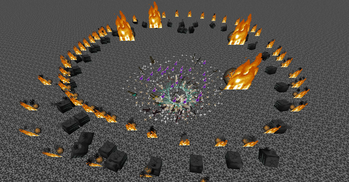
- Rotating Item - Summons items that orbit around you, launch them as projectiles
- Rotating Block - Summons blocks that orbit around you, launch them as projectiles
Spells
- Time Freeze - Freezes the time of the current world for x seconds. The default duration is 6 seconds. The duration of Iron's Spells 'n Spellbooks increases with the level, and Ars Nouveau allow for free configuration.
- Time Box - When hitting a target, a Time Box is generated. Time inside the box is in a frozen state (this includes the ability to freeze only entities, blocks, and particles). When hitting a creature, a Time Box with a hitbox size of ×1.5 is generated; when hitting a block, a 5×5×5-sized Time Box is generated. The default duration is 6 seconds, and this is an exclusive spell of Ars Nouveau.
Time Box
- Time inside the box is in a frozen state, and it can only freeze entities, blocks, liquids, and particles. Due to technical limitations, it can only be generated via commands or spells.
The Time Box can be reversed through the configuration file. After reversal, time outside the Time Box will be in a frozen state, while time inside the box remains normal.
Commands:
- /timeclock tickrate <value> - Set the game tickrate
/timeclock virtualtickrate <value> — Sets the virtual tickrate of the current world /timeclock entityVirtualTickrate <target> <value> — Sets the virtual tickrate of target entities
- /timeclock pauseTime <true/false> - Set whether to enable time stop, can be used to forcibly enable or disable time stop
- /timeclock whitelist list - View the whitelist
- /timeclock whitelist list <true/false> - Same as above, but choose whether to output to the log
- /timeclock whitelist clear - Remove all entities in the whitelist
- /timeclock whitelist remove <target> - Remove the target from the whitelist
- /timeclock whitelist remove uuid <UUID> - Remove the UUID from the whitelist.
- /timeclock whitelist add <target> - Add the target to the whitelist.
- /timeclock config reload - Reload the config (required after making modifications to the external config file).v2.0.0+ Removed.
- /timeclock timebox add <id> <min> <max> <expandAfterCreation> <changeSpeed>
- /timeclock timebox add <id> <min> <max> <expandAfterCreation> <changeSpeed> <color>
- /timeclock timebox add <id> <min> <max> <expandAfterCreation> <changeSpeed> <color> <alpha>
- /timeclock timebox add <id> <min> <max> <expandAfterCreation> <changeSpeed> <color> <alpha> <tick>
- /timeclock timebox add <id> <min> <max> <expandAfterCreation> <changeSpeed> <color> <alpha> <tick> <removeAnimation>
- /timeclock timebox add <id> <min> <max> <expandAfterCreation> <changeSpeed> <color> <alpha> <tick> <removeAnimation> <startCenter>
- /timeclock timebox remove <id>
- /timeclock timebox clear
- /timeclock timebox list <logging>
- /timeclock timebox modify <id>[<active/color/expandAfterCreation/changeSpeed>] <active/color/expandAfterCreation/speed>
- /timeclock timebox modify <id> [<color>] <color> <alpha>
Key Bindings
- Left Ctrl + Mouse Wheel - Toggle time clock mode
- Right Ctrl - Open the tooltip overlay config screen
- G - Launch Orbit Objects
Highlights
From source dataGame versions
Supports 3 Minecraft versions, the newest being 1.21.1.
Loaders
Runs on Fabric, Forge and NeoForge.
Footprint
Rated a light load on a server.
Time Stop Clock on Nxeon
From our catalogue- One-click install
- Supported on Nxeon Minecraft servers. We download it from Modrinth, place it, and restart the server.
- Server side
- Required on the server
- Server type needed
- Fabric, Forge, NeoForge
- Server load
- light
- Smallest plan we suggest
- Minecraft — 2 GB (2 GB RAM). This follows our own load rating above, not a benchmark.
- Latest build
- 4.8.0+forge, released 2026-09-19
Game versions by loader
| Loader | Game versions | Newest |
|---|---|---|
| Fabric | 1.20.1 to 1.21.1 (2 versions) | 1.21.1 |
| Forge | 1.20.1 | 1.20.1 |
| NeoForge | 1.21.1 | 1.21.1 |
From 5 recorded builds of Time Stop Clock.
Recent builds
| Build | Released | Game versions | Loaders |
|---|---|---|---|
| 4.8.0+forge | 2026-09-19 | 1.20.1 | Forge |
| 4.8.0+fabric | 2026-09-19 | 1.20.1 | Fabric |
| 4.7.0+neoforge | 2026-08-04 | 1.21.1 | NeoForge |
| 4.7.0+fabric | 2026-08-04 | 1.21.1 | Fabric |
| 4.6.0+forge | 2026-06-28 | 1.20.1 | Forge |
Run Time Stop Clock on a Minecraft server
Pick a server or deploy a new one above; it is installed in one click.
What kind of mod it is
From the catalogGameplay & overhauls
New mechanics, content and overhauls that change how the game plays.
Runs on your server
From source side supportModrinth lists Time Stop Clock as required on the server. Check its Modrinth page to see whether players need it too.
Compatibility
- Game
- Minecraft
- Loaders
- FabricForgeNeoForge
- Runs on
- Serverrequired on the server
- Game versions
- 1.21.1 and 2 earlier
Verified at the source
- ✓ModrinthOfficial listing, checked 2026-10-01Open ↗
- ✓AuthorSuel_ki, as published on Modrinth
- ✓LicenseMITFree









