






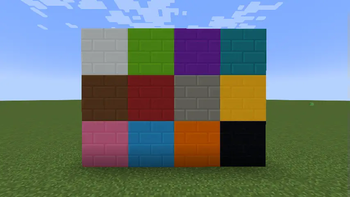

About Toms Server Additions: Concrete!
From ModrinthTSA: Concrete! adds new concrete brick blocks to your minecraft server, no client-side mods required!
Concrete Bricks!
This mod adds new concrete brick blocks for all 16 concrete blocks to your server (but also works in singleplayer).
It uses a resourcepack and distributes it to clients using polymer autohost.
No additional setup needed! You might need to enable auto-host in the polymer configs!
Requires:
and fabric api (used by both dependencies)
Recipes
- 2x2 concrete blocks of any color for concrete bricksin that color
Command
The blocks are in the "tsa" namespace, so to /give chiseled or vertical planks, do:
/give @... tsa:lime_concrete_bricks
/give @... tsa:black_concrete_bricks You can also /polymer creative to open polymer's creative menu and the filament blocks icon to access the blocks
Caveat:
This mod uses noteblocks to display the custom blocks on a server without requiring the client to have installed any mods. This means that resourcepacks that use noteblocks may not work correctly for players

Highlights
From source dataGame versions
Supports 22 Minecraft versions, the newest being 26.3.
Loaders
Runs on Fabric.
Footprint
Rated a light load on a server.
Toms Server Additions: Concrete! on Nxeon
From our catalogue- One-click install
- Supported on Nxeon Minecraft servers. We download it from Modrinth, place it, and restart the server.
- Server side
- Required on the server
- Server type needed
- Fabric
- Server load
- light
- Smallest plan we suggest
- Minecraft — 2 GB (2 GB RAM). This follows our own load rating above, not a benchmark.
- Latest build
- 1.1.6+26.3, released 2026-10-01
Game versions by loader
| Loader | Game versions | Newest |
|---|---|---|
| Fabric | 1.21 to 26.3 (19 versions) | 26.3 |
From 5 recorded builds of Toms Server Additions: Concrete!.
Recent builds
| Build | Released | Game versions | Loaders |
|---|---|---|---|
| 1.1.6+26.3 | 2026-10-01 | 26.3 | Fabric |
| 1.1.3+26.1 | 2026-05-17 | 26.1 to 26.1.2 (3 versions) | Fabric |
| 1.1.2+26.1 | 2026-03-29 | 26.1 to 26.1.2 (3 versions) | Fabric |
| 1.1.1+1.21.2-rc1-1.21.2-rc1 | 2024-10-21 | 1.21.2 to 1.21.11 (13 versions) | Fabric |
| 1.1.1+1.21-1.21.1 | 2024-09-13 | 1.21 to 1.21.1 (2 versions) | Fabric |
Dependencies
- Required: modrinth project yANxwqSX (modrinth, not in our catalogue)
Declared by the newest build that lists any. Required ones are installed with it on one-click installs.
Run Toms Server Additions: Concrete! on a Minecraft server
Pick a server or deploy a new one above; it is installed in one click.
What kind of mod it is
From the catalogBuilding & decoration
Blocks, furniture, decorations and building tools.
Runs on your server
From source side supportModrinth lists Toms Server Additions: Concrete! as required on the server. Check its Modrinth page to see whether players need it too.
Compatibility
- Game
- Minecraft
- Loaders
- Fabric
- Runs on
- Serverrequired on the server
- Game versions
- 26.3 and 21 earlier
Verified at the source
- ✓ModrinthOfficial listing, checked 2026-10-02Open ↗
- ✓Authortomalbrc, as published on Modrinth
- ✓LicenseMITFree









