








About Wireless Redstone
From ModrinthWireless Redstone adds blocks and items to use redstone remotely

Wireless Redstone adds Redstone components to Minecraft, allowing Redstone components to be controlled remotely. The concept works like any transceiver functionality.
Transmitter and receiver blocks behave in a lazy-loaded manner with respect to redstone updates in unloaded chunks. This means that unloaded chunks will not be actively loaded to make the redstone update, but as soon as the receiver is loaded, its redstone state will be updated to match that of its corresponding transmitter.
New:
- P2P Transmitters and Receivers, added with version 1.2.0
Currently wireless redstone is dimensional but this might change in the future.
Content
Redstone Transmitter & Receiver
The Redstone Transmitter transmits a signal to the Redstone Network when it is turned on by a Redstone signal and sets all receivers on the same frequency to high as well. If there is more than one transmitter transmitting on the same frequency, all receivers on that frequency will be high as long as at least one transmitter on that frequency is on. This block can be right-clicked to set the frequency.
The Redstone Receiver will output a Redstone signal of 15 as long as there is at least one active transmitter on the same frequency. This block can be right-clicked to set the frequency.
P2P Transmitter & Receiver
In addition to the classic frequency based transmitter and receiver pair, there are now P2P transmitters and receivers. Instead of "connecting" them via a frequency, they are directly connected with the help of the Linker, thus the name P2P (point to point). This means that there cannot be any frequency clashes with other players. But you can only connect one transmitter to one receiver and vice versa.
These components have two block states:
powered: Indicating whether the block is being powered (transmitter) or powers something (receiver)linked: Indicating if the block is linked with its counterpart. This property can be tested for by using a comparator. It will output redstone power of 15 if linked, and 0 otherwise.
Once the link between a transmitter and receiver pair is established, the linked property changes accordingly and redstone changes on the transmitter are reflected by the connected receiver. In case one of the two blocks gets destroyed or relinked to another block, the link of its counterpart is terminated.
There is however a unique catch to the linked property. Once a linked p2p block gets unloaded it will visually be unlinked from its counterpart. The redstone state stays the same and the actual link between them is still stored and re-established once they are both loaded again. In case the other block gets destroyed or re-linked in the meantime the block will unlink completely as soon as it tries to connect to the other block again (meaning both must be loaded). This behavior can for example be used detect if certain chunks are loaded or unloaded. I'd like to see what you can come up with using this feature.
Remote
The Remote is the item form of the Transmitter, while holding right-click the remote signal goes high. But it comes with the addition of being able to copy the frequency of a Transmitter or a Receiver by sneaking and right-clicking it. By sneaking and right-clicking the remote (not on a transmitter/receiver), you can set the frequency through the GUI.
Frequency Tool
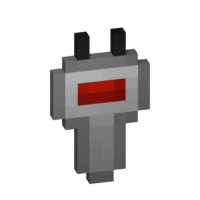
The Frequency Tool is a handy tool that makes it easy for you to take a frequency and set multiple transmitters and/or receivers to the same frequency. When holding it in your hand you can copy a frequency into the Frequency Tool by sneaking and right-clicking on a transmitter or receivers. To copy the now-stored frequency, simply right-click either a transmitter or receiver. By sneaking and right-clicking the frequency tool (not on a transmitter/receiver), you can set the frequency through the GUI.
Frequency Sniffer
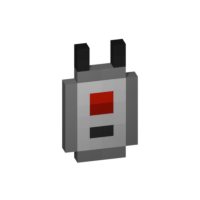
The Frequency Sniffer can be used as a tool to find active transmitters on a given frequency. As with other frequency tools too you can set the frequency either manually over the gui or copying it from a transmitter/receiver. When you right-click the sniffer tool all active transmitters on the set frequency within range are highlighted with a wireframe around the transmitter block. There is also a chat message that tells you where all the active transmitters are located at by showing the block position. If you are an admin/op, you can also click on the block position to teleport there. See example in the screenshot section. You can also change the highlight color in the configs!
Linker
Highlights
From source dataGame versions
Supports 10 Minecraft versions, the newest being 1.20.4.
Loaders
Runs on Fabric, Forge and NeoForge.
Footprint
Rated a light load on a server.
Wireless Redstone on Nxeon
From our catalogue- One-click install
- Supported on Nxeon Minecraft servers. We download it from Modrinth, place it, and restart the server.
- Server side
- Required on the server
- Server type needed
- Fabric, Forge, NeoForge
- Server load
- light
- Smallest plan we suggest
- Minecraft — 2 GB (2 GB RAM). This follows our own load rating above, not a benchmark.
- Latest build
- 1.3.0+1.20.1-forge, released 2026-10-05
Game versions by loader
| Loader | Game versions | Newest |
|---|---|---|
| Fabric | 1.20.1 to 1.20.4 (2 versions) | 1.20.4 |
| Forge | 1.20.1 to 1.20.4 (2 versions) | 1.20.4 |
| NeoForge | 1.20.1 to 1.20.4 (2 versions) | 1.20.4 |
From 10 recorded builds of Wireless Redstone.
Recent builds
| Build | Released | Game versions | Loaders |
|---|---|---|---|
| 1.3.0+1.20.1-forge | 2026-10-05 | 1.20.1 | Forge |
| 1.3.0+1.20.1-fabric | 2026-10-05 | 1.20.1 | Fabric |
| 1.3.0+1.20.4-forge | 2026-10-05 | 1.20.4 | Forge |
| 1.3.0+1.20.4-fabric | 2026-10-05 | 1.20.4 | Fabric |
| 1.3.0+1.20.4-neoforge | 2026-10-05 | 1.20.4 | NeoForge |
| 1.2.2+1.20.4-neoforge | 2025-09-30 | 1.20.4 | NeoForge |
Dependencies
- Optional: modrinth project 9s6osm5g (modrinth, not in our catalogue)
Declared by the newest build that lists any. Required ones are installed with it on one-click installs.
Run Wireless Redstone on a Minecraft server
Pick a server or deploy a new one above; it is installed in one click.
What kind of mod it is
From the catalogWeapons, items & crafting
New weapons, gear, items and the recipes to make them.
Runs on your server
From source side supportModrinth lists Wireless Redstone as required on the server. Check its Modrinth page to see whether players need it too.
Compatibility
- Game
- Minecraft
- Loaders
- FabricForgeNeoForge
- Runs on
- Serverrequired on the server
- Game versions
- 1.20.4 and 9 earlier
Verified at the source
- ✓ModrinthOfficial listing, checked 2026-10-05Open ↗
- ✓AuthorRazzokk, as published on Modrinth
- ✓LicenseGPL-3.0-onlyFree









