







About World Blender - Fabric
From ModrinthA dimension with all the features, structures, surfaces, and natural spawns from vanilla and your mods shoved in!

CURRENTLY FOR 1.17.0 MC
Needs to be on both client and server to work
(Requires Cloth API and Fabric API)
(Play this mod with Lithium and Sodium for best performance!)
[[Click here for the 1.16.5 Forge version of this mod!]](https://modrinth.com/mod/worldblender)
Recent News: Updated to 1.17.0! Enjoy the Lush Caves and Dripstone in the dimension!
Mojang bugs to beware of with this mod:
Make a copy of your world before putting on Ultra Amplified Dimension! If you remove any dimension mod, the Nether and End dimensions will be missing from the game due to a Mojang bug. Also, _putting the mod back on will not restore the dimension._ https://bugs.mojang.com/browse/MC-197860
SERVER OWNERS NOTE: If you make a fresh new world with this mod on _a server, restart the server after the world is made_ due to this mojang bug causing json dimensions to not be made upon world creation only on servers. https://bugs.mojang.com/browse/MC-195468
____________________________________________________________________________
WHAT IS WORLD BLENDER?
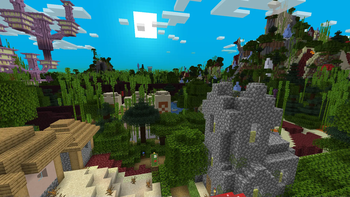
World Blender is a dimension filled with every single biome's features, structures, natural spawns, carvers (caves), and terrain surfaces shoved in! Even modded features and structures will be added to the dimension! However, some mods have hardcoded their features or structures to only spawn in their own dimensions or biomes but I will try and work out alternatives methods to get their stuff in this awesome dimension! But sometimes, those feature uses a config option to determine what dimension their stuff spawns in so if a mod's feature or structure is not spawning in World Blender's dimension, then take a look at the mod's config options first. If you still can't get it to spawn in the dimension, let me know so I can take a look and add it to my list of mods to try and be compatible with if it is possible. :)
Inside the dimension, you will find massive webs of different kinds of surfaces all filled to the brim with trees, grass, and structures. But take notice of the Nether surface path that has End surfaces on each side. That Nether path is the main walkway through the dimension as no other surfaces can interrupt that pathway. So follow that red road and explore the insanity of the world! Also, if you got modded ores mod on, all the ores will be added as well as long as they are able to spawn in Stone! And lastly, the biomes will have imported every mob's spawn entry so there's no telling what will spawn! Though animals seem to not spawn very often due to all the trees and plants covering all the Grass Blocks so you may have to burn down some forests or blacklist many plant features in the config to increase animal spawning.
And yes, the more worldgen mods you have on, the crazier World Blender's dimension becomes! It gets insane real fast! Though too many mods on and the dimension may become much slower to load. At that point, use my config and blacklist the most resource intensive worldgen stuff from other mods from being imported. World Blender requires customizing in the config for large modpacks in order to remain playable. Do note, the creation of the chunks at world origin in the dimension takes a bit of time to be generated as the Enderdragon stuff requires many chunks to be generated in a single tick.
Also, be sure to check out the images page for several screenshots of what the world looks like! And yes, you can use this mod in a modpack or download and modify the source code. It is all under LGPLv3 License
____________________________________________________________________________
HOW DO I ENTER THIS WORLD?
To enter this highly, overpowered and broken dimension, you have to prove that you had traveled quite a lot and that you are in the endgame by placing 8 chests in a 2x2x2 area and then filling every slot with 1 of every block you can find! (Slots with the same item does not count. Items without block forms does not count. Having more than 1 kind of one block will not count as extra either.) Then when you are done, hold a Nether Star in your hand. Now crouch and right click any of the chests with the star to create the portal! The portal will consume the chests and the blocks inside as sacrifice! If this is too much to do, you can easily reduce the number of unique blocks required or what activation item is needed to make the portal by going into the config file. But once the portal is made, just walk into the portal after it has cooled down (not red anymore) and you'll enter the dimension with a new portal block at your feet to let you exit easily!
If you create the portal in a bad spot, you can right click the portal blocks while crouching and holding no items to vaporize the portal. Also in this crazy dimension, you can always leave it by heading to world origin as there will be quartz altar with an unbreakable portal block to always allow you to escape. The portal will always place you back to the Overworld when leaving the dimension so keep that in mind! And also, the portal can teleport any entity or dropped item but only one at a time and it will have a cooldown phase.
Highlights
From source dataGame versions
Supports 3 Minecraft versions, the newest being 1.17.1.
Loaders
Runs on Fabric.
Footprint
Rated a light load on a server.
World Blender - Fabric on Nxeon
From our catalogue- One-click install
- Supported on Nxeon Minecraft servers. We download it from Modrinth, place it, and restart the server.
- Server side
- Required on the server
- Server type needed
- Fabric
- Server load
- light
- Smallest plan we suggest
- Minecraft — 2 GB (2 GB RAM). This follows our own load rating above, not a benchmark.
- Latest build
- 3.0.10+1.17.1, released 2021-11-25
Game versions by loader
| Loader | Game versions | Newest |
|---|---|---|
| Fabric | 1.17 to 1.17.1 (2 versions) | 1.17.1 |
From 5 recorded builds of World Blender - Fabric.
Recent builds
| Build | Released | Game versions | Loaders |
|---|---|---|---|
| 3.0.10+1.17.1 | 2021-11-25 | 1.17 to 1.17.1 (2 versions) | Fabric |
| 3.0.9+1.17.1 | 2021-11-06 | 1.17 to 1.17.1 (2 versions) | Fabric |
| 3.0.7+1.17.0 | 2021-09-06 | 1.17 to 1.17.1 (2 versions) | Fabric |
| 3.0.6+1.17.0 | 2021-07-29 | 1.17 to 1.17.1 (2 versions) | Fabric |
| 3.0.5+1.17.0 | 2021-07-22 | 1.17 to 1.17.1 (2 versions) | Fabric |
Run World Blender - Fabric on a Minecraft server
Pick a server or deploy a new one above; it is installed in one click.
What kind of mod it is
From the catalogWorld generation
Changes or adds to how new terrain, biomes and structures are created.
Runs on your server
From source side supportModrinth lists World Blender - Fabric as required on the server. Check its Modrinth page to see whether players need it too.
Compatibility
- Game
- Minecraft
- Loaders
- Fabric
- Runs on
- Serverrequired on the server
- Game versions
- 1.17.1 and 2 earlier
Verified at the source
- ✓ModrinthOfficial listing, checked 2026-10-02Open ↗
- ✓AuthorTelepathicGrunt, as published on Modrinth
- ✓LicenseLGPL-3.0-onlyFree









