







About XenoTech
From ModrinthThe vehicle tech mod - driving technology forward

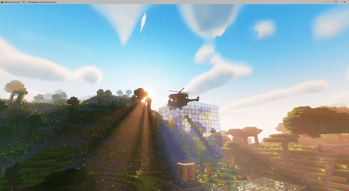
XenoTech is both a vehicle mod and a tech mod. With the mod, you will be able to build vehicles out of ordinary blocks and then - using the mod - give those blocks the ability to move. Boats, cars, airplanes - it's all there.
And the tech part? Also vehicles. Imagine a farmer but instead of a villager tending to the farm by hand, he will instead pilot a harvester tractor, and every morning he will tend to his field using the tractor. Afterwards, have a delivery driver pick up the haul and ship it to your base, depositing the goods in your chest.
Also included are various tech elements to make building and automation a little easier.
New to v1.23:
Hold alt+a or alt+d while in a hover-capable vehicle (e.g., a helicopter), to strafe left or right, respectively.
How do I get started?
To build a vehicle, the bare minimum requirements are:
Ship Terminal - used to interact with the vehicle and pilot it
Mover - Device that can physically move the vehicle, such as wheels for a car, or sails for a boat
Engine? - For certain movers, an engine is required. This can be either a Steam engine or Internal Combustion engine. Some vehicles do not require any engine, such as a boat powered by sails.
Steering? - For boats, planes, etc. they require a rudder/steering block. For example, on a boat, place the Boat Rudder on the back of your boat.
The actual construction begins with the Ship Terminal block. After building a vehicle (such as a car), the ship terminal should be placed somewhere near the front (this will be used to steer the vehicle and otherwise interact with it). When done building, interact with the terminal and choose [Construct new ship].
This will automatically seek out any blocks attached to the terminal and consider them part of the ship. This would also include ground blocks such as Grass Blocks if you built it on a grass field. As such, it is recommended that the ship be built hovering off the ground, OR built on top of the special "Shipyard Construction Platform" which will never be included as part of the ship. For a car, specifically, it will also need wheels.
Once constructed, interact with the Ship Terminal and select [Assume direct control] to begin driving. Alternatively you can use the autopilot commands: on your keyboard press the 'up arrow', 'left arrow', 'right arrow', 'down arrow', 'page up', or 'page down', while standing next to the ship terminal.
A special note on piloting: if you use F5 to get a 3rd person view, you can use the scroll wheel to zoom in or out an unlimited distance. Also, for vehicles which can go up/down (such as a helicopter), use spacebar to go up, and the control key to go down.
Also, while not required, it is highly recommended to give your vehicle a ladder on the side, so you can easily get into the vehicle.
Note that this mod is not meant to be an accurate physics simulation, it is mostly meant to give your creations some mobility. It is absolutely possible to make wacky and implausible vehicles and things that don't necessarily make sense. For example you can dive underwater in a submarine even if it's made of dirt. In the future these things might change but for now you have the freedom to make designs that make no sense.
What vehicle types are available?
Currently you can make a boat, car, balloon, helicopter, submarine, or plane.
Boat: Requires a "Boat Rudder" and a mover of either Sails or Propeller. If using a propeller, the ship will require an engine.
Car: Requires wheels and an engine. Currently "wheels" include 2 types: Tractor Wheel or Sport Tire.
Balloon: Requires only "Balloon Blocks".
Helicopter: Requires a "Helicopter Rotor" or 1+ Propellers facing upwards. The helicopter rotor will generally work better than 1 upwards propeller. Also requires an "Air Rudder" block.
Submarine: Requires a "Submarine Rudder" and 1 or more propellers.
Plane: Requires 1 or more propellers facing forwards and no upwards propellers or helicopter rotors. Also requires an "Air Rudder" block. Note that planes cannot take off vertically and must reach a minimum speed to takeoff. As such, it may be easier to add vertical propellers to make a helicopter instead.
Note that each vehicle has a weight associated with it. The more blocks you add, the more the vehicle will weigh (and each block has different weight values). To counteract the weight, you can add more than 1 mover. For example, if you construct a plane or helicopter and it is too slow, consider adding more propellers. Note that there is a small diminishing return factor on movers: each mover you add is only 98% as effective as the prior one. In most cases this has no effect on your ship's performance, but for boats they are generally comprised of many sails (and balloons comprised of many balloon blocks).
Each type of mover has a certain strength to it and adding more would add to the total strength, for example, if your plane has 1 propeller and you add a second, it becomes 2x as powerful. Note that every mover has a maximum speed and adding more things on top of that will have no effect. For example, a tractor has a top speed of 5 blocks/second and this limit can never be exceeded unless you get rid of the tractor wheels and use something else instead.
How can I modify my vehicle after construction?
After creating a vehicle, go to the ship terminal and select: Captain's Options -> Disassemble. This will convert the vehicle back into non-moving blocks and you can either dismantle the vehicle entirely and reclaim the blocks, or make modifications to it and re-construct a new vehicle.
Highlights
From source dataGame versions
Supports 2 Minecraft versions, the newest being 1.21.1.
Loaders
Runs on Forge and NeoForge.
Footprint
Rated a light load on a server.
XenoTech on Nxeon
From our catalogue- One-click install
- Supported on Nxeon Minecraft servers. We download it from Modrinth, place it, and restart the server.
- Server side
- Required on the server
- Server type needed
- Forge, NeoForge
- Server load
- light
- Smallest plan we suggest
- Minecraft — 2 GB (2 GB RAM). This follows our own load rating above, not a benchmark.
- Latest build
- 1.21.1-1.38, released 2026-06-19
Game versions by loader
| Loader | Game versions | Newest |
|---|---|---|
| Forge | 1.20.1 | 1.20.1 |
| NeoForge | 1.21.1 | 1.21.1 |
From 5 recorded builds of XenoTech.
Recent builds
| Build | Released | Game versions | Loaders |
|---|---|---|---|
| 1.21.1-1.38 | 2026-06-19 | 1.21.1 | NeoForge |
| 1.20.1-1.35 | 2025-05-17 | 1.20.1 | Forge |
| 1.20.1-1.34 | 2025-03-31 | 1.20.1 | Forge |
| 1.20.1-1.33 | 2025-02-20 | 1.20.1 | Forge |
| 1.20.1-1.32 | 2025-02-02 | 1.20.1 | Forge |
Dependencies
- Optional: modrinth project LNytGWDc (modrinth, not in our catalogue)
Declared by the newest build that lists any. Required ones are installed with it on one-click installs.
Run XenoTech on a Minecraft server
Pick a server or deploy a new one above; it is installed in one click.
What kind of mod it is
From the catalogVehicles & ships
Cars, boats, aircraft, ships and other things to drive or fly.
Runs on your server
From source side supportModrinth lists XenoTech as required on the server. Check its Modrinth page to see whether players need it too.
Compatibility
- Game
- Minecraft
- Loaders
- ForgeNeoForge
- Runs on
- Serverrequired on the server
- Game versions
- 1.21.1 and 1 earlier
Verified at the source
- ✓ModrinthOfficial listing, checked 2026-10-02Open ↗
- ✓Authordarimus, as published on Modrinth
- ✓LicenseLicenseRef-All-Rights-ReservedFree









