
About Heartbeat Mod
From mod.ioLocal mod to change when the heartbeat sound triggers
🩺 Heartbeat Mod 💓
by Solved
⛔PLEASE PAY ATTENTION TO THE INSTALLATION PROCESS⛔
SUMMARY 📜
The heartbeat mod is a local UI Mod that allows you to change the HP at when the sound of your heart beating in game triggers.
You can use this mod to disable the sound completly by setting the HP to 0
Changes on the UI are saved so you dont need to set the parameters on every game launch.
USER GUIDE 🚏
First when you boot up your game make sure the mod is showing on the clientside window in the main menu.
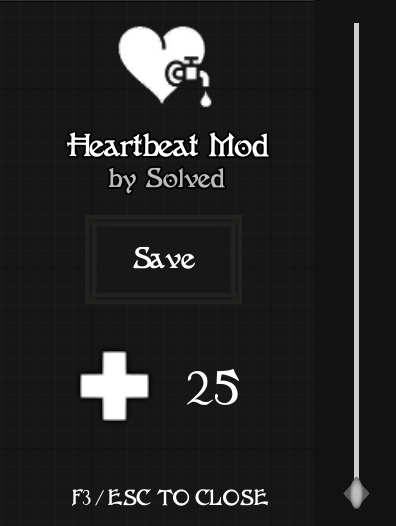
When you are spawned in game , hit F3 and the menu should pop on the right of your screen.
To close the menu hit F3 again , or Escape
Use the slider on the right to change the HP, the counter in the middle will indicate you what HP the slider value is
When you are satisfied , hit the save button.
The changes should be instant , you don't need to respawn
Be sure to hit the save button after modifying ! Otherwise it will not apply the settings !
INSTALLATION 🔧
contains the dependency mod's id too
You will need to download Cswic's Clientside Mod Autoloader.
1. Download the heartbeatmod.pak file from this page and unzip it in Mordhau/Content/CustomPaks. You might have to create the folder.

2. Get the Clientside Mod Autoloader file and unzip it in Mordhau/Content/CustomPaks : Download Here
3. Add the following in your game.ini file AT THE BOTTOM OF THE FILE (C:\Users\->YourWindowsUserName<-\AppData\Local\Mordhau\Saved\Config\WindowsClient):
<pre>
[/Game/Mordhau/Maps/ClientModMap/BP_ClientModLoaderActor.BP_ClientModLoaderActor_C] ClientMods=/Game/Mordhau/Maps/HeartbeatMod/BP_HeartbeatModSpawnActor.BP_HeartbeatModSpawnActor_C</pre> 4. Add the following in Engine.ini file (same path as game.ini, bottom of the file) :
[/Script/EngineSettings.GameMapsSettings] GameDefaultMap=/Game/Mordhau/Maps/ClientModMap/ClientMod_MainMenu.ClientMod_MainMenu</pre>
5. Save both files and boot up the game
The mod will be autoloaded everytime you open Mordhau using this method.
🚫 KNOWN ISSUES 🚫
This mod may not be compatible with some local mods.
Known incompatibilities :
Lutemod (maybe i did not test)
If you really can't make it work , join the modding discord and talk to me here. I am called Solved over there too , in the Moderator category.
Highlights
From source dataFootprint
Rated a light load on a server.
Last update
Its author last shipped an update 4 yr ago.
Heartbeat Mod on Nxeon
From our catalogue- One-click install
- Not available. One-click install isn't available for this game's mods yet. Download it and upload it to your server in Files.
- Server load
- light
- Smallest plan we suggest
- Mordhau — 4 GB (4 GB RAM). This follows our own load rating above, not a benchmark.
- Latest build
- 1.3, released 2023-01-10
Run Heartbeat Mod on a Mordhau server
Deploy a server above, then upload the file in Files.
What kind of mod it is
From the catalogCosmetics, visuals & audio
Skins, textures, shaders, models and sound — how the game looks and sounds.
Compatibility
- Game
- Mordhau
Verified at the source
- ✓mod.ioOfficial listing, checked 2026-10-30Open ↗
- ✓AuthorSolved, as published on mod.io
- ✓LicenseNot published by the sourceFree