
About [UPDATED #23] Server Messages - Server only Mod
From mod.ioWorks Server-Side! It let's you define Messages and an Interval in the Game.ini of your server and then cycles through the messagelist and sends the next message after the set interval. Also has a Random Message Function now.
Updated for Mordhau Patch #23 UE 4.26
(Many thanks to Cswic, helping me to do so)
This Mod let's you define Messages and an Interval in the Game.ini of your server and then cycles through the messagelist and sends the next message after the set interval. Also has a Random Message Function now.
Also working for vanilla maps, players don't need to download anything.
DOWNLOAD, DON'T SUBSCRIBE - IT'S SERVER SIDE ONLY!
[ You can use ModList now aswell, users would download the few kilobytes then, but only do that if you want to keep it auto-updated or if you want to help this mod getting more attention. The current auto-download implementation seems to cause alot of issues, so you should not do it if you don't need to, or if you don't use the ModList for other mods already. I suggest the MANUAL INSTALLATION AS IF YOU HAVE ONLY SERVER ACTORS INSTALLED, IT WILL NOT MARK YOUR SERVER AS MODDED IN THE SERVER BROWSER ]
How to use?
- [Skip to 2. if you install via ModList] Move the "TakiMessages.pak" into "...\Mordhau\Content\CustomPaks\" on your server. (Create "CustomPaks" folder if it's not already existing)
- Now in the "Game.ini" of your server, in the already existing Section "[/Script/Mordhau.MordhauGameMode]" add following line:
<pre>SpawnServerActorsOnMapLoad=/Game/Mordhau/Maps/Taki7o7/Actors/TakiMessages.TakiMessages_C</pre> So it now looks something like:
- Create a new Section "[TakiMessages]".
To set an Interval, you simply add a variable called "Interval" and set a value (IN SECONDS).
If you want the messages to get picked randomly, set "Random" to True. Otherwise False or don't declare the "Random" variable at all. It also avoids sending the same message twice.
For each message, you add a variable called "Message". If you want a new Line in a single message, just add "\n" where the new line should be.
This whole new section should somehow look like this now(Next message each 300 seconds [5 minutes] Value must be >= 10 seconds):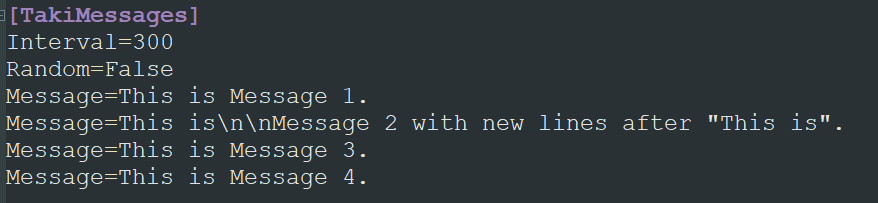
- And all together:

....
....
....
.... and the rest of your Game.ini
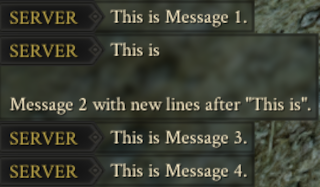
Output looks somehow like:
PS: Don't use the pipe "|" symbol somewhere in your ini, it will cut off everything after the first |
Also people told me that "https://" will not work, specifically the double slash. So avoid them. For URLs you do not need the http:// or https:// part at all ^^
Check my other Serverside-Only Mods:
Highlights
From source dataFootprint
Rated a light load on a server.
Last update
Its author last shipped an update 5 yr ago.
[UPDATED #23] Server Messages - Server only Mod on Nxeon
From our catalogue- One-click install
- Not available. One-click install isn't available for this game's mods yet. Download it and upload it to your server in Files.
- Server load
- light
- Smallest plan we suggest
- Mordhau — 4 GB (4 GB RAM). This follows our own load rating above, not a benchmark.
- Latest build
- 0.7.0, released 2021-09-11
Run [UPDATED #23] Server Messages - Server only Mod on a Mordhau server
Deploy a server above, then upload the file in Files.
What kind of mod it is
From the catalogServerside Only
Its source category doesn’t say more about what it does, so NxLabs lists it under Other.
Compatibility
- Game
- Mordhau
Verified at the source
- ✓mod.ioOfficial listing, checked 2026-10-30Open ↗
- ✓AuthorTaki7o7, as published on mod.io
- ✓LicenseNot published by the sourceFree