
About Mod Options (Build 41)
From Steam WorkshopModOptions WIP (paused)! Allows other mods to be customized. Any mod author can add custom options to their mod. Requirements (!) THIS MOD IS COMPATIBLE ONLY WITH BUILD 41 (!) For Build 42 see…
ModOptions WIP (paused)!
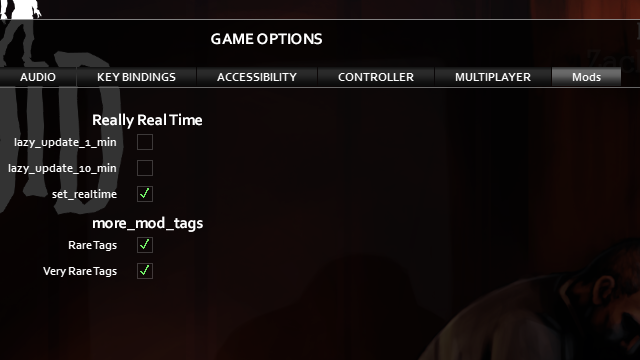
Allows other mods to be customized. Any mod author can add custom options to their mod.
Requirements
(!) THIS MOD IS COMPATIBLE ONLY WITH BUILD 41 (!) For Build 42 see here.
Steam Workshop Issues
1. Quit the game. 2. Unsubscribe. Wait ~1 minute. 3. Subscribe. Wait ~1 minute. 4. Make sure the mod version is 1.4.4
Minimal Code (for modders)
Put it in subfolder media/lua/client of your mod folder.
-- These are the default options.
local OPTIONS = {
  box1 = true,
  box2 = false,
}

-- Connecting the options to the menu, so user can change them.
if ModOptions and ModOptions.getInstance then
  ModOptions:getInstance(OPTIONS, "MyModID", "My Mod")
end

-- Check actual options at game loading.
Events.OnGameStart.Add(function()
  print("checkbox1 = ", OPTIONS.box1)
  print("checkbox2 = ", OPTIONS.box2)
end)
This mod should be enbaled. But note that your mod will work without this mod! So you do not have to create a hard dependence on this mod.
For more info, see Guide.
TODO: - Options other than checkbox (done) - Option like edit input. - Option like change color. - Possibility to add custom tab - Possibility to tune by server admins only (using UI) - Sandbox options. (done)
Workshop ID: 2169435993 Mod ID: modoptions
Highlights
From source dataFootprint
Rated a light load on a server.
Last update
Its author last shipped an update 4 yr ago.
Mod Options (Build 41) on Nxeon
From our catalogue- One-click install
- Supported on Nxeon Project Zomboid servers. We download it from Steam Workshop, place it, and restart the server.
- Server load
- light
- Smallest plan we suggest
- Project Zomboid — 6 GB (6 GB RAM). This follows our own load rating above, not a benchmark.
- Latest build
- 2022-10-17, released 2022-10-17
Game versions by loader
| Loader | Game versions | Newest |
|---|---|---|
| Workshop |
From 1 recorded build of Mod Options (Build 41).
Run Mod Options (Build 41) on a Project Zomboid server
Pick a server or deploy a new one above; it is installed in one click.
What kind of mod it is
From the catalogQuality of life & UI
Small conveniences, tweaks and interface improvements players notice straight away.
Compatibility
- Game
- Project Zomboid
Verified at the source
- ✓Steam WorkshopOfficial listing, checked 2026-11-01Open ↗
- ✓Authorstar, as published on Steam Workshop
- ✓LicenseNot published by the sourceFree