






About MAM always show research meshes
From ficsit.appFix MAM not showing research visual meshes when reloading the game.

<style> .multiplayer-banner { background-color: #4caf50; border-top: 4px solid #000; border-bottom: 4px solid #000; margin: 20px 0; padding: 10px 0; display: flex; align-items: center; justify-content: center; gap: 15px; width: 100%; } .multiplayer-text { color: #ffffff !important; font-weight: bold; text-transform: uppercase; letter-spacing: 2px; font-size: 1.1rem; text-shadow: 2px 2px 0px #000; } .multiplayer-sub { background: #000; color: #4caf50 !important; padding: 2px 10px; font-size: 0.8rem; font-weight: bold; text-transform: uppercase; border: 2px solid #fff; } .thumb-icon { font-size: 1.5rem; filter: drop-shadow(2px 2px 0px #000); } </style>
<style> .mod-container { --sf-gold: #f6ad55; --sf-science: #4299e1; --sf-discovery: #ecc94b; --sf-bg: #2d2d2d; --sf-border: #000; max-width: 850px; margin: 20px auto; background-color: var(--sf-bg); color: #e0e0e0; padding: 30px; border: 4px solid var(--sf-border); box-shadow: 10px 10px 0px var(--sf-border); } .mod-container h1 { color: var(--sf-science); text-transform: uppercase; text-align: center; border-bottom: 3px double var(--sf-gold); padding-bottom: 10px; margin-bottom: 25px; text-shadow: 2px 2px #000; } .research-banner { background: linear-gradient(90deg, #2b6cb0 0%, #744210 100%); color: #fff; padding: 15px; text-align: center; border: 2px solid #000; margin: 20px 0; font-weight: bold; text-transform: uppercase; letter-spacing: 2px; }
.artifact-grid { display: grid; grid-template-columns: 1fr 1fr; gap: 15px; margin: 25px 0; } .artifact-card { background: #1a1a1a; padding: 12px; border-left: 3px solid var(--sf-discovery); font-size: 0.85rem; } .artifact-card b { color: var(--sf-science); display: block; margin-bottom: 4px; text-transform: uppercase; font-size: 0.8rem; }
.mod-container img { width: 100%; border: 4px solid #000; display: block; margin: 15px 0; } </style>
MAM: Research Visual Fix
Restore the visual soul of your laboratory. This mod fixes the bug where research meshes disappear from the MAM after reloading, ensuring your scientific progress is always visible.

All 3D Meshes
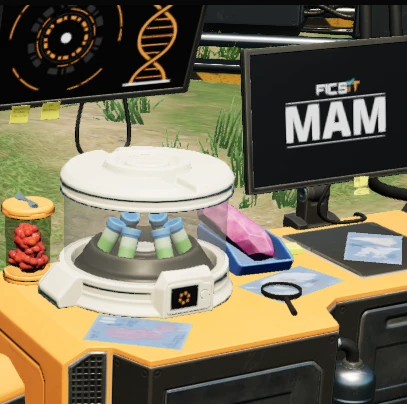
- Alien Megafauna - Hog Research: A paper showing a cross-section of the Hog, located under the magnifying glass to the right of the centrifuge.
- Alien Megafauna - Spitter Research: A paper showing a cross-section of the Spitter, located on the desk beneath the right-hand monitor.
- Alien Technology - Somersloop Analysis Research: A paper showing closer details of the somersloop, located to the front-right of the centrifuge.
- Caterium - Caterium Ore Research: A chisel and small number of Caterium rocks, located on the right side of the left desk.
- Mycelia - Mycelia Research: A small tray of soil growing several types of mushrooms, located on the left side of the left desk.
- Nutrients - Paleberry Research: A small jar of paleberries, located just behind the centrifuge.
- Power Slugs - Blue Power Slugs Research: A tray containing a slice of a blue power slug, connected to a light bulb, located below the left monitor.
- Quartz - Quartz Research: A quartz crystal in a tray, located between the right monitor and centrifuge.
- Sulfur - Black Powder Research: Two glass trays, one of sulfur and one of coal powder, and part of a nobelisk casing, located on the far right side of the desk.
Pioneer Pro-Tip: Walk around the right side of the MAM centrifuge to see the tiny details on the Somersloop blueprints—now visible every time you play!
Highlights
From source dataGame versions
Built for Satisfactory >=491125.
Footprint
Rated a light load on a server.
Dependencies
Needs 1 other project installed alongside it.
MAM always show research meshes on Nxeon
From our catalogue- One-click install
- Supported on Nxeon Satisfactory servers. We download it from ficsit.app, place it, and restart the server.
- Server side
- Required on the server
- Server load
- light
- Smallest plan we suggest
- Satisfactory — 8 GB (8 GB RAM). This follows our own load rating above, not a benchmark.
- Latest build
- 1.0.1, released 2026-06-09
Run MAM always show research meshes on a Satisfactory server
Pick a server or deploy a new one above; it is installed in one click.
What kind of mod it is
From the catalogGameplay & overhauls
New mechanics, content and overhauls that change how the game plays.
Runs on your server
From source side supportficsit.app lists MAM always show research meshes as required on the server. Check its ficsit.app page to see whether players need it too.
Compatibility
- Game
- Satisfactory
- Runs on
- Serverrequired on the server
- Game versions
- >=491125
- Requires
- 1 other project installed alongside it.
Verified at the source
- ✓ficsit.appOfficial listing, checked 2026-10-15Open ↗
- ✓AuthorAndre Aquila, as published on ficsit.app
- ✓LicenseNot published by the sourceFree








