







About Auto Splitters
From ficsit.appAutomatic splitters that do load balancing of manifold-style production lines for the rest of us.
Automatic Splitters
This mod adds a new type of splitter called Auto Splitter that supports different output rates for each output and can also automatically balance the output rates in a network of connected Auto Splitters.
As I don't have any experience in 3D modelling or texturing, the Auto Splitters look exactly like stock Programmable Splitters.
Alpha version 0.4.x of the mod has EXPERIMENTAL support for multiplayer. It should work, but is only very lightly tested right now!

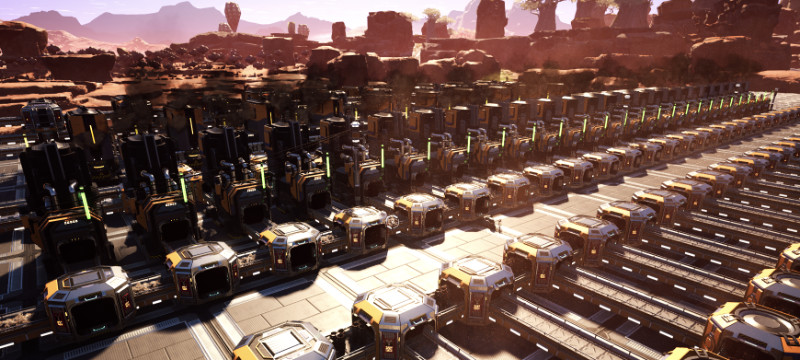
Features
- A single Auto Splitter functions like a standard splitter, has the same size and can be mixed
arbitrarily with normal splitters and mergers.
- NEW: You can upgrade existing splitters to Auto Splitters with your build gun.
- Auto Splitters auto-detect all other directly connected Auto Splitters and balance the
output of the resulting network.
- By default, all outputs of the network that are attached to a machine get the same number
of items/min.
- You can enter a fixed number of items/min for some outputs (e.g. because a machine is underclocked),
and the network will adapt to those numbers.
- All numbers are presented in items/min. The rates are based on what you enter as the target input rate for the
first splitter in the network.
- All Auto Splitters show an estimate of the average recent item throughput.
- NEW: Auto Splitters can optionally detect over- and underclocking in downstream factories and adjust
the item rate accordingly. Enable in the mod options.
- NEW: EXPERIMENTAL multiplayer support in 0.4.x!
How To Use
Just build a regular manifold-style distribution line, but replace all of the splitters with Auto Splitters. If you already have a factory (and who doesn't?), you can also upgrade your normal splitters to Auto Splitters with the build gun. Feed your manifold and gaze on in wonder at the instant, perfectly balanced startup of your production line (or the belts in this demonstration):
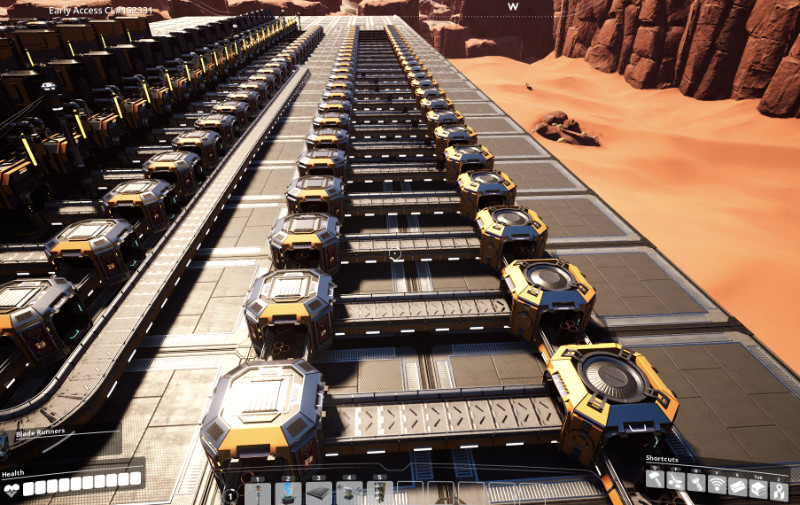
For further information about what's happening inside each splitter's brain, you can interact with it by hitting "E" or whatever you configured for it:

The UI isn't pretty, but it shows you the output rates for each output, whether the output is in "Auto" mode and whether the next building downstream is another Auto Splitter (if the output is in auto mode, the total required item rate of that downstream Auto Splitter will be automatically allocated to its output belt).
You can also see the "cycle progress" and the average item throughput of the splitter over the last few cycles. In order to distribute the items correctly, the splitter calculates a "distribution cycle". After completing a full cycle, all outputs will have received exactly their allocated share of items. The length of the cycle gets auto-tuned for a balance between performance and update speed.
The automatic algorithm assumes that all active "final" outputs of the Auto Splitter network require the same number of items per minute. Active final outputs are outputs that
- are not connected to another Auto Splitter and have at least one belt connected
(the Auto Splitter does not check whether that belt leads anywhere useful)
- or are not in "Auto" mode
If some of your machines need more or less items per minute, you can disable the "Auto" toggle for their output and enter a manual item rate:

FAQ
- After upgrading a splitter, the boxes around the splitters don't go away. What can I do?
That is known bug at the moment. As a workaround, start building some other building like a belt and then stop building again. The boxes should disappear.
- When I upgrade a splitter that has items coming in, but whose output lines are blocked,
I get some of the items on the line back in my inventory. What's that about?
All splitters have an internal buffer that can hold up to 9 items. When you upgrade the splitter, the game refunds you those items, as I haven't yet found a way to transfer them into the new Auto Splitter.
- My input belt isn't completely full. Now the numbers of the splitters are wrong!
That will be fixed in a future update. As a workaround, you can build another Auto Splitter in front of your normal "top-level" splitter and divert the excess rate to a normal splitter or merger. That line will then quickly fill up. Blocked lines get ignored by the distribution algorithm after a few ticks.
- The UI is horrible!
I know, but I first want to finish the functionality. Improvements are on the way! :-)
- Sometimes the splitter does not accept my manually entered output rate. What can I do?
That happens when the splitter cannot find a fair distribution rule for the numbers you entered using its fixed precision arithmetic. I will add a notification to the UI in a future version and (maybe) try to make the algorithm a little more "forgiving" by fuzzing the numbers a little at some point.
- I've upgraded from 0.2.0 and already had some auto splitters placed before the upgrade. Now
my game crashes when loading the save!
Upgrade to 0.3.5 before trying to load the save. If that still doesn't work, go to the mod configuration menu (in the main menu, click on "Mods" and then on the mod name) and turn on "Remove Conveyors". That will remove all conveyors attached to auto splitters during the upgrade process, but at least your game won't crash. You then have to redo the beltwork, unfortunately.
Highlights
From source dataGame versions
Built for Satisfactory >=151773.
Footprint
Rated a light load on a server.
Last update
Its author last shipped an update 5 yr ago.
Auto Splitters on Nxeon
From our catalogue- One-click install
- Supported on Nxeon Satisfactory servers. We download it from ficsit.app, place it, and restart the server.
- Server side
- Required on the server
- Server load
- light
- Smallest plan we suggest
- Satisfactory — 8 GB (8 GB RAM). This follows our own load rating above, not a benchmark.
- Latest build
- 0.4.3 (alpha), released 2021-06-10
Recent builds
| Build | Released | Game versions | Loaders |
|---|---|---|---|
| 0.4.3 alpha | 2021-06-10 | >=151773 | n/a |
| 0.3.9 beta | 2021-06-06 | >=151773 | n/a |
Run Auto Splitters on a Satisfactory server
Pick a server or deploy a new one above; it is installed in one click.
What kind of mod it is
From the catalogQuality of life & UI
Small conveniences, tweaks and interface improvements players notice straight away.
Runs on your server
From source side supportficsit.app lists Auto Splitters as required on the server. Check its ficsit.app page to see whether players need it too.
Compatibility
- Game
- Satisfactory
- Runs on
- Serverrequired on the server
- Game versions
- >=151773
Verified at the source
- ✓ficsit.appOfficial listing, checked 2026-10-15Open ↗
- ✓AuthorSteffenM, as published on ficsit.app
- ✓LicenseNot published by the sourceFree








