






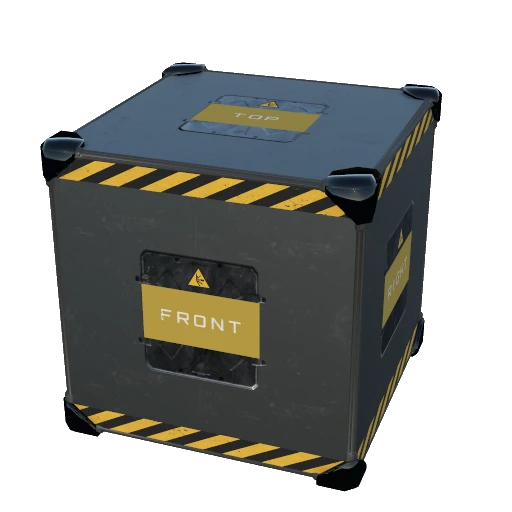
About Auto Supports
From ficsit.appProvides buildables for automatically building support structures.
Auto Supports
! This mod is currently NOT multiplayer compatible !
Mod page: Auto Supports
Overview
This mod adds a new unlockable AWESOME shop schematic that includes 1m, 2m, and 4m variants of buildable AutoSupport cubes. These cubes can be placed in the world and interacted with to configure them. Configuring involves selecting a build direction relative to the cube, parts for start, middle, and end positions, and other customization details. There are several convenience features, including saving presets and a new dismantle mode that works similar to blueprint dismantle mode. It helps make your factory look better and not float as much!
Demo
Click below to watch a demo: 
Screenshots


Features
- Adds a new schematic that unlocks an Auto Support cube buildable with 3 size variants of 1m, 2m, and 4m.
- The schematic can be unlocked in the AWESOME shop for 20 FICSIT coupons (convenience comes at a price).
- The schematic requires other schematics before the cubes can be built.
- Includes configurable mod settings to tweak various behaviors and constraints.
- The Auto Support cube buildable has an interaction dialog to configure how the support is built. The configuration and
space available in the build path affect the final result.
- The Auto Support cube buildable has direction labels on each cube face. These directions correspond to the directions
available in the interaction dialog.
- When building the support from the Auto Support, a trace will be done to figure out how much space is available.
- The build direction of the support can be configured. This is the cube face from which the support will build outwards from.
- The build will start at the cube face opposite of the selected direction. For example, if the "Top" direction is
selected, the build will start at and be flush with the "Bottom" cube face and build towards the direction of the "Top" face. This allows the support to take the place of the cube rather than be offset from it.
- Parts can be selected for the start, middle, and end positions of the support.
- At least one position must have a part to build a support.
- In each support position, a part's orientation can be configured. The easiest way to determine the orientation is imagining
you're placing the part with the build gun. An orientation of "Bottom" is the same as if you're building the part on a floor below you. An orientation of "Front"/"Left" is the same as if you're building the part on a wall in front/left of you.
- Some parts are not the most intuitive to configure. For example, H-Beams should be set to "Left"/"Right"
to be oriented correctly. Some parts also have custom placement behavior depending on the surface they are being built on, making it harder to determine the correct orientation to select. Some trial and error may be needed.
- In each support position, a part's color customization can be configured.
- For the end support position, the part's terrain bury distance can be configured. If the end piece ends up resting
against terrain, this will bury the part 0–50% of its height into the terrain to avoid awkward looking placements.
- A toggle to only intersect terrains is available, ignoring any obstacles except terrain when the tracing is done. This
can be useful when building blueprints with Auto Supports from scaffolding or to ignore certain obstacles like trees.
- When the support is built, the build logic will offset the end part to be flush with the blocking surface
(while also respecting bury distance). If needed, an extra middle part will be built to avoid gaps.
- Auto Support configurations can be copied and pasted.
- Auto Support presets can be saved, loaded, and deleted, allowing quick access to your favorite configurations.
- For ultra convenience, when Auto Supports are built standalone, they will be preconfigured to the last used configuration.
The last used configuration is unique per size variant of the Auto Support cube. This last used configuration is set during the following events:
- Changing something in the Auto Support interaction dialog.
- Copying or pasting settings.
- Saving or loading a preset.
- Auto Support cubes can be built and customized in blueprints. Building supports via the cube is not supported in
Blueprint designers.
- By default, per the mod settings, building Auto Support cubes via blueprints will attempt to automatically build the
supports when the blueprint is placed.
- A custom keybind can be held when building Auto Supports standalone or via Blueprints to toggle "Auto Build"
- This keybind can be configured in the Keybinds menu.
- Auto Build will only take place if you have the supplies required to build the support.
- The keybind must be held when placing a standalone Auto Support to take advantage of Auto Build.
Highlights
From source dataGame versions
Built for Satisfactory >=502094.
Footprint
Rated a light load on a server.
Last update
Its author last shipped an update 2 mo ago.
Auto Supports on Nxeon
From our catalogue- One-click install
- Supported on Nxeon Satisfactory servers. We download it from ficsit.app, place it, and restart the server.
- Server side
- Required on the server
- Server load
- light
- Smallest plan we suggest
- Satisfactory — 8 GB (8 GB RAM). This follows our own load rating above, not a benchmark.
- Latest build
- 1.3.1, released 2026-08-16
Run Auto Supports on a Satisfactory server
Pick a server or deploy a new one above; it is installed in one click.
What kind of mod it is
From the catalogQuality of life & UI
Small conveniences, tweaks and interface improvements players notice straight away.
Runs on your server
From source side supportficsit.app lists Auto Supports as required on the server. Check its ficsit.app page to see whether players need it too.
Compatibility
- Game
- Satisfactory
- Runs on
- Serverrequired on the server
- Game versions
- >=502094
Verified at the source
- ✓ficsit.appOfficial listing, checked 2026-10-15Open ↗
- ✓AuthorStorm, as published on ficsit.app
- ✓LicenseNot published by the sourceFree








