






About Buildable Images PNG Display
From ficsit.appAdds 6 Buildable Panels that display image files from your computer.

<style> .warning-multiplayer-banner { background-color: #fbc02d; border-top: 4px solid #000; border-bottom: 4px solid #000; margin: 20px 0; padding: 10px 0; display: flex; align-items: center; justify-content: center; gap: 15px; width: 100%; } .warning-multiplayer-text { color: #000000 !important; font-weight: bold; text-transform: uppercase; letter-spacing: 1px; font-size: 1.1rem; } .warning-multiplayer-sub { background: #000; color: #fbc02d !important; padding: 2px 10px; font-size: 0.75rem; font-weight: bold; text-transform: uppercase; border: 2px solid #fff; } .warning-icon { font-size: 1.5rem; filter: drop-shadow(1px 1px 0px #fff); } </style>
<style> .mod-container { --sf-gold: #fa9549; --sf-image: #f687b3; --sf-bg: #2d2d2d; --sf-border: #000; max-width: 850px; margin: 20px auto; background-color: var(--sf-bg); color: #e0e0e0; padding: 30px; border: 4px solid var(--sf-border); box-shadow: 10px 10px 0px var(--sf-border); } .mod-container h1 { color: var(--sf-gold); text-transform: uppercase; text-align: center; border-bottom: 3px double var(--sf-gold); padding-bottom: 10px; margin-bottom: 25px; } .mod-container .feature-grid { display: grid; grid-template-columns: 1fr 1fr; gap: 15px; margin: 20px 0; } .mod-container .feature-card { background: #1a1a1a; border-left: 4px solid var(--sf-image); padding: 12px; font-size: 0.85rem; } .mod-container .info-box { background: #252525; border: 2px solid #444; padding: 15px; margin: 20px 0; font-size: 0.85rem; } .mod-container ul { list-style-type: square; padding-left: 20px; margin: 10px 0; } .mod-container li { margin-bottom: 5px; font-size: 0.85rem; } .mod-container .gallery img { width: 100%; display: block; border: 4px solid #000; margin-bottom: 15px; } </style>
Buildable Images - PNG & JPG Display
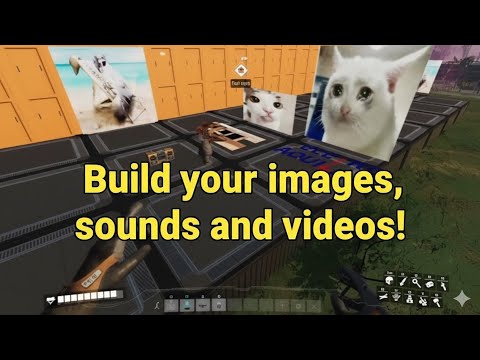
Personalize your factory floors and walls! Display your custom PNG and JPG images directly on buildable signs.
Full support for PNG and JPG image formats.
PNG images with transparency will render correctly in-world.
Includes 4x8, 8x8, and 8x4 displays for any surface.
Build the panel and interact to open the file selection dialog.
How to Use
- Build: Open the "Special" tab in the Build Menu to find the panels.
- Select Image: Interact with the placed sign. Browse to your folder and select your
.pngor.jpgfile. - Done: Your selected image will now appear on the buildable sign.


Important Notes
- Image Location: Your files must remain in the same folder after you select them. Moving or deleting the file will break the display.
- Precision Placement: For the best results in resizing and placement, I highly recommend using the SirDigby Infinite Nudge mod.


The Three Importers Collection
Part of a series of mods designed for factory customization:
Honest note: I hope these visual elements make your factory feel truly unique. Enjoy building your gallery!
Highlights
From source dataGame versions
Built for Satisfactory >=491125.
Footprint
Rated a light load on a server.
Dependencies
Needs 2 other projects installed alongside it.
Buildable Images PNG Display on Nxeon
From our catalogue- One-click install
- Supported on Nxeon Satisfactory servers. We download it from ficsit.app, place it, and restart the server.
- Server side
- Required on the server
- Server load
- light
- Smallest plan we suggest
- Satisfactory — 8 GB (8 GB RAM). This follows our own load rating above, not a benchmark.
- Latest build
- 1.0.4, released 2026-06-09
Run Buildable Images PNG Display on a Satisfactory server
Pick a server or deploy a new one above; it is installed in one click.
What kind of mod it is
From the catalogGameplay & overhauls
New mechanics, content and overhauls that change how the game plays.
Runs on your server
From source side supportficsit.app lists Buildable Images PNG Display as required on the server. Check its ficsit.app page to see whether players need it too.
Compatibility
- Game
- Satisfactory
- Runs on
- Serverrequired on the server
- Game versions
- >=491125
- Requires
- 2 other projects installed alongside it.
Verified at the source
- ✓ficsit.appOfficial listing, checked 2026-10-15Open ↗
- ✓AuthorAndre Aquila, as published on ficsit.app
- ✓LicenseNot published by the sourceFree








