







About Cable Highlighter
From ficsit.appUse F8 to toggle highlighting of nearby power cables through walls.
Use Cable Highlighter to quickly locate nearby power cables, including cables hidden inside walls, foundations, terrain, and other structures.
<table> <tr> <td width="50%">  </td> <td width="50%">
 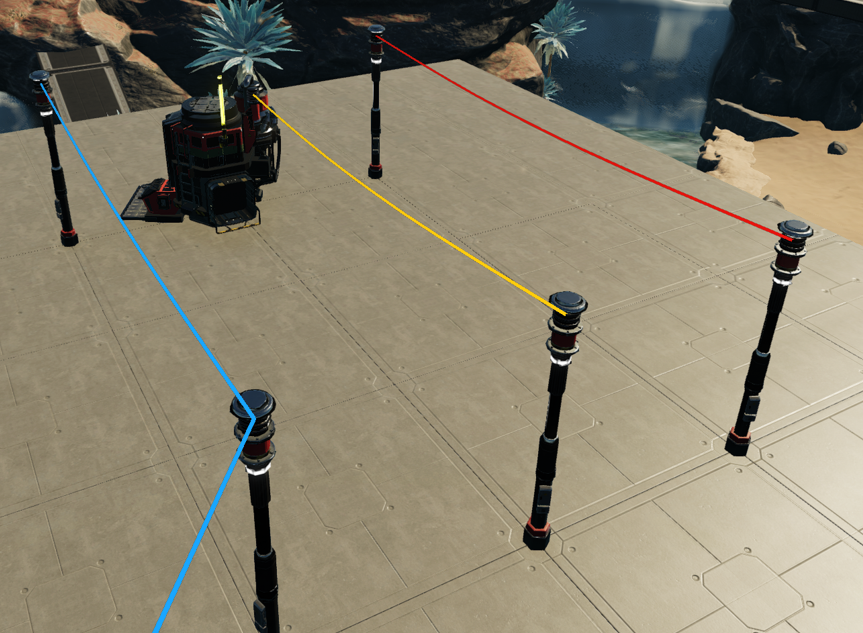 </td> </tr> </table>
Press F8 by default to toggle cable highlighting. The keybind can be changed under Options → Keybindings by searching for "Cable".
Customize the Highlight Radius to 25m, 50m, 100m, 200m, or 300m.
Features
- Power Status Colors
Optionally color cables based on their current power state:
- Blue — Powered
- Yellow — Tripped
- Red — No production capacity
- Fade Over Distance
Cables within 25m remain at full intensity, then gradually fade toward the configured edge strength at the outer highlight radius.
- Edge Highlight Strength
Adjust how strongly cables are highlighted at the outer edge of the highlight radius.
- Visible Through Objects
Highlighted cables remain visible through walls, foundations, terrain, and other objects, making buried or hidden wiring much easier to locate.
Recommended Settings
For distance fading, 100m Highlight Radius with 0.4 Edge Highlight Strength is a good starting point.
Highlight Radius
Available distances:
25m · 50m · 100m · 200m · 300m
The previous 500m and 1000m options were removed because cables are generally not visible at those distances, while searching such large areas adds unnecessary computational cost.
Highlights
From source dataGame versions
Built for Satisfactory >=502094.
Footprint
Rated a light load on a server.
Last update
Its author last shipped an update 33d ago.
Cable Highlighter on Nxeon
From our catalogue- One-click install
- Supported on Nxeon Satisfactory servers. We download it from ficsit.app, place it, and restart the server.
- Server side
- Required on the server
- Server load
- light
- Smallest plan we suggest
- Satisfactory — 8 GB (8 GB RAM). This follows our own load rating above, not a benchmark.
- Latest build
- 1.2.0, released 2026-09-12
Run Cable Highlighter on a Satisfactory server
Pick a server or deploy a new one above; it is installed in one click.
What kind of mod it is
From the catalogTechnology & automation
Machines, power, logistics and automation.
Runs on your server
From source side supportficsit.app lists Cable Highlighter as required on the server. Check its ficsit.app page to see whether players need it too.
Compatibility
- Game
- Satisfactory
- Runs on
- Serverrequired on the server
- Game versions
- >=502094
Verified at the source
- ✓ficsit.appOfficial listing, checked 2026-10-15Open ↗
- ✓AuthorDBKynd, as published on ficsit.app
- ✓LicenseNot published by the sourceFree








