







About Web Browser Signs
From ficsit.appPut a Web Sign on your game, or access a web browser using a widget.

<style> .no-multiplayer-banner { background-color: #d32f2f; border-top: 4px solid #000; border-bottom: 4px solid #000; margin: 20px 0; padding: 10px 0; display: flex; align-items: center; justify-content: center; gap: 15px; width: 100%; } .no-multiplayer-text { color: #ffffff !important; font-weight: bold; text-transform: uppercase; letter-spacing: 2px; font-size: 1.1rem; text-shadow: 2px 2px 0px #000; } .no-multiplayer-sub { background: #000; color: #ff5252 !important; padding: 2px 10px; font-size: 0.8rem; font-weight: bold; text-transform: uppercase; border: 2px solid #fff; } .stop-icon { font-size: 1.5rem; filter: drop-shadow(2px 2px 0px #000); } </style>
<style> .mod-container { --sf-gold: #fa9549; --sf-digital: #b794f4; --sf-bg: #2d2d2d; --sf-border: #000; max-width: 850px; margin: 20px auto; background-color: var(--sf-bg); color: #e0e0e0; padding: 30px; border: 4px solid var(--sf-border); box-shadow: 10px 10px 0px var(--sf-border); } .mod-container h1 { color: var(--sf-gold); text-transform: uppercase; text-align: center; border-bottom: 3px double var(--sf-gold); padding-bottom: 10px; margin-bottom: 25px; } .mod-container .feature-grid { display: grid; grid-template-columns: 1fr 1fr; gap: 15px; margin: 20px 0; } .mod-container .feature-card { background: #1a1a1a; border-left: 4px solid var(--sf-digital); padding: 12px; font-size: 0.85rem; } .mod-container .command-box { background: #000; border: 2px solid var(--sf-digital); padding: 15px; text-align: center; margin: 20px 0; } .mod-container code { color: #fff; background: #333; padding: 2px 6px; font-family: monospace; font-size: 1.1rem; } .mod-container .gallery img { width: 100%; display: block; border: 4px solid #000; margin-bottom: 15px; } </style>
Web Browser Signs
Bring the internet into your factory! Put a Web Sign on your walls or access a browser anywhere using a widget.
Access your favorite build calculators or wikis without Alt-Tabbing.
Build actual signs in your world that display live web content.
How to Build Web Signs
Simply find the Web Sign in your build menu. Once placed, you can set the URL to display anything you need for your factory layout.

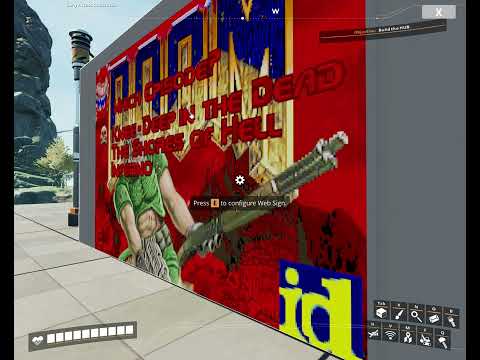


Quick Browser Access
If you don't want to build a sign, you can just call the browser whenever you want using a simple chat command:
/web 
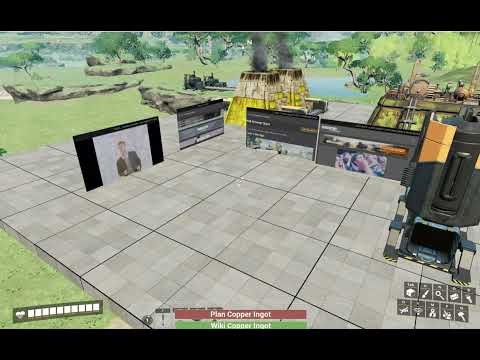
Honest note: Using the browser might feel a bit different than Chrome, but it saves your life when you need to check a production line recipe quickly!
<style> .aquila-footer { --sf-bg: #1a1a1a; --sf-border: #000; --sf-gold: #f2c94c; --discord: #3b4e8d; --patreon: #ff6058; --steam: #f2f2f2; --pix: #f2d600; --paypal: #249ce2; max-width: 850px; margin: 40px auto; background-color: var(--sf-bg); padding: 30px; border: 4px solid var(--sf-border); border-top: 6px solid var(--sf-gold); box-shadow: 10px 10px 0px var(--sf-border); text-align: center; } .aquila-footer .btn-container { display: grid; grid-template-columns: 1fr 1fr; gap: 12px; margin-bottom: 20px; } .aquila-footer .full-btn { grid-column: span 2; } .aquila-footer .social-btn { display: flex; align-items: center; justify-content: center; padding: 12px; border: 3px solid #000; box-shadow: 4px 4px 0px #000; text-decoration: none; transition: transform 0.1s; text-align: center; } .aquila-footer .social-btn:hover { transform: translate(-2px, -2px); box-shadow: 6px 6px 0px #000; } .aquila-footer .btn-text { color: #ffffff !important; text-transform: uppercase; font-weight: bold; font-size: 0.9rem; line-height: 1.2; } .aquila-footer .discord { background: var(--discord); } .aquila-footer .patreon { background: var(--patreon); } .aquila-footer .steam { background: var(--steam); } .aquila-footer .steam .btn-text { color: #d35400 !important; } .aquila-footer .paypal { background: var(--paypal); } .aquila-footer .sub-text { display: block; font-size: 0.65rem; opacity: 0.9; font-weight: normal; margin-top: 4px; text-transform: none; } .aquila-footer .footer-meta { border-top: 1px solid #333; margin-top: 20px; padding-top: 15px; } </style>
Highlights
From source dataGame versions
Built for Satisfactory >=416835.
Footprint
Rated a light load on a server.
Last update
Its author last shipped an update 9 mo ago.
Web Browser Signs on Nxeon
From our catalogue- One-click install
- Supported on Nxeon Satisfactory servers. We download it from ficsit.app, place it, and restart the server.
- Server side
- Required on the server
- Server load
- light
- Smallest plan we suggest
- Satisfactory — 8 GB (8 GB RAM). This follows our own load rating above, not a benchmark.
- Latest build
- 1.0.6, released 2026-01-20
Recent builds
| Build | Released | Game versions | Loaders |
|---|---|---|---|
| 1.0.6 | 2026-01-20 | >=416835 | n/a |
| 1.0.0 alpha | 2024-02-20 | >=273254 | n/a |
Run Web Browser Signs on a Satisfactory server
Pick a server or deploy a new one above; it is installed in one click.
What kind of mod it is
From the catalogGameplay & overhauls
New mechanics, content and overhauls that change how the game plays.
Runs on your server
From source side supportficsit.app lists Web Browser Signs as required on the server. Check its ficsit.app page to see whether players need it too.
Compatibility
- Game
- Satisfactory
- Runs on
- Serverrequired on the server
- Game versions
- >=416835
Verified at the source
- ✓ficsit.appOfficial listing, checked 2026-10-15Open ↗
- ✓AuthorAndre Aquila, as published on ficsit.app
- ✓LicenseNot published by the sourceFree








