






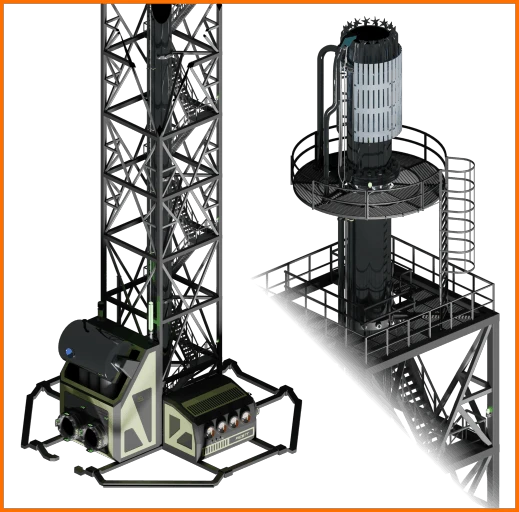
About Industrial Flare Stack
From ficsit.appThe Industrial Flare Stack is a unit designed to vent excess combustible liquids and gases to prevent production stalls.
<font color="#ff8e3c">INDUSTRIAL FLARE STACK</font>
<font color="#ff8e3c">A.D.A. NOTICE:</font> "Pioneer, your downstream consumption has reached a state of terminal saturation. To prevent a total hydrostatic seizure of your refinery infrastructure, FICSIT Inc. has authorized the Industrial Flare Stack to convert your excess energy into atmospheric waste. It is an inefficient sacrifice, but a necessary one. The flame is the only thing standing between you and a dead factory. Burn the surplus. Save the system.
The Industrial Flare Stack facilitates the rapid conversion of your logistical failures into atmospheric pollutants. Note: Planetary heating is within acceptable corporate parameters. Your breathing remains a secondary priority."
"Efficiency through elimination. FICSIT Inc. approved."
<font color="#ff8e3c">🏭 OVERVIEW</font>
The Industrial Flare Stack is a high-capacity relief unit designed to vent excess combustible liquids and gases to prevent production stalls.
While I am not a professional game developer, I am a professional industrial machine engineer. This model was fully engineered from the ground up in Autodesk Inventor Pro to ensure real-world parametric CAD precision and functional structural logic. To bridge the gap into a AAA game environment like Satisfactory, the asset underwent a massive optimization pipeline in Blender (which was a 'shock' for a CAD guy), decimating the high-density CAD geometry from 34 million polygons down to approximately 673,000 faces to guarantee solid in-game performance.
- Max Consumption: 250 m³/min.
- Audio: Custom Wwise integration with a 9s pressure spool-up.
- Visuals & Flames: Real-time Analog/Digital machine status gauges, BlackBody thermal shaders, and realistic Niagara flame behavior dynamically driven by live fluid pressure and output rates.
- Burnable Feedstock: Crude Oil, Heavy Oil Residue (HOR), Fuel, Turbo Fuel, Biofuel, Rocket Fuel, and Ionized Rocket Fuel.
- Steam Injectors: Custom Niagara-driven particle extension featuring a 14-nozzle high-pressure steam injection ring. Automatically activates when a recipe utilizing water is processed, significantly reducing smoke emission and suppressing heavy soot formation during peak flaring loads.
- Dimensions: 20m × 20m Base | 84m Height (Requires approximately a 3×3 Foundation footprint).
<font color="#ff8e3c">⚙️ V1.4.0 CONTROLS, IGNITION & TELEMETRY</font>
- Paintable Surfaces: Fully paintable to match your factory color swatches.
- Full Control Panel Operation: Directly manage speed, on/off states, manual ignition, and PID control knob configurations from the config menu.
- Auto-Tuning Calibration Workflow: Set the flare stack to its lowest speed, keep it running continuously (not on standby), and select auto mode. The system scans junction inputs/outputs and calibrates over 60–70 seconds to catch fuel dynamics (slosh).
- Important Reference Requirement: Ensure a stable production baseline with your downstream consumers during calibration. This sets the reference point the system regulates toward to maintain steady flow for upstream oil and fuel producers.
- Custom UI Tuning Parameters:
- SlopeGain: Range 0.0 to 30.0 (Default: 2.0). Controls transient response lag compensation.
- PressureKp: Range 0.0 to 64.0 (Default: 5.0). Controls proportional pressure-relief intensity.
- Visual, Smoke & Logging Adjustments:
- Gauge & Panel Colors: Light color of the Gauge UI and control panel can be set via custom RGB values in the config menu.
- Display Knob Readout: The display on the pressure knob shows game time passed on the upper line, and your actual local time on the lower line (fully configurable to 12-hour or 24-hour mode via the config menu).
- Smoke Dwell Time: Adjustable directly via the in-game control panel config menu or standard Mod settings menu (press Esc in-game and select
FlareStackunder MODS). - Auto PID Logging: A detailed
.logfile of the Auto PID tuning can be generated by selecting LOG True in the config menu. Files are saved under yourSaved/Logsfolder starting withFSPIDalongside a date/time stamp.
- Ignition System & Safety Hazards:
- Low Fuel Indicator: Visual warning when feedstock levels drop below operational thresholds.
- Auto-Ignition: Automatically ignites when fuel is present at power binding.
- Manual Ignition: Required when auto-ignition is bypassed. Turn the ignition knob and press it within 5 seconds. A fireball is launched through the ignitor pipe (taking about 5 to 8 seconds) before you hear the gas ignite. You can visually follow ignition processes by flying up to the flare stack head.
- Occupational Hazards: You will take damage if you touch the heat shield while the flame burns, and you will meet an immediate demise if you touch the active ignitor!
- Interactive Menu Controls:
- Highlight knob or interface elements with the mouse.
- Press and hold RMB to select and open interactions.
- Use the Mouse Wheel (Up/Down) for menu selection and parameter adjustments.
- Press LMB to confirm and select parameters or values.
- Auto PID & T-Pipe Junction:
Highlights
From source dataGame versions
Built for Satisfactory >=502094.
Footprint
Rated a light load on a server.
Last update
Its author last shipped an update 4d ago.
Industrial Flare Stack on Nxeon
From our catalogue- One-click install
- Supported on Nxeon Satisfactory servers. We download it from ficsit.app, place it, and restart the server.
- Server side
- Required on the server
- Server load
- light
- Smallest plan we suggest
- Satisfactory — 8 GB (8 GB RAM). This follows our own load rating above, not a benchmark.
- Latest build
- 1.4.0, released 2026-10-11
Recent builds
| Build | Released | Game versions | Loaders |
|---|---|---|---|
| 1.4.0 | 2026-10-11 | >=502094 | n/a |
| 1.2.0 | 2026-06-07 | >=491125 | n/a |
Run Industrial Flare Stack on a Satisfactory server
Pick a server or deploy a new one above; it is installed in one click.
What kind of mod it is
From the catalogTechnology & automation
Machines, power, logistics and automation.
Runs on your server
From source side supportficsit.app lists Industrial Flare Stack as required on the server. Check its ficsit.app page to see whether players need it too.
Compatibility
- Game
- Satisfactory
- Runs on
- Serverrequired on the server
- Game versions
- >=502094
Verified at the source
- ✓ficsit.appOfficial listing, checked 2026-10-15Open ↗
- ✓AuthorAlex1965, as published on ficsit.app
- ✓LicenseNot published by the sourceFree








