






About InfoRobots
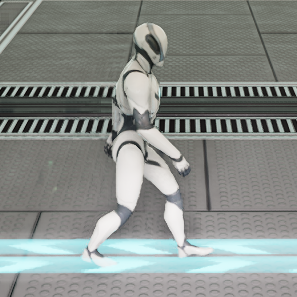
From ficsit.appA mod that introduces a walking mascot robot that patrolls factory floors to collect and visualize operational data.
A mod that introduces a walking mascot robot that patrolls factory floors to collect and visualize operational data.


Features
- Allows robots to walk around the factory.
- Provides a robot's perspective to view your factory.
- Enables robots to collect data on facility's flows(production, consumption) and stocks(input buffer).
Overview
Basic concept
- Robots are spawned from a Base Station.
- Robots patrol along a Walking Path, starting from that Base Station.
- A Walking Path is created by connecting various nodes (Base Stations, Walking Path Nodes, Monitoring Nodes, and so on).
- A robot's patrol route is created by sequentially selecting Monitoring Nodes within the Walking Path network connected to its home station.
- By linking facilities to a Monitoring Node, the robot can collect equipment data and bring it back to the Base Station.
- At the Base Station, this data is aggregated, allowing users to check production and consumption information for each item.
Stations
- Base Station can also aggregate data collected by other stations. This allows stations to be structured hierarchically.
- Data Packer Stations and Data Unpacker Stations are facilities used to turn data into items and transport them over long distances via conveyors or other means.
- Data Packer Station functions almost identical to a Base Station, but it outputs the information collected by its assigned robots onto a conveyor.
- Data Unpacker Station unpacks and stores the information received from the conveyor. It also provides that information to any robots patrolling this station.
- Currently, you can only build up to 20 Data Packer Stations. While I plan to increase this limit, it is finite under the current specifications.
- These can also be used to divide very large sets of walking paths.
- The station relocation feature(v1.4.1) moves a complete set of station information to the destination station.
- A "complete set of information" includes associated robots, collected data, trend data, and the station name.
- Please note that all existing information at the relocation destination will be deleted.
- The destination station must be reachable via a walking path and must be of the same type.
- The original station is left in place for safety; however, please remove the original station after the relocation is complete.
- The expected relocation procedure is as follows:
- Build the station at the destination.
- Establish a walking path.
- Execute the relocation at the original station.
- Remove the original station.
Waypoint Nodes
- Walking Path Nodes are used solely to form the Walking Path.
- Monitoring Nodes serve as robot destinations and are utilized for facility monitoring. You can change the monitoring range and the visibility of Monitoring Nodes in the global settings.
- Robot-only JumpPad(v1.5.5) is a special node designed to connect distant nodes. Place two jumppads, select one of the jumppads and link them together. This feature unlocks upon releasing JumpPad.
- Robot-only Portal(v1.0.2) is also a special node designed to connect distant nodes. Place two portals, select one of the portals and link them together. This feature unlocks upon releasing SPWN.
- Sign Update Node(v1.3.0) is a node that updates the text of a linked Sign. It displays values on the Sign text from information collected at the home station of the robot that visited the node. The displayable metrics are the current/maximum values for each item's production, consumption, and stock. While all items currently collected across all stations appear as selectable options, only the latest information available at the visiting robot's home station can actually be displayed.
- Elevator Node(v1.6.1) allows robots to use elevators. Place an elevator node at the entrance of the elevator on each floor. It will automatically link to the elevator on that floor. Once you connect the linked Elevator Node to the walking path of that floor, robots will start using the elevator.
- TruckStation Node(v1.6.2) allows robots to use motor vehicles. Place an TruckStation node near the truck station. It will automatically link to the truck station. Once you connect the linked TruckStation Node to the walking path, robots will start using motor vehicles for transportation.


Highlights
From source dataGame versions
Built for Satisfactory >=502094.
Footprint
Rated a light load on a server.
Last update
Its author last shipped an update 19d ago.
InfoRobots on Nxeon
From our catalogue- One-click install
- Supported on Nxeon Satisfactory servers. We download it from ficsit.app, place it, and restart the server.
- Server side
- Required on the server
- Server load
- light
- Smallest plan we suggest
- Satisfactory — 8 GB (8 GB RAM). This follows our own load rating above, not a benchmark.
- Latest build
- 1.6.2, released 2026-09-26
Run InfoRobots on a Satisfactory server
Pick a server or deploy a new one above; it is installed in one click.
What kind of mod it is
From the catalogListed on ficsit.app as “Mods”
Technology & automation
Machines, power, logistics and automation.
Runs on your server
From source side supportficsit.app lists InfoRobots as required on the server. Check its ficsit.app page to see whether players need it too.
Compatibility
- Game
- Satisfactory
- Runs on
- Serverrequired on the server
- Game versions
- >=502094
Verified at the source
- ✓ficsit.appOfficial listing, checked 2026-10-15Open ↗
- ✓AuthorAbexSoft, as published on ficsit.app
- ✓LicenseNot published by the sourceFree








