






About SatisManager
From ficsit.appCheck all aspects of your factories from anywhere! HUD Ping, Map Ping, Teleport to Machine included!
You can open the mod interface by pressing 'G' (can be changed in game setting menu).
Features:
Quick Building Access
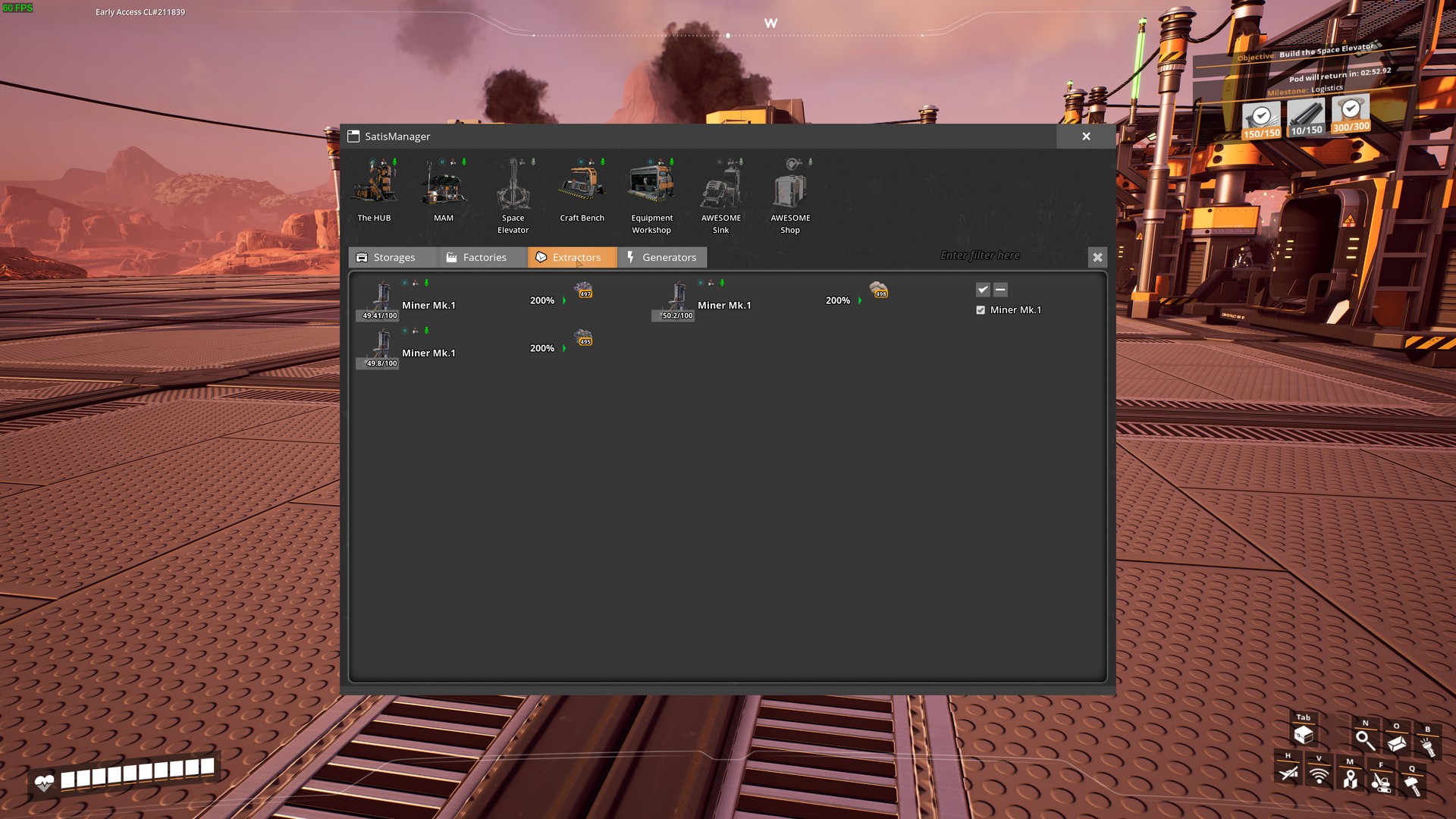
Every building icon has 4 small icons on top.
>* Ping - HUD ping at location(same as regular alt+click ping visual)
>* Show on map- Open map and places a temporarily orange dot in place of building.
>* Teleport - Teleports player to that building.
>* Start/Stop - Put building on pause or start it.
Quality of Life
>* Auto-Open HUB/MAM - Will open interface on ship return/research completion.
(If no other window is opened and no hostile creatures nearby)
>* Highlight nearby pickupable items - Press "L" to highlight items.
(Can be changed in game settings menu)
>* Area with buttons to access game-significant buildings anywhere. Greyed out is not built. (HUB/MAM/Space Elevator/Workbench/Equipment Workshop/AWESOME Sink/AWESOME Shop/PowerSuit Fabrication Station[Requires PowerSuit mod]
4 Tabs with Different Building Categories.
- Storage
- Production
- Extractors
- Generators
Tab Options
- Main Filter field - if anything is entered in this field, tabs will be filtered by name and content.
(MP Compatibility1)
- Building Type filter on every tab - Only those buildings of checked type will be shown.
(Stacks with main filter) >For example : If you select coal, than only buildings with coal in name/inventory(for storages), or in recipe(for factories) ,or in fuel(for generators),or in resource(for extractors) will be shown.
- Click on building icon - Will open its interaction interface.
- Click on building name - Will let you enter a custom name for that building.
Factories, extractors and generators will sometimes have a red/yellow border around some of their contents. Red means that there is not enough of that resource to start production cycle/produce power. Yellow means the stack is full. >> 1MP Compatibility - if you're not the host, then there is no live updates on building contents, and filtering is performed only by building's names.
Screenshots: 



You can leave any issue, suggestions on My github page. Or contact me (DeadMoroz#9600) on Discord
Big thanks xXdrewbaccaXx for mod icon!
Highlights
From source dataGame versions
Built for Satisfactory >=210096.
Footprint
Rated a light load on a server.
Last update
Its author last shipped an update 3 yr ago.
SatisManager on Nxeon
From our catalogue- One-click install
- Supported on Nxeon Satisfactory servers. We download it from ficsit.app, place it, and restart the server.
- Server side
- Required on the server
- Server load
- light
- Smallest plan we suggest
- Satisfactory — 8 GB (8 GB RAM). This follows our own load rating above, not a benchmark.
- Latest build
- 1.1.4, released 2023-06-04
Run SatisManager on a Satisfactory server
Pick a server or deploy a new one above; it is installed in one click.
What kind of mod it is
From the catalogMaps & scenarios
Custom maps, arenas and scenarios to play on.
Runs on your server
From source side supportficsit.app lists SatisManager as required on the server. Check its ficsit.app page to see whether players need it too.
Compatibility
- Game
- Satisfactory
- Runs on
- Serverrequired on the server
- Game versions
- >=210096
Verified at the source
- ✓ficsit.appOfficial listing, checked 2026-10-15Open ↗
- ✓AuthorxXdrewbaccaXx, as published on ficsit.app
- ✓LicenseNot published by the sourceFree








