






About Production Stats
From ficsit.appSee production and consumption statistics.

<style> .multiplayer-banner { background-color: #4caf50; border-top: 4px solid #000; border-bottom: 4px solid #000; margin: 20px 0; padding: 10px 0; display: flex; align-items: center; justify-content: center; gap: 15px; width: 100%; } .multiplayer-text { color: #ffffff !important; font-weight: bold; text-transform: uppercase; letter-spacing: 2px; font-size: 1.1rem; text-shadow: 2px 2px 0px #000; } .multiplayer-sub { background: #000; color: #4caf50 !important; padding: 2px 10px; font-size: 0.8rem; font-weight: bold; text-transform: uppercase; border: 2px solid #fff; } .thumb-icon { font-size: 1.5rem; filter: drop-shadow(2px 2px 0px #000); } </style>
<style> .mod-container { --sf-gold: #fa9549; --sf-stats: #ff9800; --sf-bg: #2d2d2d; --sf-border: #000; max-width: 850px; margin: 20px auto; background-color: var(--sf-bg); color: #e0e0e0; padding: 30px; border: 4px solid var(--sf-border); box-shadow: 10px 10px 0px var(--sf-border); } .mod-container h1 { color: var(--sf-gold); text-transform: uppercase; text-align: center; border-bottom: 3px double var(--sf-gold); padding-bottom: 10px; margin-bottom: 25px; } .warning-banner { background-color: #3d2b1f; border: 2px dashed #ff9800; padding: 12px; margin-bottom: 20px; text-align: center; font-size: 0.85rem; color: #ffb86c; } .mod-container .feature-grid { display: grid; grid-template-columns: 1fr 1fr; gap: 15px; margin: 20px 0; } .mod-container .feature-card { background: #1a1a1a; border-left: 4px solid var(--sf-stats); padding: 12px; font-size: 0.85rem; } .mod-container .command-box { background: #000; border: 2px solid var(--sf-stats); padding: 15px; margin: 20px 0; } .mod-container code { color: #fff; background: #333; padding: 2px 6px; font-family: monospace; font-size: 1rem; } .mod-container .graph-legend { background: #252525; border: 1px solid #444; padding: 15px; margin: 20px 0; } .mod-container .gallery img { width: 100%; display: block; border: 4px solid #000; margin-bottom: 15px; } </style>
Production Stats
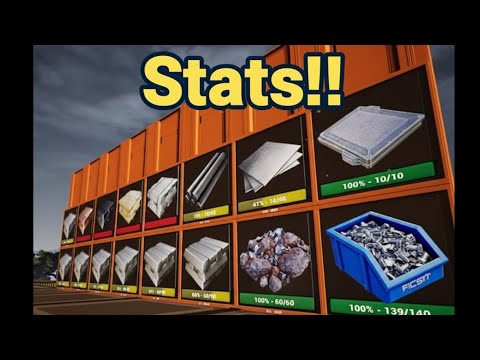
Master your factory's efficiency! Monitor real-time production and consumption data through customizable signs and detailed sheets.
Build physical displays to see throughput directly on your factory floor.
Access comprehensive tables of all produced and consumed items.
Chat Commands
/stats - Toggle Stats Sheet / Mini View
(SinglePlayer Only)
/statstime [seconds] - Set update frequency (Default: 20s)
/statsdist [cm] - Set activation distance (Default: 10000)
How to Read the Data
- ■ Green Line: Current Production vs. Total Capacity
- ■ Orange Line: Current Consumption vs. Total Capacity
- ■ Red Text: Alert! Consumption is currently higher than production.



Looking for time-based graphs? Check out: StatsGraph
Honest note: Keep an eye on those red alerts—nothing kills a factory faster than a production deficit!
Highlights
From source dataGame versions
Built for Satisfactory >=491125.
Footprint
Rated a light load on a server.
Dependencies
Needs 1 other project installed alongside it.
Production Stats on Nxeon
From our catalogue- One-click install
- Supported on Nxeon Satisfactory servers. We download it from ficsit.app, place it, and restart the server.
- Server side
- Required on the server
- Server load
- light
- Smallest plan we suggest
- Satisfactory — 8 GB (8 GB RAM). This follows our own load rating above, not a benchmark.
- Latest build
- 1.0.22, released 2026-06-07
Recent builds
| Build | Released | Game versions | Loaders |
|---|---|---|---|
| 1.0.22 | 2026-06-07 | >=491125 | n/a |
| 1.0.14 alpha | 2023-11-16 | >=264901 | n/a |
Run Production Stats on a Satisfactory server
Pick a server or deploy a new one above; it is installed in one click.
What kind of mod it is
From the catalogGameplay & overhauls
New mechanics, content and overhauls that change how the game plays.
Runs on your server
From source side supportficsit.app lists Production Stats as required on the server. Check its ficsit.app page to see whether players need it too.
Compatibility
- Game
- Satisfactory
- Runs on
- Serverrequired on the server
- Game versions
- >=491125
- Requires
- 1 other project installed alongside it.
Verified at the source
- ✓ficsit.appOfficial listing, checked 2026-10-15Open ↗
- ✓AuthorAndre Aquila, as published on ficsit.app
- ✓LicenseNot published by the sourceFree








