







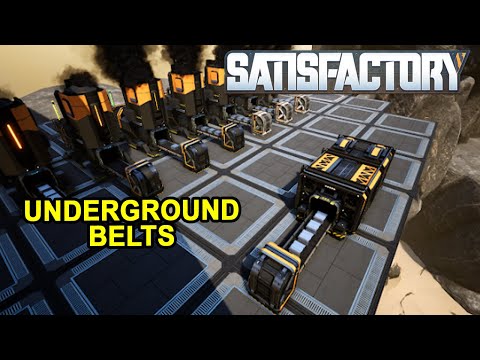
About Underground Belts
From ficsit.appYou could place as many "x" inputs for "1" output and vice versa.

<style> .multiplayer-banner { background-color: #4caf50; border-top: 4px solid #000; border-bottom: 4px solid #000; margin: 20px 0; padding: 10px 0; display: flex; align-items: center; justify-content: center; gap: 15px; width: 100%; } .multiplayer-text { color: #ffffff !important; font-weight: bold; text-transform: uppercase; letter-spacing: 2px; font-size: 1.1rem; text-shadow: 2px 2px 0px #000; } .multiplayer-sub { background: #000; color: #4caf50 !important; padding: 2px 10px; font-size: 0.8rem; font-weight: bold; text-transform: uppercase; border: 2px solid #fff; } .thumb-icon { font-size: 1.5rem; filter: drop-shadow(2px 2px 0px #000); } </style>
<style> .mod-container { --sf-gold: #fa9549; --sf-belt: #8b4513; --sf-bg: #2d2d2d; --sf-border: #000; max-width: 850px; margin: 20px auto; background-color: var(--sf-bg); color: #e0e0e0; padding: 30px; border: 4px solid var(--sf-border); box-shadow: 10px 10px 0px var(--sf-border); } .mod-container h1 { color: var(--sf-gold); text-transform: uppercase; text-align: center; border-bottom: 3px double var(--sf-gold); padding-bottom: 10px; margin-bottom: 25px; } .mod-container .feature-card { background: #1a1a1a; border-left: 4px solid var(--sf-belt); padding: 12px; margin-bottom: 10px; font-size: 0.85rem; } .mod-container h2 { color: var(--sf-belt); font-size: 1.2rem; border-left: 4px solid var(--sf-belt); padding-left: 10px; margin-top: 25px; } .mod-container .step-box { background: #252525; border: 1px solid #444; padding: 15px; margin: 10px 0; font-size: 0.85rem; } .mod-container .server-note { background: #3d2b1f; color: var(--sf-gold); padding: 5px 10px; font-size: 0.75rem; font-weight: bold; display: inline-block; margin-bottom: 5px; } .mod-container .gallery img { width: 100%; display: block; border: 4px solid #000; margin-bottom: 15px; } .multiplayer-banner { background-color: #4caf50; border-top: 4px solid #000; border-bottom: 4px solid #000; margin: 20px 0; padding: 10px 0; display: flex; align-items: center; justify-content: center; gap: 15px; width: 100%; } .multiplayer-text { color: #ffffff !important; font-weight: bold; text-transform: uppercase; letter-spacing: 2px; font-size: 1.1rem; text-shadow: 2px 2px 0px #000; } </style>
Underground Belts
Efficiently manage your item flow and declutter your factory floor with flexible underground logistics.
PS: The 3 old versions of the Underground Belt are still available to build.



How to Use (New Networks)
Place Input → Place Output (or vice versa). The link is created automatically.
- Place all desired Outputs first.
- Place the single Input last.
- Place all desired Inputs first.
- Place the single Output last.
Advanced Management
Adding to Existing Networks: Build an Input/Output, interact to make it Active, then interact again to select your group.


Honest note: Underground logistics can be a lifesaver for clean factory builds. Enjoy the extra space!
Highlights
From source dataGame versions
Built for Satisfactory >=502094.
Footprint
Rated a light load on a server.
Dependencies
Needs 1 other project installed alongside it.
Underground Belts on Nxeon
From our catalogue- One-click install
- Supported on Nxeon Satisfactory servers. We download it from ficsit.app, place it, and restart the server.
- Server side
- Required on the server
- Server load
- light
- Smallest plan we suggest
- Satisfactory — 8 GB (8 GB RAM). This follows our own load rating above, not a benchmark.
- Latest build
- 3.0.33, released 2026-09-08
Recent builds
| Build | Released | Game versions | Loaders |
|---|---|---|---|
| 3.0.33 | 2026-09-08 | >=502094 | n/a |
| 3.0.9 alpha | 2023-11-16 | >=264901 | n/a |
Run Underground Belts on a Satisfactory server
Pick a server or deploy a new one above; it is installed in one click.
What kind of mod it is
From the catalogTechnology & automation
Machines, power, logistics and automation.
Runs on your server
From source side supportficsit.app lists Underground Belts as required on the server. Check its ficsit.app page to see whether players need it too.
Compatibility
- Game
- Satisfactory
- Runs on
- Serverrequired on the server
- Game versions
- >=502094
- Requires
- 1 other project installed alongside it.
Verified at the source
- ✓ficsit.appOfficial listing, checked 2026-10-15Open ↗
- ✓AuthorAndre Aquila, as published on ficsit.app
- ✓LicenseNot published by the sourceFree








