







About YouMod
From ficsit.appAutomatically develop a ContentLib-based mod using text files. Bonus: Factorio data-raw conversion tool.

Create a new mod ingame, using text files with ContentLib.
This mod will help you create your first mod using contentlib. It will create editable text files for modded and vanilla assets, depending of what you have in your game at the time of the generation of the files.
This mod was made with CONTENTLIB:


PS: Don't use Windows Notepad, or Notepad++, will actively make editing your scripts more difficult. They are nice editors, but not for this purpose. Get a text editor that supports JSON Schemas, or you can use the VSCode web editor if you don’t want to download anything. https://vscode.dev/
Documentation for ContentLib: https://docs.ficsit.app/contentlib/latest/Tutorials/ConceptOverview.html

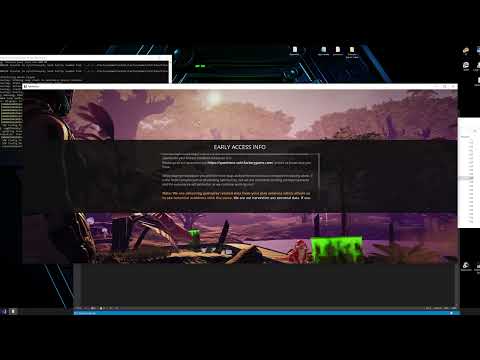

Steps: -
- Use the chat command to open the widget:
/createmod

- Choose what you want to extract from the game as text files:
- All Recipes from your current game (...YourMod/ContentLib/RecipePatches/)
- All Items from your current game (...YourMod/ContentLib/ItemPatches/)
- All Milestones from your current game (...YourMod/ContentLib/SchematicPatches/)
- All Entities stats from your current game (...YourMod/ContentLib/CDOs/)
- Example of new Recipes (...YourMod/ContentLib/Recipes/)
- Example of new Items (...YourMod/ContentLib/Items/)
- Example of new Milestones (...YourMod/ContentLib/Schematics)

- Edit the text files (All files will be already on your Mod Folder from Satisfactory)
You will see that types of files :
Entities: - 


Recipes: -

Items: -

Milestones: -

Visual Kits: -

- Delete all files you didn't edit.
- Restart the game
- If you think your mod is ready, zip it and upload to ficsit.app
Observations: -
- Recipes can't be set to Workbech or Workshop, so they don't "Clear Buildings" as default.
Extracting All Items and Recipes from Factorio
This guide outlines the process of extracting all items and recipes from Factorio to Satisfactory using YouMod.
Video Demonstration:
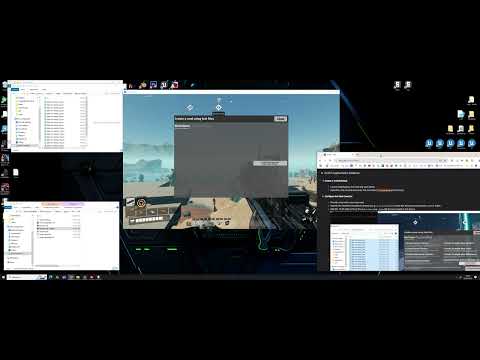
Steps:
- Ensure Factorio Modded Items:
- Confirm that your Factorio installation includes all desired mods and items available.
- Generate Data Dump:
- Run Factorio with the following command-line parameter:
\bin\x64\factorio.exe --dump-data - This command generates a data dump file and the game will not launch.
- Locate the Data Dump File:
- The generated file is named
data-raw-dump.json. - It's typically located in:
%AppData%\Roaming\Factorio\script-output\data-raw-dump.json
- Split the Data Dump File:
- The
data-raw-dump.jsonfile is often very large. - Use a file splitting tool (e.g., https://textfilesplitter.com/) to divide it into 15-20 smaller parts. This will improve processing efficiency and avoid crashing the game when processing it.
- Create a YouMod Mod:
- Launch Satisfactory and load any save game.
- Open the chat console and enter the command:
/createmod(press Enter).
- Configure the Mod Creation:
- Provide a name for your new mod.
- Specify the Factorio installation directory (e.g.,
C:\Factorio\). Ensure this directory contains the/data/folder. - Add the 15-20 split parts of the
data-raw-dump.jsonfile that you made in the step 4. 
- Generate ContentLib Files:
- Uncheck any boxes related to Satisfactory-specific content.
- Check the box that you "read" the terms.
- Check the "Convert to Factorio" box.
- Click "Generate Mod".
- This process extracts all ContentLib files for items, recipes, and icons into your mod's folder. (This may take 3-10 minutes).
- Modify and Customize:
- Modify or delete files as needed. (Folder: .../Mod/YourModName )
- Create recipes to convert Satisfactory ores to Factorio equivalents, or merge content as desired.
- Add any missing items or recipe ingredients/products.

Important Notes:
Highlights
From source dataGame versions
Built for Satisfactory >=491125.
Footprint
Rated a light load on a server.
Last update
Its author last shipped an update 4 mo ago.
YouMod on Nxeon
From our catalogue- One-click install
- Supported on Nxeon Satisfactory servers. We download it from ficsit.app, place it, and restart the server.
- Server side
- Required on the server
- Server load
- light
- Smallest plan we suggest
- Satisfactory — 8 GB (8 GB RAM). This follows our own load rating above, not a benchmark.
- Latest build
- 1.0.14, released 2026-06-23
Run YouMod on a Satisfactory server
Pick a server or deploy a new one above; it is installed in one click.
What kind of mod it is
From the catalogWeapons, items & crafting
New weapons, gear, items and the recipes to make them.
Runs on your server
From source side supportficsit.app lists YouMod as required on the server. Check its ficsit.app page to see whether players need it too.
Compatibility
- Game
- Satisfactory
- Runs on
- Serverrequired on the server
- Game versions
- >=491125
Verified at the source
- ✓ficsit.appOfficial listing, checked 2026-10-15Open ↗
- ✓AuthorAndre Aquila, as published on ficsit.app
- ✓LicenseNot published by the sourceFree








