







About QuietPause
From ThunderstoreMutes Schedule I while minimized or unfocused and pauses world sounds in the pause menu (menu clicks stay). Options in Settings > Audio. IL2CPP build.
Quiet Pause
> IL2CPP build for the default Steam branch. Playing on the alternate (Mono) branch? Install QuietPause_Mono instead.

Schedule I keeps playing every sound while it is minimized and while the pause menu is open. Quiet Pause fixes both:
- Mute in background — silent while the window is minimized or another window has focus;
fades back in when you return. Or keep a low background volume if you prefer.
- Mute when paused — world sounds (ambience, footsteps, vehicles, voices, weather) pause while
the pause menu is open and resume exactly where they stopped. Menu clicks stay audible; music can keep playing if you like.
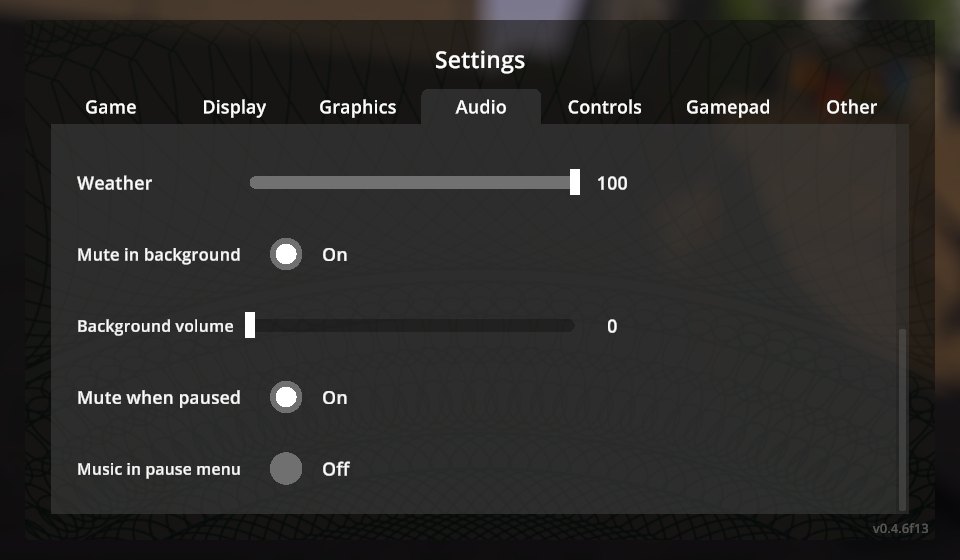
The options are added to the game's own Settings → Audio tab (main menu and pause menu), translated by Polyglot.
Installation
- Install MelonLoader 0.7.3 (0.7.1 is not supported).
- Download
QuietPause-<version>-IL2CPP.zip(default Steam branch) orQuietPause-<version>-Mono.zip
(alternate branch) from Releases.
- Extract it into the game folder so that
Mods/QuietPause_Il2Cpp.dll(or_Mono.dll) is in place.
Configuration
UserData/MelonPreferences.cfg:
[QuietPause]
MuteInBackground = true   # silent while minimized / unfocused
BackgroundVolume = 0      # 0-100 % volume in the background
MuteWhenPaused = true     # pause world sounds in the pause menu
MusicWhenPaused = false   # keep the music playing in the pause menu
Changelog
See CHANGELOG.md.
Credits
Developed with AI assistance (Claude by Anthropic) and tested in game on both branches with automated in-game tests.
License
MIT.
Highlights
From source dataLoaders
Runs on BepInEx.
Footprint
Rated a light load on a server.
Last update
Its author last shipped an update 34d ago.
QuietPause on Nxeon
From our catalogue- One-click install
- Not available. One-click install isn't available for this game's mods yet. Download it and upload it to your server in Files.
- Server type needed
- BepInEx
- Server load
- light
- Latest build
- 1.0.0, released 2026-09-30
Game versions by loader
| Loader | Game versions | Newest |
|---|---|---|
| BepInEx |
From 1 recorded build of QuietPause.
Dependencies
- Required: MelonLoader
Declared by the newest build that lists any. Required ones are installed with it on one-click installs.
What kind of mod it is
From the catalogCosmetics, visuals & audio
Skins, textures, shaders, models and sound — how the game looks and sounds.
Compatibility
- Game
- Schedule I
- Loaders
- BepInEx
- Requires
- One-click install needs a BepInEx server.
Verified at the source
- ✓ThunderstoreOfficial listing, checked 2026-10-02Open ↗
- ✓AuthorBbIJABNPOBATEJb, as published on Thunderstore
- ✓LicenseNot published by the sourceFree












