About HylandHelper
From ThunderstoreA companion toolset for Schedule I: in-game recipe and layout tools, plus optional pairing with the free Hyland Helper app or website for send-to-game, live sync, and an online layout library.
Hyland Helper - Live Sync Bridge
Hyland Helper is a companion toolset for Schedule I. This mod adds in-game tools for building and saving recipes and for capturing your property builds, and it works great on its own. Connect the free Hyland Helper app for iOS and Android to unlock the full experience: send recipes to your in-game phone, design layouts in the Layout Studio, live game sync, and a personal layout library you can open in the app and on the website.
Home base, app, and your synced layout library: https://hylandhelper.com Guides and help: https://hylandhelper.com/docs
What it does
- In-game recipe tools: build and save recipes from a phone tile in your game, no account needed.
- QR pairing: the pairing screen shows a QR code next to the pairing code, so you can connect the app without typing.
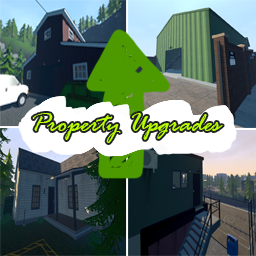
- Save Layout: capture your current property build, right from the in-game phone tile.
- Apply a saved layout: drop a saved layout back into an owned property and let the mod place every object for you (the in-game cost is charged as you'd expect).
- Send recipes to your in-game phone: calculate a mix in the Hyland Helper app and push it straight to your Phone Recipes.
- Design in the Layout Studio: shape and edit property layouts in the app.
- Live game sync: the app reads your live game state so its calculators and advice match your save.
- Personal layout library: layouts you save in-game upload to your account, so you can open them in the app and on the website.
The recipe tools and Save Layout work on their own. Connect the free Hyland Helper app to unlock Send to Game, the Layout Studio, live sync, and your online layout library.
Syncing with the app and website
Anything that syncs outside the game, such as your own saved layouts and recipes plus community layouts and mixes, flows through your account. To use it you need the free Hyland Helper app (or the website), signed in with Steam, with the mod linked to it via the pairing code or QR code shown on the in-game tile. Your game and your account are matched by your Steam ID, so once the app is signed in and the mod is paired, layouts you save in-game upload to your library automatically. Downloading layouts from the app or website into the game is temporarily unavailable and will return in an app update. Without the app connected, the in-game recipe tools and Save Layout still work on their own, but there is nothing to sync to or from.
Setup
- Install MelonLoader for Schedule I.
- Install this mod. Its dependencies (S1API and Sideload) install automatically through your mod manager.
- Launch the game and open the in-game Hyland Helper phone tile.
- For the full experience, pair the Hyland Helper app using the pairing code or QR code from the tile.
More info and app links: https://hylandhelper.com
Requirements
- Schedule I 0.4.7f12 (current)
- MelonLoader
- S1API 3.2.1
- Sideload 1.31.1
Compatibility
Built for Schedule I 0.4.7f12. Layout apply only runs on game versions this mod has been checked against; on any other version the Layouts screen asks you to update the mod instead. A game update can require a matching mod and app update. Grab the latest here and update the app when it prompts you.
v0.4.0
- Updated for the Schedule I 0.4.7 Special Customers update. Property layouts didn't change, so layout apply and app layout import work on 0.4.7 saves.
- New: QR pairing. The pairing screen shows a QR code above the pairing code. Scan it with your phone camera, or with Scan QR in the Hyland Helper app once its update is out. Typing the code still works.
- Fixed: applying a layout to the Motel Room, Sweatshop or Sewer Office was refused because of the wall clock.
- Fixed: layouts deleted in the app no longer get stuck on "Loading this layout".
- Fixed: layout sync could stay disconnected after restarting the game, even though the app showed the PC as paired.
- If a layout apply was interrupted and can't safely continue, it no longer blocks the property. The Layouts screen shows what happened and lets you dismiss it. Dismissing doesn't refund or remove anything.
- Layout apply only runs on game versions this mod has been checked on. On a newer game version it asks you to update the mod.
- The pairing code is no longer written to the game log.
- Requires S1API 3.2.1.
v0.3.1
- Fixed applying a layout you created in the app or on the website to an owned property. It was incorrectly reported as a property you don't own, so the apply couldn't start. Layouts captured in-game were unaffected.
v0.3.0
- Updated for Schedule I 0.4.6f13
- New in-game Layouts screen with Save Layout
- Personal cloud layout library with recovery
- More reliable layout capture
- Dependency updates: S1API to 3.2.0, Sideload to 1.31.1
Support: hylandhelper@madjagstudios.com More info: https://hylandhelper.com
Highlights
From source dataLoaders
Runs on BepInEx.
Footprint
Rated a light load on a server.
Dependencies
Needs 3 other projects installed alongside it.
HylandHelper on Nxeon
From our catalogue- One-click install
- Not available. One-click install isn't available for this game's mods yet. Download it and upload it to your server in Files.
- Server type needed
- BepInEx
- Server load
- light
- Latest build
- 0.4.0, released 2026-10-11
Game versions by loader
| Loader | Game versions | Newest |
|---|---|---|
| BepInEx |
From 6 recorded builds of HylandHelper.
Recent builds
| Build | Released | Game versions | Loaders |
|---|---|---|---|
| 0.4.0 | 2026-10-11 | n/a | BepInEx |
| 0.3.1 | 2026-08-22 | n/a | BepInEx |
| 0.3.0 | 2026-08-22 | n/a | BepInEx |
| 0.2.1 | 2026-08-07 | n/a | BepInEx |
| 0.2.0 | 2026-08-02 | n/a | BepInEx |
| 0.1.3 | 2026-07-21 | n/a | BepInEx |
Dependencies
- Required: MelonLoader
- Required: S1API Forked
- Required: Sideload
Declared by the newest build that lists any. Required ones are installed with it on one-click installs.
What kind of mod it is
From the catalogAdmin & protection
Permissions, moderation, anti-cheat and land protection for the people running the server.
Compatibility
- Game
- Schedule I
- Loaders
- BepInEx
- Requires
- One-click install needs a BepInEx server. 3 other projects installed alongside it.
Verified at the source
- ✓ThunderstoreOfficial listing, checked 2026-10-12Open ↗
- ✓AuthorMadJagStudios, as published on Thunderstore
- ✓LicenseNot published by the sourceFree