About SOTFEdit
From ThunderstoreAn open-source savegame editor for Sons of The Forest
SOTFEdit - Sons of The Forest Savegame Editor


A savegame editor for "Sons of The Forest".

- SOTFEdit - Sons of The Forest Savegame Editor
- Disclaimer
- Features
- Download
- Requirements
- Usage
- Inventory
- Storage
- Armor
- NPCs
- Structures
- Map
- Weather
- Reviving
- Spawning
- Troubleshooting
- Contributing
- Final Words
- Links and Credits
- Attributions
- Icons
Disclaimer
This project is in no way or form associated with the developers of the game. It is just a non-commercial fan project, nothing more, nothing less.
Features
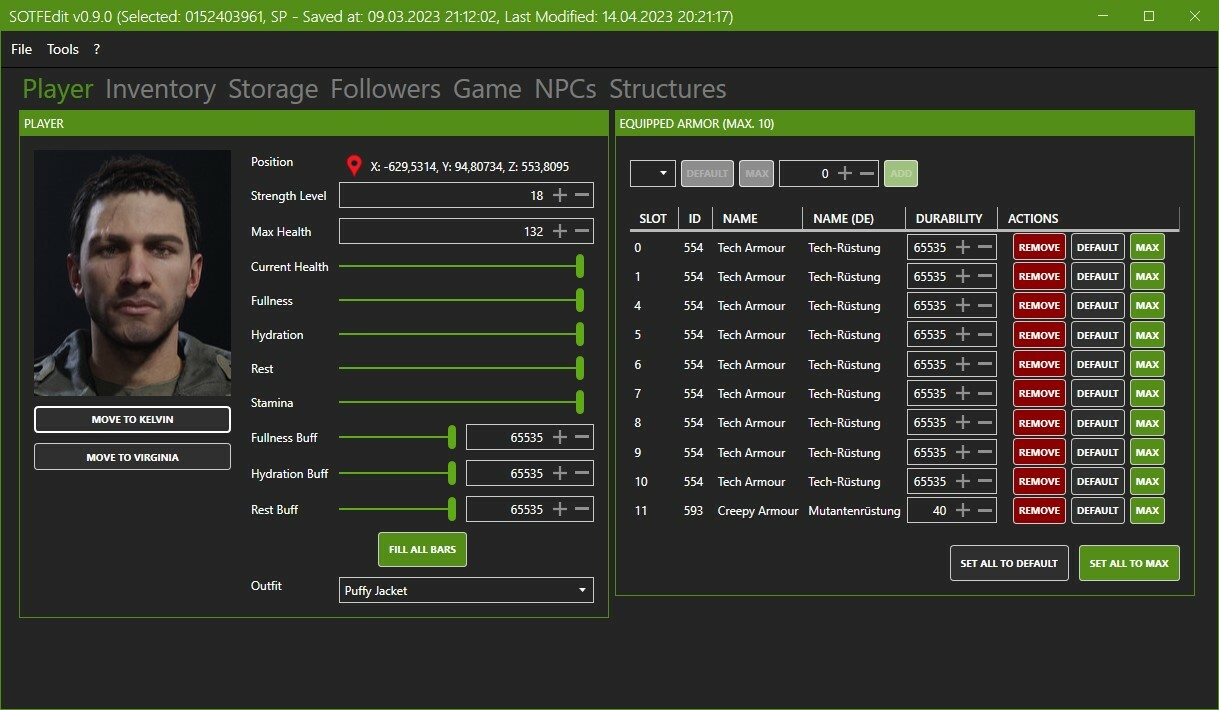
- Edit Player Stats (Strength, MaxHealth, CurrentHealth, Fullness etc.)
- Move Player to Virginia & Kelvin
- Edit Game Setup (Game Mode, Spawn Rate, Survival Damage etc.)
- Edit Inventory (Add/Remove items, change quantities)
- Edit Armor Data (Add Armor Pieces, change durability)
- Edit Weather Data (Weather, Seasons...)
- Edit Game State Data (Playtime, Doors open/closed, Bunkers opened/closed)
- Edit Storage Data (Unlimited Logs, sticks etc.)
- Edit Influences of Players towards Kelvin and Virginia
- Edit NPCs
- Edit Structures / Blueprints
- Theme Support
- Ignite and refuel all fires as well as lowering their fuel drain rate
- Reset Structural Damage
- Teleport to and clone World Objects like Glider and Knight V
- Reset consumed items
- Modify Virginias equipped items
- Change Virginias and Kelvins outfits
- Spawn an army of Virginias and Kelvins
- Several experiments
- Revive Virginia & Kelvin
- Set stats for Virginia & Kelvin
- Move Kelvin & Virginia to Player or each other
- Regrow Trees selectively (All, Removed, Half-Chopped, Stumps)
- Reset containers, crates and pickups in caves and open world
- Backup changed files automatically
- ... more features are planned
Download
- You can find the newest version at the Releases page
Requirements
- Windows 8+
- .net 6.0 Desktop Runtime
Usage
- Start the application using SOTFEdit.exe
- Click on "File" -> "Open Savegame"
- Select your savegame
- Edit
- Save with "File" -> "Save"
Inventory
- In order to add or remove items, click on the add or remove buttons
- You can use the other buttons to modify the current count in a convenient way
- Items that are (currently) not available for the inventory are hidden, but can easily be enabled in data.json
- When Legs and Arms are added they will default to their cooked variants. The same applies to already existing
Arms/Legs when you just increase the count
Storage
- Only items that are supported by the storages are available. Solar Panels for example can not be stored there
- The editor will obey the maximum number of items per slot
Armor
Armor protects you from most hazards. However you are still going to drown and die from fall damage.
NPCs
The game groups some enemies into "families". Most likely they won't attack each other and raid the player.
One word about modifying NPCs: Some enemies are in caves/bunkers and have a different GraphMask. When this option is selected (Only in the same area as this actor) only enemies in the same "phase" are edited.
So, if you just want to remove babies in caves, select this option. If you remove all of them, just deselect it.
Spawners: I haven't fully investigated how the game works with those spawners. When you delete them the game will re-create them on the next game save. So this would be one way to increase the number of enemies.
Structures
This tool lets you "almost" finish blueprints, set them to "unfinished" or remove them. Why "almost"? Because it is too complex to convert blueprints to final buildings. So this tool will change the blueprints to require one last item until a blueprint is finished.
The cool thing about this is that you can use it in order to have an easy source for logs for example. Just set some shelters, change them to "almost finished", take them down and all logs will drop to the ground.
Another cool thing is that you can use it to build stuff in caves or bunkers. The process is the same: Just set the blueprints, mark them as "almost finished", take them down and use the resources to build new stuff.
If you want to build larger structures like shelters in a cave or bunker, you have to place a small blueprint first ( like a chair), then change its type and save.
Map
The map combines static information about points-of-interest with dynamic information that are read directly from the savegame. Some positions are missing but they may be added in the future.
Features
- Show/hide information about 3D Printers, Actors/NPCs, Ammunition, Bunkers, Camps, Cannibal Villages, Caves, Crates,
Highlights
From source dataLoaders
Runs on BepInEx.
Footprint
Rated a light load on a server.
Dependencies
Needs 1 other project installed alongside it.
SOTFEdit on Nxeon
From our catalogue- One-click install
- Not available. One-click install isn't available for this game's mods yet. Download it and upload it to your server in Files.
- Server type needed
- BepInEx
- Server load
- light
- Smallest plan we suggest
- Sons of the Forest — 4 GB (4 GB RAM). This follows our own load rating above, not a benchmark.
- Latest build
- 0.12.10, released 2025-02-26
Game versions by loader
| Loader | Game versions | Newest |
|---|---|---|
| BepInEx |
From 25 recorded builds of SOTFEdit.
Recent builds
| Build | Released | Game versions | Loaders |
|---|---|---|---|
| 0.12.10 | 2025-02-26 | n/a | BepInEx |
| 0.12.9 | 2025-01-18 | n/a | BepInEx |
| 0.12.8 | 2025-01-17 | n/a | BepInEx |
| 0.12.7 | 2024-06-21 | n/a | BepInEx |
| 0.12.6 | 2024-04-19 | n/a | BepInEx |
| 0.12.4 | 2024-03-28 | n/a | BepInEx |
Dependencies
- Required: SOTFEdit Companion
Declared by the newest build that lists any. Required ones are installed with it on one-click installs.
Run SOTFEdit on a Sons of the Forest server
Deploy a server above, then upload the file in Files.
What kind of mod it is
From the catalogAdmin & protection
Permissions, moderation, anti-cheat and land protection for the people running the server.
Compatibility
- Game
- Sons of the Forest
- Loaders
- BepInEx
- Requires
- One-click install needs a BepInEx server. 1 other project installed alongside it.
Verified at the source
- ✓ThunderstoreOfficial listing, checked 2026-10-02Open ↗
- ✓Authorcodengine, as published on Thunderstore
- ✓LicenseNot published by the sourceFree