About Map Ruler [10.6]
From Steam WorkshopMap Ruler Donate | Discord A client-side ruler for the in-game map: right-click the map, pick RULER, click the far end. Every line you draw is numbered on the map and its measurement is listed in the…
Map Ruler [10.6]
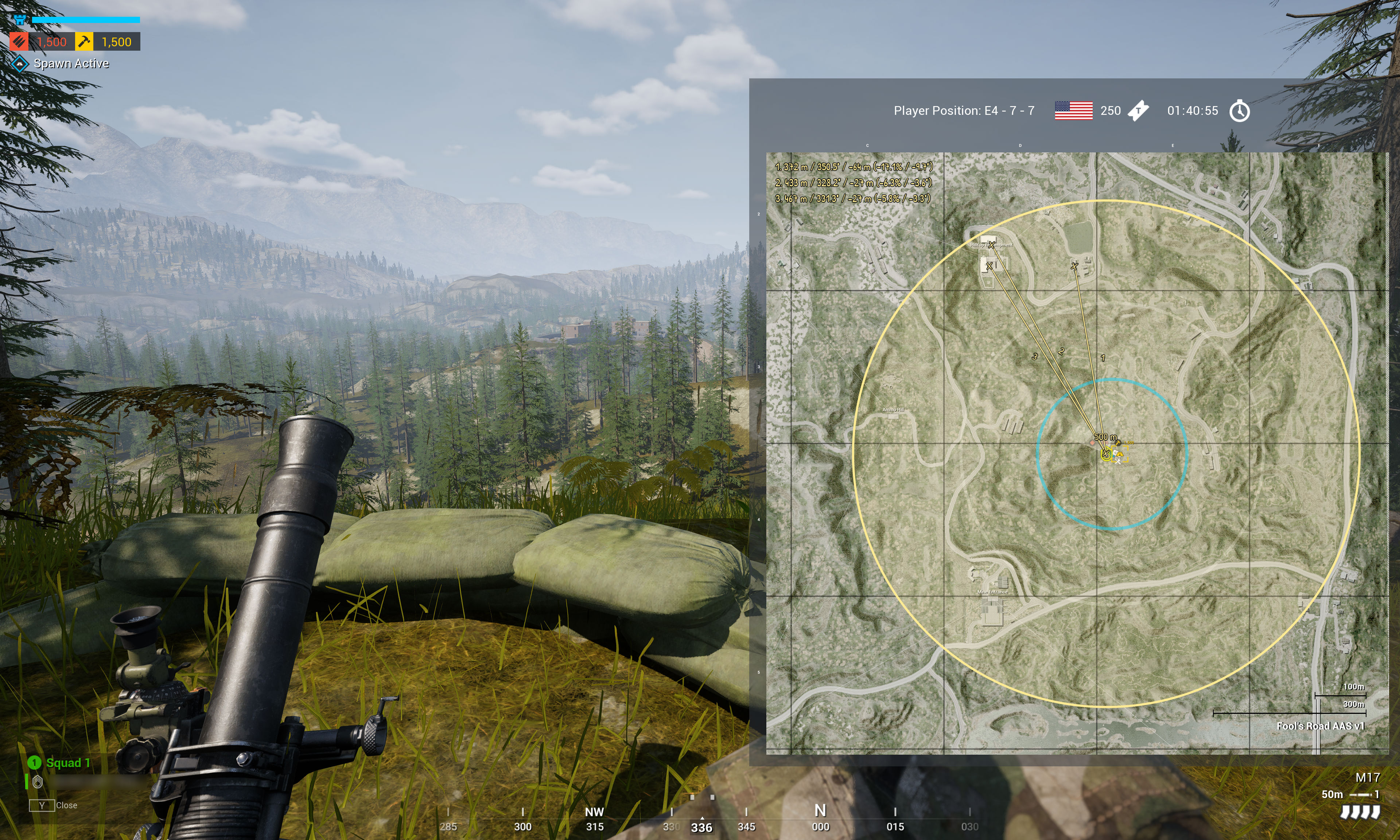
A client-side ruler for the in-game map: right-click the map, pick RULER, click the far end. Every line you draw is numbered on the map and its measurement is listed in the map's own corner, and both follow the map through zoom and pan. Works on any layer of any server that has it installed (see Server installation); everything is drawn locally on your client and nobody else sees it.
Drawing
- Open the map, right-click an empty spot and press RULER. Squad and fireteam leaders find RULER under ORDER DIRECTORS in the grid.
- The point you right-clicked is the first end. Move the mouse to preview, left-click to set the far end.
- RADIUS draws a ring instead: press RADIUS, move the mouse to set the radius (it snaps to 10 m), left-click to keep it.
- Right-click next to a friendly mortar to start exactly at the mortar, or near an existing end to start from exactly that point. A mortar wins over a line end.
Reading
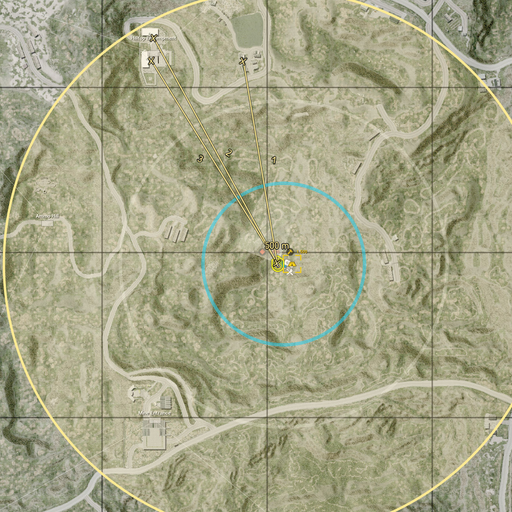
While you are drawing, the full measurement runs along the line under your cursor. Once you click, the line keeps only its NUMBER and the measurement moves to the list in the top-left of the map, under that same number - so a dozen lines stay readable instead of burying each other in text. A line keeps its number until every line is removed. An X marks each finished end and the centre of each ring.
A line's entry reads "NNN m / BBB.B° / +HH m (+P% / +A°)": distance in metres, compass bearing from the first point to the second to a tenth of a degree (0° north, 90° east), then the height of the second point relative to the first in metres, the slope in percent and the elevation angle in degrees. One sign covers all three, so a small drop reads "-0 m (-0.2% / -0.1°)". The height part is omitted where the terrain under a point is not loaded on your client. A ring takes no row in that list: its radius is written on the map at the ring's own centre, just above the X that marks it.
Removing
Right-click a line or a ring to pick it out.
- As an ordinary soldier, the menu that opens carries a DELETE row - press it.
- As a squad or fireteam leader, the centre of the command grid turns into a bin - press that.
Every part of a line answers that right click, its ends included, and so does a ring's centre. The menu still carries RULER, so a click on an existing end either removes that line or starts a new one from exactly that point - the row you press decides.
Server installation
ModLoader is no longer needed. [olist] [*]Add this mod to the server's Workshop mods. [*]In SquadGame/ServerConfig/ModsConfig.cfg add 3796677774 to ModLoadOrder=. IDs are separated by commas, so keep the ones already there; the position of this mod in the list does not matter. With no other mods listed the line reads:
ModLoadOrder=3796677774[/code]
[*]Restart the server. A layer change is not enough.
[/olist]
If the ID is not in ModLoadOrder, the ruler does not appear and the server logs nothing about it.

[b]Updating from the ModLoader version:[/b] remove [code]"/AegisRuler/BP_AegisRuler.BP_AegisRuler_C": true
Platforms
Windows and Linux servers.
Credits
Labels are set in Patrick Hand by Patrick Wagesreiter, licensed under the SIL Open Font License 1.1.
Highlights
From source dataFootprint
Rated a light load on a server.
Last update
Its author last shipped an update 30d ago.
Map Ruler [10.6] on Nxeon
From our catalogue- One-click install
- Supported on Nxeon Squad servers. We download it from Steam Workshop, place it, and restart the server.
- Server load
- light
- Smallest plan we suggest
- Squad — 16 GB (16 GB RAM). This follows our own load rating above, not a benchmark.
- Latest build
- 2026-10-05, released 2026-10-05
Game versions by loader
| Loader | Game versions | Newest |
|---|---|---|
| Workshop |
From 3 recorded builds of Map Ruler [10.6].
Recent builds
| Build | Released | Game versions | Loaders |
|---|---|---|---|
| 2026-10-05 | 2026-10-05 | n/a | Workshop |
| 2026-10-04 | 2026-10-04 | n/a | Workshop |
| 2026-09-14 | 2026-09-14 | n/a | Workshop |
Dependencies
- Required: ModLoader [3MB] [10.5]
Declared by the newest build that lists any. Required ones are installed with it on one-click installs.
Run Map Ruler [10.6] on a Squad server
Pick a server or deploy a new one above; it is installed in one click.
What kind of mod it is
From the catalogMaps & scenarios
Custom maps, arenas and scenarios to play on.
Compatibility
- Game
- Squad
Verified at the source
- ✓Steam WorkshopOfficial listing, checked 2026-11-03Open ↗
- ✓AuthorKombikorm, as published on Steam Workshop
- ✓LicenseNot published by the sourceFree