






About advanced furnace 1 IC
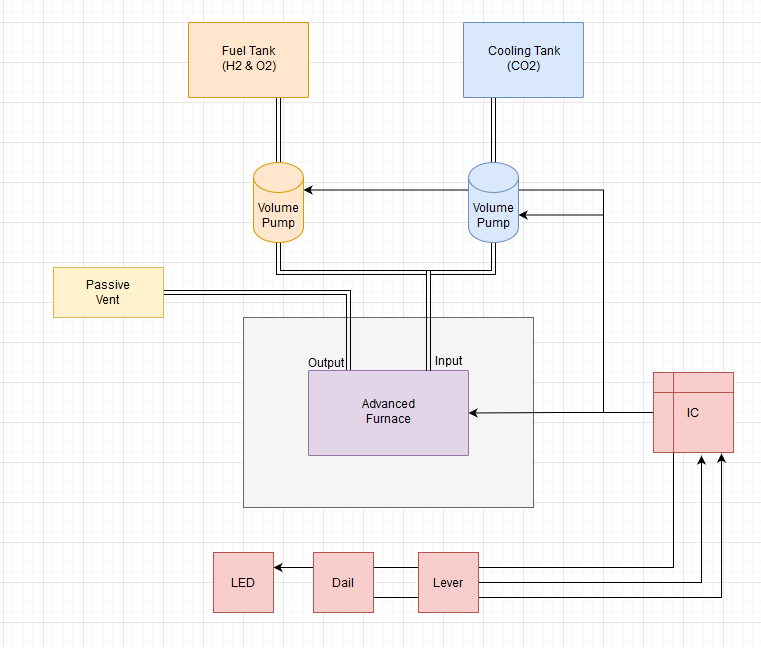
From Steam WorkshopThis setup uses the idea from TryCatch and adapts it for the updated Alloy Recipes. The Main advantage is that it features active cooling via CO2. Be aware that the IC-Chip needs to be programmed two…
This setup uses the idea from TryCatch and adapts it for the updated Alloy Recipes. The Main advantage is that it features active cooling via CO2.
Be aware that the IC-Chip needs to be programmed two times. The first program is only the Stack which contains the recipes. The second program contains the statemachine.
d0 - Dial d1 - Lever d2 - LED light d3 - Furnace d4 - CoolPump d5 - FuelPump
Dail: 0 constantan 1 electrum 2 invar 3 solder 4 steel and normal ingots 5 astroloy 6 hastelloy 7 inconel 8 stellite 9 waspaloy
Happy smelting
the code is on github: https://github.com/ItchyBoi/stationeers/tree/master/Advanced%20Furnace
Below the Text from TryCatch and his Workshop:
Benefits: - single circuit solution - automated pressure and temperature control - quickly melts all known alloys and ingots in a safe way - automatically ejects alloy when ready - moderate fuel consumption - looks pretty good and friendly :)
Disadvantage: you need to build pressurized room with elementary cooling system for it. Otherwise it will work rather unstable.
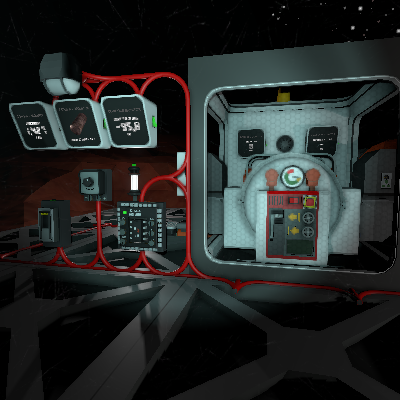
Setup 1. Build room around furnace and cooling system - at least one passive vent on the inside and one radiator on the outside, connected to the same pipe(see picture). An active vent is also be useful, or any other way to change the pressure inside the room. Add chutes and style as you like.
2. Connect devices in one network - IC Housing, Advanced Furnace, at least one Console with Hash display motherboard, LED light, Lever and a Dial. Set devices on IC Housing screws(see picture): d0 - Dial d1 - Lever d2 - LED light d3 - Furnace
3. Insert data disk into console with hash display and select IC Housing - it provides picture for selected recipe. Not necessary, but if you have two more consoles with gas display motherboard - insert data disk into it, select furnace and choose mode to display(pressure or temperature).
4. Now, the complex part: Before turn it on, you need to achieve pressure below 20kPa inside the pressurized room. After furnace heats up, you may want to change pressure inside the room or rebuild cooling system - it's on your own. The idea is that the furnace will slowly cooled down, about 5-10 degrees per second. So, if you want it to work faster increase the cooling, but it will be more difficult for the furnace to hit the narrow temperature window for some alloys. And vice versa, if you decrease the cooling too much you will have to wait forever until it reaches the target temperature :)
Interaction After everything is up and powered(and provided with fuel!), rotate dial to select recipe and look at hash display - it should switch picture. There are 7 options: 0 - Astroloy 1 - Hastelloy 2 - Inconel 3 - Waspaloy 4 - Stellite 5 - Invar 6 - Other alloys(Constantan, Electrum, Solder, Steel and simple ingots for sure) Then pull lever - LED should turn on - and throw ore into furnace. That's all! If you dropped correct ingredients, the furnace will return the correct alloy. When you done, pull up lever - furnace will stop.
Melting simple ingots - furnace will not eject them automatically. So, after you put a few stacks of Iron(or any other ore) and the yellow light changes to the green, pull the lever - furnace will eject everything. Just don't mix different ores if you don't want to get an alloy or a reagent mix :)
LED colors: Red light - indicates that the pressure or temperature is out of range Yellow light - something in the furnace import slot, trying to melt it Green light - pressure and temperature in range, waiting
advanced furnace 1 IC on Nxeon
From our catalogue- One-click install
- Not available. One-click install isn't available for this game's mods yet. Download it and upload it to your server in Files.
- Server load
- light
- Smallest plan we suggest
- Stationeers — 4 GB (4 GB RAM). This follows our own load rating above, not a benchmark.
Run advanced furnace 1 IC on a Stationeers server
Deploy a server above, then upload the file in Files.
What kind of mod it is
From the catalogWeapons, items & crafting
New weapons, gear, items and the recipes to make them.
Compatibility
- Game
- Stationeers
- File size
- 2 MB
Verified at the source
- ✓Steam WorkshopOfficial listing, checked 2026-09-24Open ↗
- ✓Authoritchy, as published on Steam Workshop
- ✓LicenseNot published by the sourceFree









