







About AIO Atmospherics Control
From Steam WorkshopAll in One - Atmospherics Control v1.1.2 by LOG3 -------------- Table of Contents -------------- -Description -Room Setup -Installation -Screw Setup -Script Settings -------------- Description…
All in One - Atmospherics Control v1.1.2 by LOG3
-------------- Table of Contents --------------
-Description -Room Setup -Installation -Screw Setup -Script Settings
-------------- Description --------------
This IC10 script takes care of the whole atmosphere of a room:
-regulating the pressure and temperature -regulating the set gas ratios of N2, CO2 and O2 -venting all other unwanted gasses
I tried to make it easy to undersand and flexible enough to be changed according to your preferences.
New with v1.1: Buffer mechanics Temperature/Pressure/Gas ratios now all have a target and buffer value set in the script. Once a value is over/under its target +/- the buffer the system is triggered and react until the target is reached.
This acts as a buffer so that the system is not constantly reacting to small changes and spends longer time in idle when everything is within limits. The default Settings should be good to go but if you are not happy you can play around with the appropriate settings. Refer to the Script Settings section.
-------------- Room Setup --------------
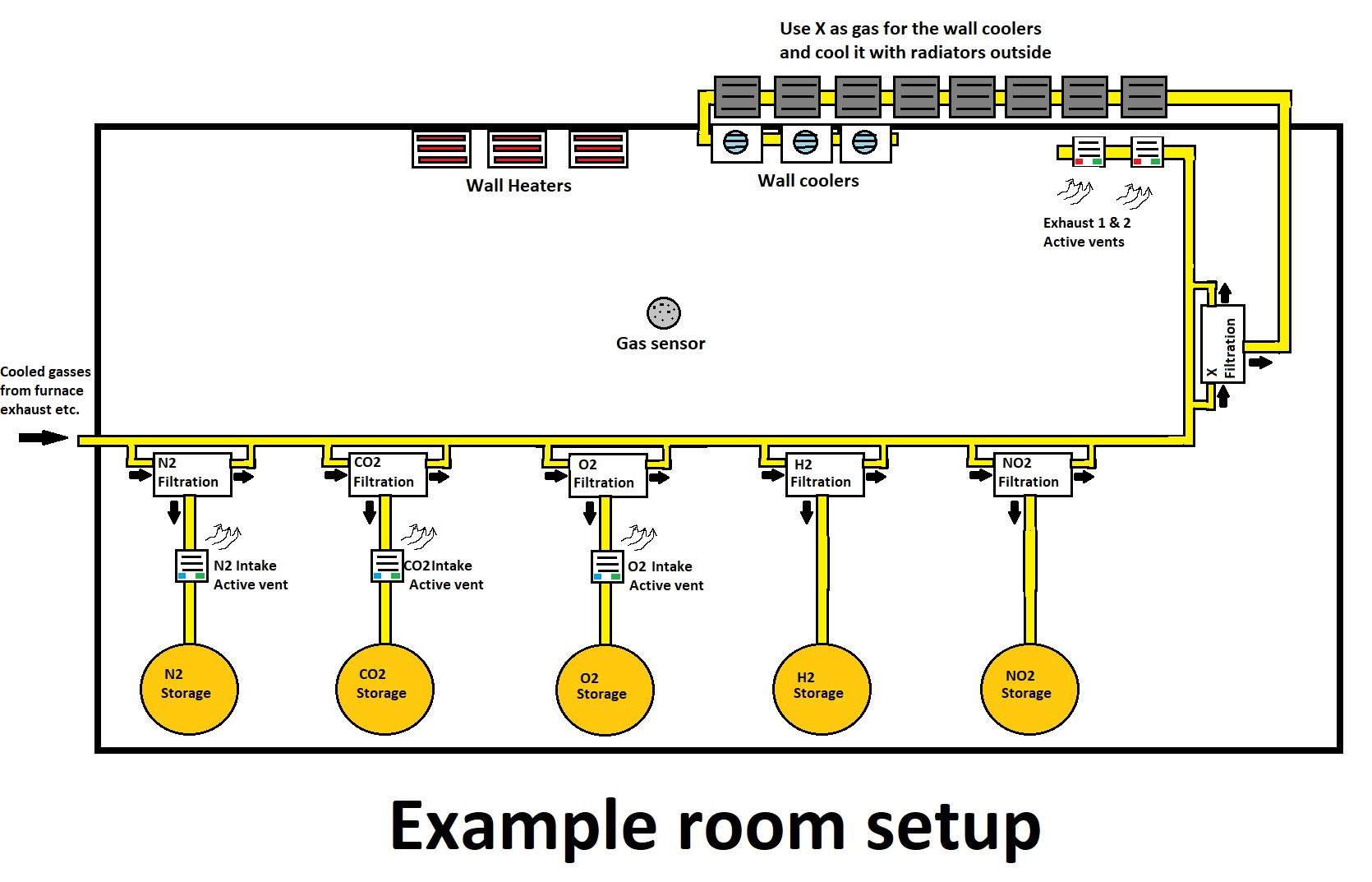
This script works with active vents for both intake and exhaust and wall coolers and wall heaters.
Your room needs:
-access to a filtration loop where every gas is filtered. -2 active vents for sucking up the air in the room back into the filtration loop. Unwanted gasses should be either stored or vented outside. -3 active vents, one for each gas in the atmosphere: N2, CO2 and O2 which supply the room with these wanted gasses. -at least 1 wall cooler and 1 wall heater and these should be the only ones connected to the IC10 network.
Notice: It should be possible to rework the script for other solutions with minimal changes:
-You could replace the 3 active intake vents with volume pumps and combine the pipes into a single passive vent but you will need to alter the script slightly by deleting the section where it sets the vent modes and vent pressures. -You could use other forms of heating/cooling as long as you can write to all of them in the network because this does not use up one of the screw slots. -You could use only 1 or 2 gasses for the atmosphere and free up more screw slots this way. You will need to delete the appropriate section where it regulates the gas you don't want in your room and copy one of the unwanted gasses section and replace the sensor readout to that gas.
-------------- Installation --------------
1. Turn off the IC10 you want to use 2. Load the script from the ingame library 3. Select the correct IC10 housing and click export 4. Set the screws accordingly (see section below) and verify or change the settings in the script to your liking 5. Turn on the IC10 and observe your atmosphere to see if its working
-------------- Screw Setup --------------
d0 - (Sensor) a gas sensor in your room. It should be placed in the middle or at least away from your intake/exhaust vents to read the poper room atmosphere and not a local atmosphere influenced by the vents d1 - (N2 intake) an active vent that can supply your room with pure N2 gas d2 - (CO2 intake) an active vent that can supply your room with pure CO2 gas d3 - (O2 intake) an active vent that can supply your room with pure O2 gas d4 - (Exhaust) an active vent that sucks the air from the room d5 - (Exhaust) another active vent that sucks the air from the room
Notice: The correct inward/outward settings are handled by the script and do not need to be set up manually. Also you could use only 1 active vent as exhaust and free up a screw slot but 2 are preffered for better performance.
-------------- Script Settings --------------
These values can be found relatively at the top of the script and can be recognized by the keyword define. They dictate how the system reacts and operates and also your target values that you want your atmosphere to have.
vPO - Upper pressure limit in kPa for when your intake vents are running. Has to be higher than your target room pressure tP + buffer bP to work! Default 106 vPI - Lower pressure limit in kPa for when your exhaust vents are running. Has to be lower than your target room pressure tP - buffer bP to work! Default 91
The vPO and vPI settings dictate how powerful the vents reacts when they turn on. The further away they are from the current room pressure the more violently will they suck air in or spew in new gasses. This can make the system work faster or slower but can also make the difference between an unstable or stable system. An unstable system reacts too strong to reach equilibrium and will bounce between being over/under the limits. I like to have a little bit more power on the vPI because it usually takes longer to suck up all the air when waiting for a specific gas ratio to drop than waiting for a gas ratio to rise when only this specific gas is being pumped in.
tN2 - The target ratio of N2 you want to achieve. This is in percent divided by 100. A value of 0.1 equals 10%. Default 0.1 bN2 - The buffer of N2 you want to have. This is the value that defines the limits for when the system starts to react. Upper limit is target ratio tN2 + buffer bN2. Lower limit is target ratio tN2 - buffer bN2. This is in percent divided by 100. A value of 0.01 equals 1%. Default 0.01
tCO2 - CO2 target ratio. Same as above with N2 but with CO2 Default 0.5 bCO2 - CO2 buffer. Same as above with N2 but with CO2 Default 0.01 tO2 - O2 target ratio. Same as above with N2 but with O2 Default 0.4
AIO Atmospherics Control on Nxeon
From our catalogue- One-click install
- Not available. One-click install isn't available for this game's mods yet. Download it and upload it to your server in Files.
- Server load
- light
- Smallest plan we suggest
- Stationeers — 4 GB (4 GB RAM). This follows our own load rating above, not a benchmark.
Run AIO Atmospherics Control on a Stationeers server
Deploy a server above, then upload the file in Files.
What kind of mod it is
From the catalogTechnology & automation
Machines, power, logistics and automation.
Compatibility
- Game
- Stationeers
- File size
- 279 KB
Verified at the source
- ✓Steam WorkshopOfficial listing, checked 2026-09-24Open ↗
- ✓AuthorLOG3, as published on Steam Workshop
- ✓LicenseNot published by the sourceFree









