






About AirLock
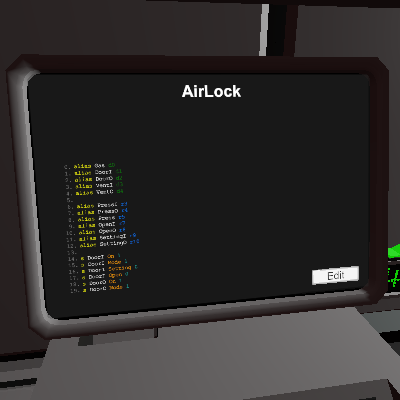
From Steam WorkshopHello about the code. 1. Connect the gas sensor to (Gas) It remembers where and how much pressure was. 2. Connect the door of the entrance to the room to (DoorI) 3. Connect the exit door to (DoorO) 4…
Hello about the code.
1. Connect the gas sensor to (Gas) It remembers where and how much pressure was. 2. Connect the door of the entrance to the room to (DoorI) 3. Connect the exit door to (DoorO) 4 Entrance ventilation, the one that leads to the room (VentI) 5 Ventilation outlet, the one outside (VentO)
This sluice adjusts to the pressures in your exit and entry rooms. That is, it pumps up pressure as much as in the rooms on both sides of the airlock. If you play on Mars, then it will pump 2KPa on exit, you get the idea. If you need to split the pressures between rooms, this sluice is just what you need.
First, the gateway is configured, the first opening will be performed immediately, since it records the sensor readings. RECOMMEND! After you have installed the chip and the doors have closed, pump out the pressure from the airlock to the room from which it was pumped, so as not to lose it. After you walk back and forth 1 time, he will write down the indicators and then he will pump up the pressure himself as expected. You can also not wait until it pumps up and just click on the door panel, by the way, this is exactly how the gateway is controlled by pressing the panel on the door. Translation via google translator. If the code doesn't work or there are suggestions, an idea. please inform
AirLock on Nxeon
From our catalogue- One-click install
- Not available. One-click install isn't available for this game's mods yet. Download it and upload it to your server in Files.
- Server load
- light
- Smallest plan we suggest
- Stationeers — 4 GB (4 GB RAM). This follows our own load rating above, not a benchmark.
Run AirLock on a Stationeers server
Deploy a server above, then upload the file in Files.
What kind of mod it is
From the catalogBuilding & decoration
Blocks, furniture, decorations and building tools.
Compatibility
- Game
- Stationeers
- File size
- 99 KB
Verified at the source
- ✓Steam WorkshopOfficial listing, checked 2026-09-24Open ↗
- ✓AuthorNO[R]D, as published on Steam Workshop
- ✓LicenseNot published by the sourceFree









