






About Battery level indicator with device switch-off
From Steam WorkshopThe charge level of all batteries (small and large) is read out and shown on an LED display called "Battery%" (without ""). There was also a display for the power consumption. For this, a cable…
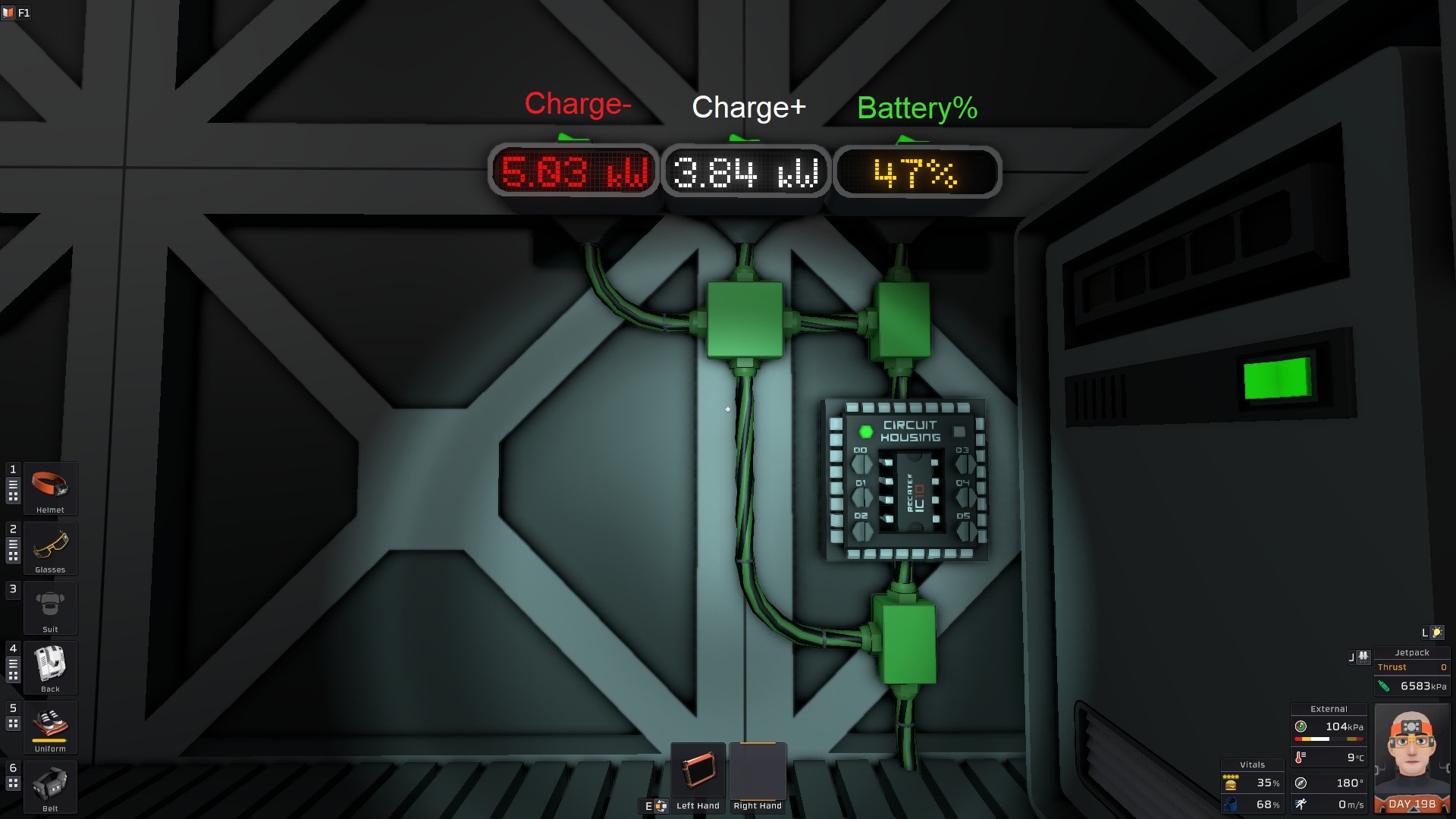
The charge level of all batteries (small and large) is read out and shown on an LED display called "Battery%" (without ""). There was also a display for the power consumption. For this, a cable analyzer (can also be several with the same name) is required on the input and output lines. Those on the input side must be named "CA_Input" and those on the output side must be named "CA_Output" (without ""). The LED displays for the display must be named "Charge+" for the display of the incoming current and "Charge-" for the display of the consumed current (without ""). The color of the "Charge-" display changes depending on whether you are consuming more power than is coming in or less. (red = more consumption, yellow = approximately the same, green = less consumption)
The LED displays can be small, medium or large. However, you have to decide on one type for all of them. (at the beginning of the program only remove the # at the beginning of one type)
In addition, devices can be switched off and on at different charge levels. Small transformers are already preset and configured as I use them in my base. For example, the transformer "TF_Miner" is switched off at 40% charge level and switched on again at 41%. You can also connect devices to all 6 connections of the IC housing that you want to switch on or off, as all other devices (LED display, batteries) are controlled via HASH.
I have also left many comments so that it is easier to see what is being done at which point in the program (all in German).
Translated with DeepL.com (free version)
Battery level indicator with device switch-off on Nxeon
From our catalogue- One-click install
- Not available. One-click install isn't available for this game's mods yet. Download it and upload it to your server in Files.
- Server load
- light
- Smallest plan we suggest
- Stationeers — 4 GB (4 GB RAM). This follows our own load rating above, not a benchmark.
Run Battery level indicator with device switch-off on a Stationeers server
Deploy a server above, then upload the file in Files.
What kind of mod it is
From the catalogQuality of life & UI
Small conveniences, tweaks and interface improvements players notice straight away.
Compatibility
- Game
- Stationeers
- File size
- 187 KB
Verified at the source
- ✓Steam WorkshopOfficial listing, checked 2026-09-24Open ↗
- ✓AuthorGreendragon, as published on Steam Workshop
- ✓LicenseNot published by the sourceFree









