






About Easy Configurable Clock v1.1
From Steam WorkshopClocks are surprisingly useful to have around when you're deep in your base and can't see the sun (Vulcan's can be a bit of a problem, for instance), or if you want to know when night will end so you…
Clocks are surprisingly useful to have around when you're deep in your base and can't see the sun (Vulcan's can be a bit of a problem, for instance), or if you want to know when night will end so you can take full advantage of limited daylight.
This clock script is both versatile and simple to use, with a few flexible configuration options.
It supports up to five LED displays directly controlled by the IC (on d1 through d5). All three sizes of LED display from the console kit are recognized, and any invalid device will be ignored instead of crashing the script.
Logic Memory parts can be used as well, and will have the same time value written to them, allowing it to be shared to a different wiring network for use by a logic/batch writer, etc. The currently selected LED color is shown on the IC housing too, so you can have a second logic/batch writer updating the color on those remote displays. With only a little work, even a very large base can have a clock display in every room. (For instance, if the clock IC and memory are on your heavy cable mains from your battery bank, anyplace that has a transformer can also have logic writers to pull the clock and color data from the mains and write it to the appropriate displays in the area's local power network.)
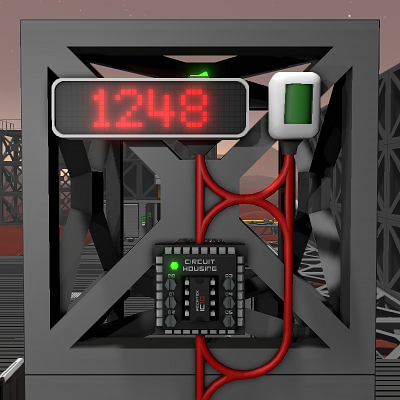
Requires one daylight sensor (on d0), placed on the south side of a block so that it looks toward the southern horizon, with the data port toward the ground (see the screenshot, which was taken while looking north). The sensor placement may become more configurable later. If north-facing or upside-down sensor placement options (for instance) would be a highly desirable feature for you, please leave feedback.
The text color on the display will change to denote AM and PM (blue and red by default). The color choices are configurable, and both may be set to the same value if you don't want the clock to change colors.
The default 12 hour mode looks great (IMHO). It won't suffer from any loss of leading or trailing zeros. There is also a 24 hour mode, but honestly there's no way to make that look very good with the way the LED displays work in the current version of Stationeers. The LED doesn't offer any formatting options (aside from percentage and power modes) so no matter what kind of workarounds you try you're always dropping leading or trailing zeroes, or both.
There is also the option to remove "minutes" from the display and only show the hours. Since in-game days are very short, these compressed minutes fly past and may not be all that useful in the first place. Simplifying the display to only show the hour may be preferable, especially if you're a die-hard fan of 24 hour clocks.
As mentioned above, I may eventually add the ability to use a north-facing daylight sensor and/or to place them with the port pointing in other directions besides down (right, up, left). Once implemented, using these alternatives will simply require changing some configuration values for south/north (0, 1) and/or a rotation value of 0, 1, 2, or 3 to keep the clock counting forward and in sync with the actual time of day. They'll be easy to fix if they aren't set right, and the defaults will work right out of the box if the sensor is placed according to current requirements, so existing clocks won't break from updating the script version.
If you find this useful, let me know!
Highlights
From source dataFootprint
A 1017 KB download, rated a light load on a server.
Last update
Its author last shipped an update 7 yr ago.
Easy Configurable Clock v1.1 on Nxeon
From our catalogue- One-click install
- Not available. One-click install isn't available for this game's mods yet. Download it and upload it to your server in Files.
- Server load
- light
- Smallest plan we suggest
- Stationeers — 4 GB (4 GB RAM). This follows our own load rating above, not a benchmark.
- Latest build
- 2019-11-02, released 2019-11-02, 1017 KB
Game versions by loader
| Loader | Game versions | Newest |
|---|---|---|
| Workshop |
From 1 recorded build of Easy Configurable Clock v1.1.
Run Easy Configurable Clock v1.1 on a Stationeers server
Deploy a server above, then upload the file in Files.
What kind of mod it is
From the catalogWorkshop
Its source category doesn’t say more about what it does, so NxLabs lists it under Other.
Compatibility
- Game
- Stationeers
- File size
- 1017 KB
Verified at the source
- ✓Steam WorkshopOfficial listing, checked 2026-10-10Open ↗
- ✓AuthorTallinu, as published on Steam Workshop
- ✓LicenseNot published by the sourceFree









