






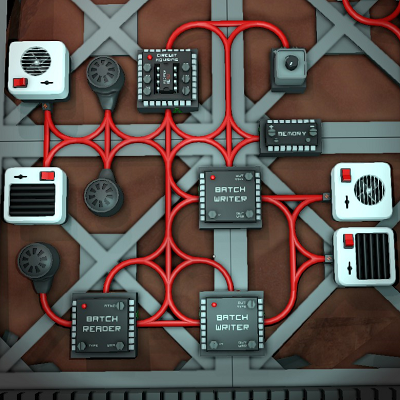
About Easy Super-Flexible Climate Controller
From Steam WorkshopEasy Super-Flexible Climate Controller Assign devices to any screw you like! Device types are auto-detected via their unique PrefabHash. This climate control script aims to be the most flexible and…
Easy Super-Flexible Climate Controller
Assign devices to any screw you like! Device types are auto-detected via their unique PrefabHash.
This climate control script aims to be the most flexible and easiest to set up available. There are only a few requirements and limits on what or how many devices can be attached. Here is the list of device types that will be recognized, followed by further details on usage, limits, etc:
1. A Dial (Logic Switch kit). If one of these is found it will be used to input the temperature to maintain, in Celsius. Ensure that the dial's range is set high enough that your desired temperatures can be selected. See the "Control Device Options and Limits" section below.
2. A Logic Memory unit. If one of these is found, the stored value will be interpreted as the desired temperature in Kelvin, allowing automatic adjustment of climate control from other scripts or circuits. See the "Control Device Options and Limits" section below.
3. One or more Gas Sensors. Any gas sensors assigned to a screw will be used to get the current temperature reading. If more than one is assigned, their readings will be averaged, without requiring a batch reader. (Be sure to name the sensors uniquely so you know you've selected different devices!) See the "Sensor Requirements and Limits" section below.
4. A Batch Reader. If a batch reader is assigned instead, its output value will be interpreted as the average of the temperature readings from its connected gas sensors. It should be configured to match. See the "Sensor Requirements and Limits" section below.
5. Wall Heaters and Wall Coolers. Any of these which are assigned to a screw will be directly controlled as needed with no further restrictions or requirements (although the limited number of screws does impose its own restriction).
6. One or two Batch Writers. If present, these will be used to control wall heaters and wall coolers. They must be configured to write to the "On" parameter of the respective device type, and to read from the IC housing. See the "Batch Writers" section below.
--- Control Device Options and Limits ---
If no temperature setting input is found, a default value of 25 degrees Celsius will be used. This default can be changed by editing the IC code, and is found at the top in the marked "Configuration" section.
Only the first temperature input device (by screw order) will be recognized. For instance, more than one dial, or a dial and memory unit, are not supported. Any additional devices of either type beyond the first will be ignored.
--- Sensor Requirements and Limits ---
At least one gas sensor, or a batch reader with attached sensors, must be present for correct functioning. If none are present, the script will be unable to function until one is assigned.
Directly assigning gas sensors as well as a batch reader at the same time is not supported, nor is multiple batch readers. Only the first type discovered (by screw order) will be used. Any batch reader discovered after one or more gas sensors will be ignored, and if a batch reader comes first, any other readers or sensors will be ignored. (Not only would it make little sense to use up limited screws for a sensor when a batch reader for them is already present, there's also no way for a script to know how many sensors are being read by a batch reader, so accurately combining multiple such inputs is impossible.)
--- Batch Writers ---
IMPORTANT: Batch writers will have their power switched on and off automatically to control which type of device (heaters or coolers) gets activated. Attempting to manually control their power state is not recommended -- if you turn both of them on while heaters or coolers are being run, you're likely to activate both the heaters and the coolers simultaneously! Leave them off while getting everything set up, and let the script turn them on. Be prepared to manually shut off incorrect heaters/coolers if needed. Power subnetworks isolated by APC or transformer are highly recommended when using batch writers for any purpose, and even more so with climate control devices.
By default, the first batch writer assigned (by screw order) will be treated as controlling heaters, and the second will be used for coolers. This can be reversed (for instance, to allow the use of a single batch writer for coolers, while heaters are directly assigned to IC screws) by editing the IC code and changing the value of the "FirstWriter" definition at the top in the marked "Configuration" section. Changing the setting from the default value of 1 to -1 (negative) indicates that the first writer should be activated when cooling is needed and the second, if present, will be used for heating. Remember that the type of device selected on each batch writer must still be appropriate for their activation conditions.
Any additional batch writers found after the first two (by screw order) will be ignored.
--- Other Configuration Settings ---
These can be found near the top, in the marked "Configuration" section, while editing the IC code. Remember to confirm changes and export code after editing.
Sleep Time: The number of seconds the script "sleeps" in between updates. The default is 5 seconds. Heating and cooling does not need to turn on and off rapidly, especially for larger rooms, so you may wish to increase this value to save a few CPU cycles here and there.
Easy Super-Flexible Climate Controller on Nxeon
From our catalogue- One-click install
- Not available. One-click install isn't available for this game's mods yet. Download it and upload it to your server in Files.
- Server load
- light
- Smallest plan we suggest
- Stationeers — 4 GB (4 GB RAM). This follows our own load rating above, not a benchmark.
Run Easy Super-Flexible Climate Controller on a Stationeers server
Deploy a server above, then upload the file in Files.
What kind of mod it is
From the catalogTechnology & automation
Machines, power, logistics and automation.
Compatibility
- Game
- Stationeers
- File size
- 2 MB
Verified at the source
- ✓Steam WorkshopOfficial listing, checked 2026-09-24Open ↗
- ✓AuthorTallinu, as published on Steam Workshop
- ✓LicenseNot published by the sourceFree









