






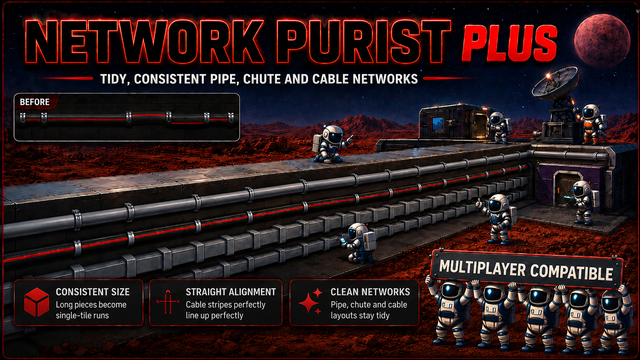
About Network Purist Plus
From Steam WorkshopNetwork Purist Plus Removes the long (3-, 5-, and 10-segment) straight pipe, chute, and super-heavy cable variants and aligns straight cables to one consistent orientation; existing worlds are…
Network Purist Plus
Removes the long (3-, 5-, and 10-segment) straight pipe, chute, and super-heavy cable variants and aligns straight cables to one consistent orientation; existing worlds are converted when a save loads.
Full multiplayer compatibility. Safe to add to an existing savegame.
What it does
Long pieces removed everywhere
The merged "long" Straight 3 / 5 / 10 variants are taken out of the game's menus: gas pipes, insulated pipes, liquid pipes, insulated liquid pipes, chutes, and super-heavy cables (the only cable tier with long variants). They are stripped from the build-kit mouse wheel and hidden from the Stationpedia. You build pipes, chutes, and cables one tile at a time, the way it worked before the merge feature was added. The merge-with-a-tool action can no longer produce a long piece either.
Existing long runs rebuilt on load
When a save loads, every already-placed long pipe, chute, or cable run is rebuilt from the equivalent single-tile pieces at the same cells, rotation and custom colour. Networks stay connected, but rebuilt pipe runs start empty -- the gas is not preserved; re-pressurise them. This is a one-time conversion the first time you load a world after installing the mod (and again for any world a long piece sneaks into). The long variants are gone from the build menus, so there is no way to build one directly; a long piece that turns up some other way (a blueprint paste, another mod, the creative menu) is converted on the next world load.
Cable alignment
A straight cable is a tube with a coloured band along the side, but the game lets it be placed at any of four "rolls" about its run direction, so a cable next to one placed a different way shows the band misaligned (most visible on super-heavy cables, and common where zoop-built and hand-built cables meet). This mod picks one orientation per run axis and applies it: every placed straight cable is realigned when a save loads, and a freshly built cable snaps to the canonical orientation the instant it is placed. The rotate key on a cable becomes preview-only. Cosmetic only: connectivity, networks and colour are untouched.
Plays nicely with drag-build mods
ZoopMod: zooping a long stretch just places single tiles, already lined up. ZoopMod discovers the "long" variants by scanning the build kit's option list, which this mod has emptied of them, so ZoopMod finds none and falls back to single tiles with no error; each tile then goes through the same alignment hook. BlueprintMod: a template built before this mod, or from another world, can still contain long pieces. A pasted long piece sits there until the next world load, where the on-load rebuild converts it to single tiles like any other (that rebuild is the universal backstop). Pasted straight cables are realigned on the next world load by the same on-load sweep. Other build mods (an "upgrade to a long run" command, the merge-with-a-tool action, a future build mod): this mod never rejects anything -- it rewrites a long-variant placement into single tiles on the next world load and re-rolls a built straight cable as it is placed. The other mod keeps working; its output just comes out single-tile and consistently oriented, and the on-load rebuild catches anything it missed.
Settings
In the in-game mod settings panel, under Server - Pieces and Server - Cables. All server-authoritative: the host's values take effect, and every player and dedicated server must run the same values (a mismatched client is rejected, the same way a version mismatch is). All take effect on a game restart -- the strip / hide / build-cursor work runs once at startup, so toggling one mid-session does nothing until you relaunch.
- Enable Network Purist Plus (default on): master switch -- off means the mod does nothing.
- Remove Long Gas Pipes (the basic pipe -- named "Gas Pipe" so it's not confused with the liquid one), Remove Long Liquid Pipes, Remove Long Insulated Gas Pipes, Remove Long Insulated Liquid Pipes, Remove Long Chutes, Remove Long Super-Heavy Cables (all default on): per-family toggles -- whether that family's long variants are stripped from the kit, hidden from the Stationpedia, and rebuilt from single tiles on load.
- Align Straight Cables (default on): re-roll straight cables (all tiers) to one consistent orientation -- existing runs on load, new ones as built, and the cursor for the cable tiers without long variants. Cosmetic only; the cable rotate key becomes preview-only.
Limitations
- Rebuilt pipe runs are emptied: the gas inside a long pipe run is deleted when the run is rebuilt from single tiles, by design -- the game's atmospherics-event system loses a pipe network's gas when its pipes are replaced this way, and there is no clean workaround. Re-pressurise the new pipes. Layout, rotation, colour and connectivity are preserved; only the gas is lost. Happens on the first load after installing, and again for any long pipe that enters a world later (NetworkUpgrader, a blueprint paste, the creative menu).
- An item physically in transit inside a long chute segment at the moment it is rebuilt is deleted, also by design. Items sitting in chute bins are unaffected.
- Straight cables align to each other, but the coloured band can still jump where a straight meets a corner cable: corner pieces have a fixed band orientation and aren't re-rolled (re-rolling a corner would change connectivity, not just looks), and no single per-axis orientation mates with every corner. The mod picks the one that mates with the most.
- The rotate key no longer changes a placed straight cable's roll -- a built cable always snaps to the canonical orientation for its run axis. This is the cable-alignment feature; it affects the build preview, not gameplay.
Compatibility
Highlights
From source dataFootprint
Rated a light load on a server.
Last update
Its author last shipped an update 5 mo ago.
Network Purist Plus on Nxeon
From our catalogue- One-click install
- Not available. One-click install isn't available for this game's mods yet. Download it and upload it to your server in Files.
- Server load
- light
- Smallest plan we suggest
- Stationeers — 4 GB (4 GB RAM). This follows our own load rating above, not a benchmark.
- Latest build
- 2026-05-31, released 2026-05-31
Game versions by loader
| Loader | Game versions | Newest |
|---|---|---|
| Workshop |
From 1 recorded build of Network Purist Plus.
Run Network Purist Plus on a Stationeers server
Deploy a server above, then upload the file in Files.
What kind of mod it is
From the catalogTechnology & automation
Machines, power, logistics and automation.
Compatibility
- Game
- Stationeers
Verified at the source
- ✓Steam WorkshopOfficial listing, checked 2026-10-16Open ↗
- ✓AuthorSixFive7, as published on Steam Workshop
- ✓LicenseNot published by the sourceFree









