






About Phenomenal Hardsuit Script
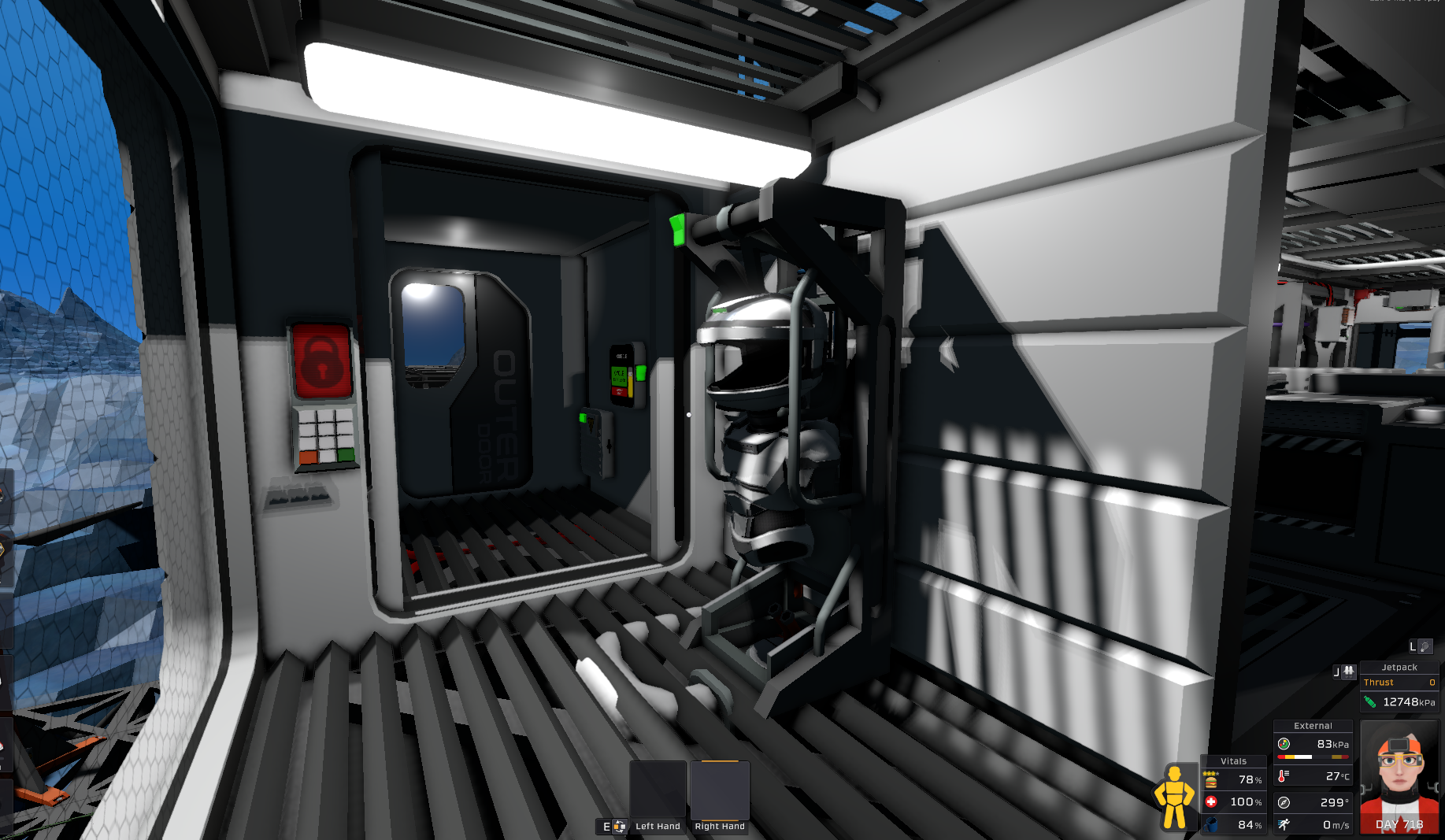
From Steam WorkshopThis script will automatically control your hardsuit and helmet with options for manual overrides in case of a poisonous or hypoxic environment. Besides that, it can interface with its companion…
This script will automatically control your hardsuit and helmet with options for manual overrides in case of a poisonous or hypoxic environment. Besides that, it can interface with its companion script to warn the player about storms or even remotely enable a tracking beacon.
[b]alias[/b] suit db
[b]alias[/b] helmet d0
[b]alias[/b] isStormy r15
[b]alias[/b] wasStormy r14
[b]alias[/b] alarmTimer r13
[b]define[/b] maxTemp 320
[b]define[/b] minTemp 275
[b]define[/b] maxKpa 150
[b]define[/b] minKpa 40

[i]#This script starts in automatic mode where the suit is on temp or kpa are bad,[/i]
[i]#and will open the suit automatically when they are good. When on, the filtration[/i]
[i]#will only trigger when needed to increase filter life. Each tick, the weather is[/i]
[i]#checked, regardless of suit status, but this only works with a second IC connected[/i]
[i]#to a weather station and a logic transmitter set to mirror the suit. This script[/i]
[i]#will work without that, but you won't recieve weather updates. Both the closed[/i]
[i]#and open modes can be overriden by manually opening or closing the helmet.[/i]
[i]#it will return to automatic mode by cycling the helmet back to the previous state.[/i]
[i]#This is handy if your base suddenly fills with toxins. And yes, it does still[/i]
[i]#check the weather. Check the workshop for the other script. It also allows[/i]
[i]#you to manually enable a tracking beacon by increasing the temperature[/i]
[i]#setpoint of the suit.[/i]

[b]s[/b] suit [u]Setting[/u] 0 [i]#prevent alarm from triggering on suit update[/i]
[i]###AUTOMATIC LOOP LOGIC[/i]
[u]EnableLifeSupport:[/u]
[b]move[/b] r0 1
[b]jal[/b] [u]SetLifeSupportStatus[/u]
[u]WaitForSafety:[/u]
[b]yield[/b]
[b]jal[/b] [u]CheckWeather[/u] [i]#check for weather updates[/i]
[b]l[/b] r0 helmet [u]Open[/u] [i]#check manual override[/i]
[b]bnez[/b] r0 [u]OverrideToOpen[/u]
[b]jal[/b] [u]HandleFiltration[/u]
[b]l[/b] r0 suit [u]TemperatureExternal[/u] [i]#determine if helmet should remain closed[/i]
[b]bge[/b] r0 maxTemp [u]WaitForSafety[/u] [i]#check temp[/i]
[b]ble[/b] r0 minTemp [u]WaitForSafety[/u]
[b]l[/b] r0 suit [u]PressureExternal[/u]
[b]bge[/b] r0 maxKpa [u]WaitForSafety[/u] [i]#check pressure[/i]
[b]ble[/b] r0 minKpa [u]WaitForSafety[/u] [i]#continue to disable life support all conditions are good[/i]
[u]DisableLifeSupport:[/u]
[b]move[/b] r0 0
[b]jal[/b] [u]SetLifeSupportStatus[/u]
[u]WaitForDanger:[/u]
[b]jal[/b] [u]CheckWeather[/u] [i]#check for weather updates[/i]
[b]l[/b] r0 helmet [u]Open[/u] [i]#check manual override[/i]
[b]beqz[/b] r0 [u]OverrideToClosed[/u]
[b]l[/b] r0 suit [u]TemperatureExternal[/u] [i]#determine if helmet should be closed[/i]
[b]bge[/b] r0 maxTemp [u]EnableLifeSupport[/u] [i]#check temp[/i]
[b]ble[/b] r0 minTemp [u]EnableLifeSupport[/u]
[b]l[/b] r0 suit [u]PressureExternal[/u]
[b]bge[/b] r0 maxKpa [u]EnableLifeSupport[/u] [i]#check pressure[/i]
[b]ble[/b] r0 minKpa [u]EnableLifeSupport[/u]
[b]yield[/b] [i]#maintain open loop while all conditions are good[/i]
[b]j[/b] [u]WaitForDanger[/u]

[i]###MANUAL LOOP LOGIC[/i]
[u]OverrideToOpen:[/u]
[b]move[/b] r0 0
[b]jal[/b] [u]SetLifeSupportStatus[/u]
[u]HoldOpenTillClosed:[/u]
[b]yield[/b]
[b]jal[/b] [u]CheckWeather[/u]
[b]l[/b] r0 helmet [u]Open[/u]
[b]beqz[/b] r0 [u]EnableLifeSupport[/u]
[b]j[/b] [u]HoldOpenTillClosed[/u]
[u]OverrideToClosed:[/u]
[b]move[/b] r0 1
[b]jal[/b] [u]SetLifeSupportStatus[/u]
[u]HoldClosedTillOpen:[/u]
[b]yield[/b]
[b]jal[/b] [u]CheckWeather[/u]
[b]l[/b] r0 helmet [u]Open[/u]
[b]bnez[/b] r0 [u]DisableLifeSupport[/u]
[b]jal[/b] [u]HandleFiltration[/u]
[b]j[/b] [u]HoldClosedTillOpen[/u]

[i]###WEATHER HELPER FUNCTION[/i]
[u]CheckWeather:[/u]
[b]l[/b] isStormy suit [u]Setting[/u] [i]#set by logic transmitter, mirrors mode of weather station[/i]
[b]seqz[/b] r0 wasStormy [i]#check if storm status has changed since last tick[/i]
[b]and[/b] r0 r0 isStormy
[b]breqz[/b] r0 3 [i]#skip starting alarm if status is unchanged (not stormy OR still stormy)[/i]
[b]move[/b] alarmTimer 1 [i]#otherwise, enable alarm and sound alert[/i]
[b]s[/b] suit [u]SoundAlert[/u] [u]Sound.StormIncoming[/u]
[b]beqz[/b] alarmTimer [u]FinishForecast[/u] [i]#return if alarm is off[/i]
[b]brgt[/b] alarmTimer 6 6 [i]#else, skip to end warning if alarm is finished[/i]
[b]add[/b] alarmTimer alarmTimer 1 [i]#else, increment alarm timer[/i]
[b]l[/b] r0 helmet [u]On[/u] [i]#and flash helmet for visual indication[/i]
[b]seqz[/b] r0 r0
[b]s[/b] helmet [u]On[/u] r0
[b]j[/b] [u]FinishForecast[/u] [i]#then return[/i]
[b]move[/b] alarmTimer 0 [i]#skips here when alarm hits max time, disables sound and timer[/i]
[b]s[/b] suit [u]SoundAlert[/u] 0
[u]FinishForecast:[/u]
[b]move[/b] wasStormy isStormy [i]#move current tick data to previous tick[/i]
[b]j[/b] ra [i]#then return[/i]
[i]###LIFE SUPPORT HELPER FUNCTION[/i]
[u]SetLifeSupportStatus:[/u]
[b]s[/b] suit [u]On[/u] r0
[b]s[/b] suit [u]AirRelease[/u] r0
[b]s[/b] suit [u]Filtration[/u] r0
[b]seqz[/b] r0 r0
[b]s[/b] helmet [u]Open[/u] r0
[b]j[/b] ra
[i]###FILTRATION HELPER FUNCTION[/i]
[u]HandleFiltration:[/u]
[b]l[/b] r0 helmet [u]Pressure[/u]
[b]l[/b] r1 helmet [u]RatioOxygen[/u]
[b]mul[/b] r0 r0 r1
[b]sle[/b] r0 r0 30
[b]s[/b] suit [u]Filtration[/u] r0
[b]j[/b] ra
Phenomenal Hardsuit Script on Nxeon
From our catalogue- One-click install
- Not available. One-click install isn't available for this game's mods yet. Download it and upload it to your server in Files.
- Server load
- light
- Smallest plan we suggest
- Stationeers — 4 GB (4 GB RAM). This follows our own load rating above, not a benchmark.
Run Phenomenal Hardsuit Script on a Stationeers server
Deploy a server above, then upload the file in Files.
What kind of mod it is
From the catalogListed on Steam Workshop as “Workshop”
Technology & automation
Machines, power, logistics and automation.
Compatibility
- Game
- Stationeers
- File size
- 297 KB
Verified at the source
- ✓Steam WorkshopOfficial listing, checked 2026-09-24Open ↗
- ✓AuthorWilhelm W. Walrus, as published on Steam Workshop
- ✓LicenseNot published by the sourceFree









