






About Power Audit [StationeersLaunchPad]
From Steam WorkshopNEW: Computer Motherboard for showing the UI in a computer screen, still takes the sizing from the normal UI (F7) Shows exactly what every powered device on your base is drawing right now. Vanilla…
NEW: Computer Motherboard for showing the UI in a computer screen, still takes the sizing from the normal UI (F7)
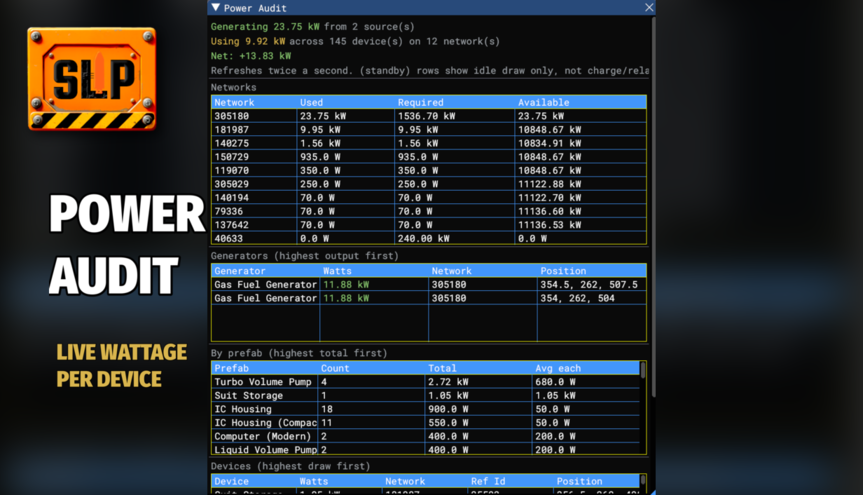
Shows exactly what every powered device on your base is drawing right now.
Vanilla only reports live wattage per-battery, per-Area-Power-Control or through a Cable Analyser clamped to one point in the network - there is no built-in way to just see every device's draw at once. This reads it straight off the electrical simulation for every device that exists, sorted highest first.
The live window also groups everything by prefab - "all 4 Turbo Volume Pumps combined" instead of one row per pump - so it's easy to see which type of device is actually costing you the most, not just which single instance.
HOW TO USE
Open the console with F3 and type:
poweraudit text dump: networks, then top 25 devices by watts poweraudit 50 text dump, top 50 instead poweraudit ui opens a live-updating window instead (same data, refreshes twice a second)
There is also a rebindable "Power Audit Toggle" key under Settings > Controls > Power Audit that opens/closes the same window. Bound to F7 by default - rebind or unbind it from the same Controls page if it clashes with anything.
POWER AUDIT MOTHERBOARD
A new printable circuitboard for the Electronics Printer. Insert it into a Computer to show a read-only summary on its screen - generation, usage, net, battery reserve, and the top 5 current draws - refreshed once a second, no console or key needed. It doesn't have any of the buttons/tabs a vanilla computer board does; it's read-only by design.
Requires BepInEx 5 and StationeersLaunchPad.
Highlights
From source dataFootprint
Rated a light load on a server.
Last update
Its author last shipped an update 53d ago.
Power Audit [StationeersLaunchPad] on Nxeon
From our catalogue- One-click install
- Not available. One-click install isn't available for this game's mods yet. Download it and upload it to your server in Files.
- Server load
- light
- Smallest plan we suggest
- Stationeers — 4 GB (4 GB RAM). This follows our own load rating above, not a benchmark.
- Latest build
- 2026-08-24, released 2026-08-24
Game versions by loader
| Loader | Game versions | Newest |
|---|---|---|
| Workshop |
From 1 recorded build of Power Audit [StationeersLaunchPad].
Run Power Audit [StationeersLaunchPad] on a Stationeers server
Deploy a server above, then upload the file in Files.
What kind of mod it is
From the catalogTechnology & automation
Machines, power, logistics and automation.
Compatibility
- Game
- Stationeers
Verified at the source
- ✓Steam WorkshopOfficial listing, checked 2026-10-16Open ↗
- ✓AuthorSaito, as published on Steam Workshop
- ✓LicenseNot published by the sourceFree









