






About Power Transmitter Plus
From Steam WorkshopPower Transmitter Plus Adds a visible beam, scrolling pulses, a configurable distance cost, new logic readouts, and wall and ceiling placement to the Microwave Power Transmitter. Full multiplayer…
Power Transmitter Plus
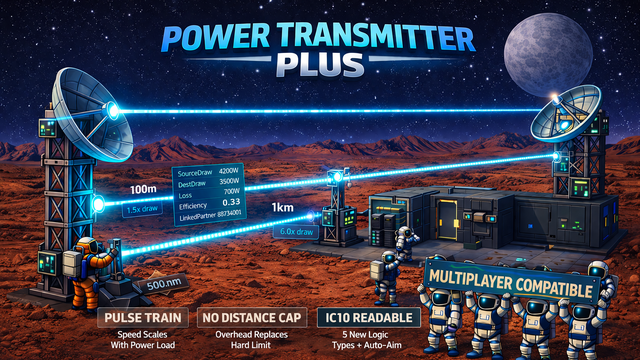
Adds a visible beam, scrolling pulses, a configurable distance cost, new logic readouts, and wall and ceiling placement to the Microwave Power Transmitter.
Full multiplayer compatibility. Safe to remove from existing savegames.
Features
Visible Laser Beam
A colored beam is drawn between a linked transmitter and receiver whenever the link is up, regardless of whether power is flowing. The beam is at full brightness at all times while visible, so you can see at a glance which dishes are actually connected. Power flow is shown by the pulse train (see below): when no power is flowing, the stripes freeze in place.
Scrolling Pulse Train
Energy pulses scroll along the beam from transmitter to receiver. Stripe spacing is constant in world meters (same look on a 5m link or a 500m link). Scroll speed scales with power throughput, so a lightly-loaded link is clearly distinguishable from a heavily-loaded one at a glance.
Distance Cost
Vanilla Stationeers caps microwave transmission capacity based on distance and hard-stops at 500m. This mod removes that cap and replaces it with a source-draw overhead: the transmitter pulls more from its source cable network per watt delivered, proportional to link distance. Formula: source pulls (1 + k * distance_km) watts per watt delivered. With the default k = 5:
- 0 m: 1.0 watts in per watt out
- 100 m: 1.5
- 500 m: 3.5
- 1 km: 6.0
- 5 km: 26.0
By default there is no per-transmitter throughput cap, so one dish carries as much power as its cables and source allow. An optional Max Transfer Capacity setting (default unlimited; see Settings) re-imposes a per-transmitter watt limit. The vanilla game limit was 5000 W per dish.
Logic Types
Six logic types are available on both the transmitter and the receiver, readable from configuration tablets and from IC10. Five are read-only readouts; the sixth, MicrowaveAutoAimTarget, is writable:
- MicrowaveSourceDraw: watts pulled from the source cable network
- MicrowaveDestinationDraw: watts delivered to the receiver's cable network
- MicrowaveTransmissionLoss: source minus destination (watts lost to distance)
- MicrowaveEfficiency: delivered / source as a 0..1 ratio
- MicrowaveLinkedPartner: ReferenceId of the linked partner dish (0 when unlinked)
- MicrowaveAutoAimTarget: (writable) write a target's ReferenceId to aim the dish, 0 to disable
The power readouts return 0 when the link is down, the device is off, or no power is flowing. MicrowaveLinkedPartner returns 0 only when unlinked, regardless of power state.
Auto-Aim
MicrowaveAutoAimTarget is writable on both transmitter and receiver. Write a Thing's ReferenceId and the dish slews to point at it via the built-in servo; the base game's link raycast decides when the pairing actually forms, so obstacles in the path still take priority. Writing 0 disables. Manually adjusting Horizontal or Vertical cancels auto-aim. Cached targets persist across save/load and multiplayer join.
The host can disable auto-aim entirely via the Enable Auto-Aim server setting. When off, MicrowaveAutoAimTarget is not registered at all: it does not appear in the tablet dropdown, IC10 compilation does not resolve the name, and writes to it no-op. Clients whose Enable Auto-Aim value does not match the host's are rejected at join time with a clear error.
Wall and Ceiling Placement
The transmitter and receiver dishes can be built on walls and ceilings as well as on the floor. The placement cursor cycles through every face the player aims at, and rotation hotkeys cover all three axes on non-floor faces. Any combination of mount surfaces can form a link, including floor-to-wall, wall-to-ceiling, and ceiling-to-ceiling, as long as the two dishes point at each other.
The host can revert to vanilla floor-only placement via the Allow Non-Floor Placement server setting. Like Enable Auto-Aim it is restart-gated, and mismatched clients are rejected at join time.
Settings
All features are configurable via the mod settings panel.
All settings are server-authoritative: the host's values control gameplay and visuals for everyone. Changes to the visual, distance-cost, and capacity settings broadcast live to all connected clients on connect and on every change. Enable Auto-Aim and Allow Non-Floor Placement are restart-gated toggles, not live-broadcast settings: changing either requires a full Stationeers restart to take effect, and mismatches between client and host are caught at join time. The in-game settings panel groups the ten entries under six headers:
Server - Features:
- Enable Auto-Aim (default true): Master toggle for MicrowaveAutoAimTarget. Restart-gated; mismatched joins rejected
Server - Placement:
- Allow Non-Floor Placement (default true): Build dishes on walls and ceilings too. Restart-gated; mismatched joins rejected
Server - Capacity:
- Max Transfer Capacity (W) (default 0 = unlimited): Caps watts a transmitter delivers; 0 = unlimited. Vanilla was 5000 W
Server - Distance:
- Cost Factor (k) (default 5.0): Per-km source-draw overhead. k = 0 disables it; k = 10 doubles the default
Server - Pulse:
- Stripe Wavelength (default 2.0): World meters between pulses
- Scroll Speed (default 25.0): Pulse speed at full power (5 kW); scales with sqrt(load)
- Trough Brightness (default 0.5): Beam brightness between pulses, 0..1
Server - Visual:
- Beam Color (default 000DFF): Hex RGB; 000DFF is vanilla cyan-blue
- Beam Width (default 0.1): Beam thickness in world meters
- Emission Intensity (default 10.0): HDR brightness multiplier
Compatibility
Highlights
From source dataFootprint
A 2 MB download, rated a light load on a server.
Last update
Its author last shipped an update 5 mo ago.
Power Transmitter Plus on Nxeon
From our catalogue- One-click install
- Not available. One-click install isn't available for this game's mods yet. Download it and upload it to your server in Files.
- Server load
- light
- Smallest plan we suggest
- Stationeers — 4 GB (4 GB RAM). This follows our own load rating above, not a benchmark.
- Latest build
- 2026-06-01, released 2026-06-01, 2 MB
Game versions by loader
| Loader | Game versions | Newest |
|---|---|---|
| Workshop |
From 1 recorded build of Power Transmitter Plus.
Run Power Transmitter Plus on a Stationeers server
Deploy a server above, then upload the file in Files.
What kind of mod it is
From the catalogTechnology & automation
Machines, power, logistics and automation.
Compatibility
- Game
- Stationeers
- File size
- 2 MB
Verified at the source
- ✓Steam WorkshopOfficial listing, checked 2026-10-16Open ↗
- ✓AuthorSixFive7, as published on Steam Workshop
- ✓LicenseNot published by the sourceFree









