






About ScriptedScreens [StationeersLaunchPad]
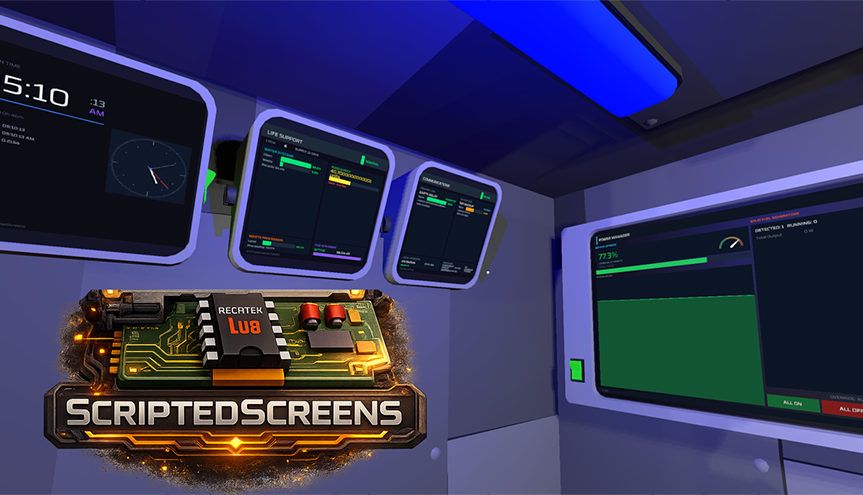
From Steam WorkshopScriptedScreens Custom touchscreen UIs for Stationeers using Lua — dashboards, monitoring, control panels, and games rendered on in-game screens and tablets.…
ScriptedScreens
Custom touchscreen UIs for Stationeers using Lua — dashboards, monitoring, control panels, and games rendered on in-game screens and tablets.


[hr][/hr]
v1.0 highlights
- Configuration Disk enters config mode (vanilla Data Disks are for StationeersLua ic.disk). Example DataDiskPortableTheme.lua SAVEs/LOADs panel themes onto a portable Data Disk.
- Visor HUD world targeting (ss.hud.target / markers), distance scaling, resizable panels, on_move, drag-to-front, and suit PAN vitals sample.
- Streaming charts (handle:push), drag_group and nested parent_id layout fixes, FR/DE in-game Lua reference, ic.persist preferred over deprecated serialize/deserialize.
[hr][/hr]
Requirements
- BepInEx 5.x — Unity mod framework
- StationeersLaunchPad — Stationeers modding framework
- StationeersLua — Lua scripting for programmable chips (REQUIRED — install first; ScriptedScreens will not load without it)
- IC10Editor — In-game code editor (Steam Workshop)
Script version lines track StationeersLua compatibility — skim both workshop pages after major game updates.
[hr][/hr]
Crafted hardware
Boards are crafted at the electronics printer. Programmable Visor (Lua Chip) is crafted at the tool manufactory (Tier 2). Motherboard (Lua Chip) slots into a Computer with one Integrated Circuit (Lua) socket, six device ports (d0–d5), and two screen surfaces — ideal for fixed installs. Circuitboard (Lua Chip) is the compact variant with the same chip slot. Cartridge (Lua Chip) is the wired tablet package. Cartridge (Lua Chip, Wireless) adds wireless data access point tethering so your UI and ic.net batching behave like a desk board while you EVA.
[hr][/hr]
Declarative UI system
Define layouts with Lua tables: element kinds, anchors, styles, and callbacks — no C# required. Rich widgets include labels, panels, dividers, lines, circles, rectangles, icons, buttons, checkboxes, radios, toggles, sliders, dropdowns, text inputs, sparklines, bar and line charts, arc gauges, sortable tables, remote images (PNG, JPG, animated GIF), video streaming, built-in and remote audio, scroll views with customizable scrollbars, flex rows and columns, grids, nested containers via ui:layout(), pixel and percentage placement, and virtual resolutions up to 4096x4096. Switch named surfaces with ss.ui.activate() and optionally refresh inactive surfaces in the background.
[hr][/hr]
Canvas, media, and sound
Pixel-level canvas APIs power custom graphics and lightweight games. Pair batching helpers with on_frame for fluid motion. Game icons and slot thumbnails resolve by name or hash with painted variants where supported. 3D spatialized audio follows the screen; atmosphere-aware volume; Ctrl+Alt+Scroll adjusts per-screen volume when enabled.
[hr][/hr]
Input and targeting
Pointer click, change, and toggle events cover most panels. Interface Mode captures the full keyboard for text entry and games; click the panel to enter and press ALT to exit. Frame-aligned input polling complements event callbacks for twitchy interactions.
[hr][/hr]
Multiplayer and persistence
UI state replicates to clients with the same mod installed; busy canvases use batched begin/commit updates with XOR diffs and LZ4 for remote parity. Join snapshots bring late players current. Board UI state persists across saves. Unicode text renders through bundled font assets.
[hr][/hr]
Samples and editor quality
The Examples/ folder ships monitoring stacks, arcade mini-games, airlock templates, sparkline telemetry, and flex-heavy console shells. Recent work tightens multiplayer ordering for overlapping widgets, safer hot-reload defaults, and clearer IC10Editor diagnostics when a surface callback throws.
[hr][/hr]
🚀 Quick start
[olist] [*] Install BepInEx, StationeersLaunchPad, StationeersLua, and IC10Editor, then subscribe to ScriptedScreens. [*] Place a Computer, insert a ScriptedScreens motherboard or circuitboard, and add an Integrated Circuit (Lua) in the built-in slot. [*] Open IC10Editor, paste an example from the Examples folder, and publish to the chip. [*] If nothing draws, call ss.ui.activate("main") or the surface name you defined. [/olist] See GUIDE.MD for walkthroughs, API tables, and advanced patterns.
[hr][/hr]
Troubleshooting
- Blank UI? Confirm you are on a ScriptedScreens board, the Lua chip is present, and the active surface name matches your script.
- Clicks ignored? The element must sit on the active surface and sit above neighbors in z_index.
- Keyboard stuck? Exit Interface Mode with ALT.
- Mod missing? StationeersLua must load first; check the BepInEx log for dependency errors.
- Canvas desync? Every player needs ScriptedScreens installed for reliable canvas replication.
[hr][/hr]
Documentation
- 📖 Online documentation — full API reference, guides, and screenshots
- GUIDE.MD — comprehensive feature tour with copy-paste samples
- Examples/ — 30+ ready scripts spanning dashboards, games, HUDs, and industrial panels
Highlights
From source dataFootprint
A 6 MB download, rated a light load on a server.
Last update
Its author last shipped an update 2 mo ago.
ScriptedScreens [StationeersLaunchPad] on Nxeon
From our catalogue- One-click install
- Not available. One-click install isn't available for this game's mods yet. Download it and upload it to your server in Files.
- Server load
- light
- Smallest plan we suggest
- Stationeers — 4 GB (4 GB RAM). This follows our own load rating above, not a benchmark.
- Latest build
- 2026-08-12, released 2026-08-12, 6 MB
Game versions by loader
| Loader | Game versions | Newest |
|---|---|---|
| Workshop |
From 1 recorded build of ScriptedScreens [StationeersLaunchPad].
Dependencies
- Required: StationeersLua [StationeersLaunchPad]
Declared by the newest build that lists any. Required ones are installed with it on one-click installs.
Run ScriptedScreens [StationeersLaunchPad] on a Stationeers server
Deploy a server above, then upload the file in Files.
What kind of mod it is
From the catalogWorkshop
Its source category doesn’t say more about what it does, so NxLabs lists it under Other.
Compatibility
- Game
- Stationeers
- File size
- 6 MB
Verified at the source
- ✓Steam WorkshopOfficial listing, checked 2026-10-16Open ↗
- ✓AuthorZedle, as published on Steam Workshop
- ✓LicenseNot published by the sourceFree









