






About Solar Tracker Maxi MK1
From Steam WorkshopMK2 is now available. https://steamcommunity.com/sharedfiles/filedetails/?id=3621810786 🌞 Solar Tracker System Overview Tracks the sun on all planets* (WIP — it tracks, but doesn’t face sunrise as…
MK2 is now available. https://steamcommunity.com/sharedfiles/filedetails/?id=3621810786
🌞 Solar Tracker System Overview
Tracks the sun on all planets* (WIP — it tracks, but doesn’t face sunrise as it moves on some worlds). Designed to maximise solar input while minimising control power. See YouTube for a walk-through on the Set-up.
🔧 Features
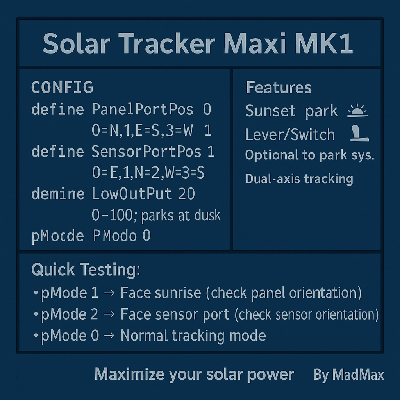
Dual-axis tracking Compatible with all movable solar panels Night mode: parks before power loss (based on efficiency check before loss of power) Optional: continue tracking at night (requires IC Housing power all night) Optional lever to park system (manual override to force panels parked) Zero control power at night when parked; ~50 W by day (for IC housing/logic) Minimal setup Built-in test modes — use pMode settings to confirm panel and sensor orientation (see Quick Testing Guide)
🖥️ System Requirements
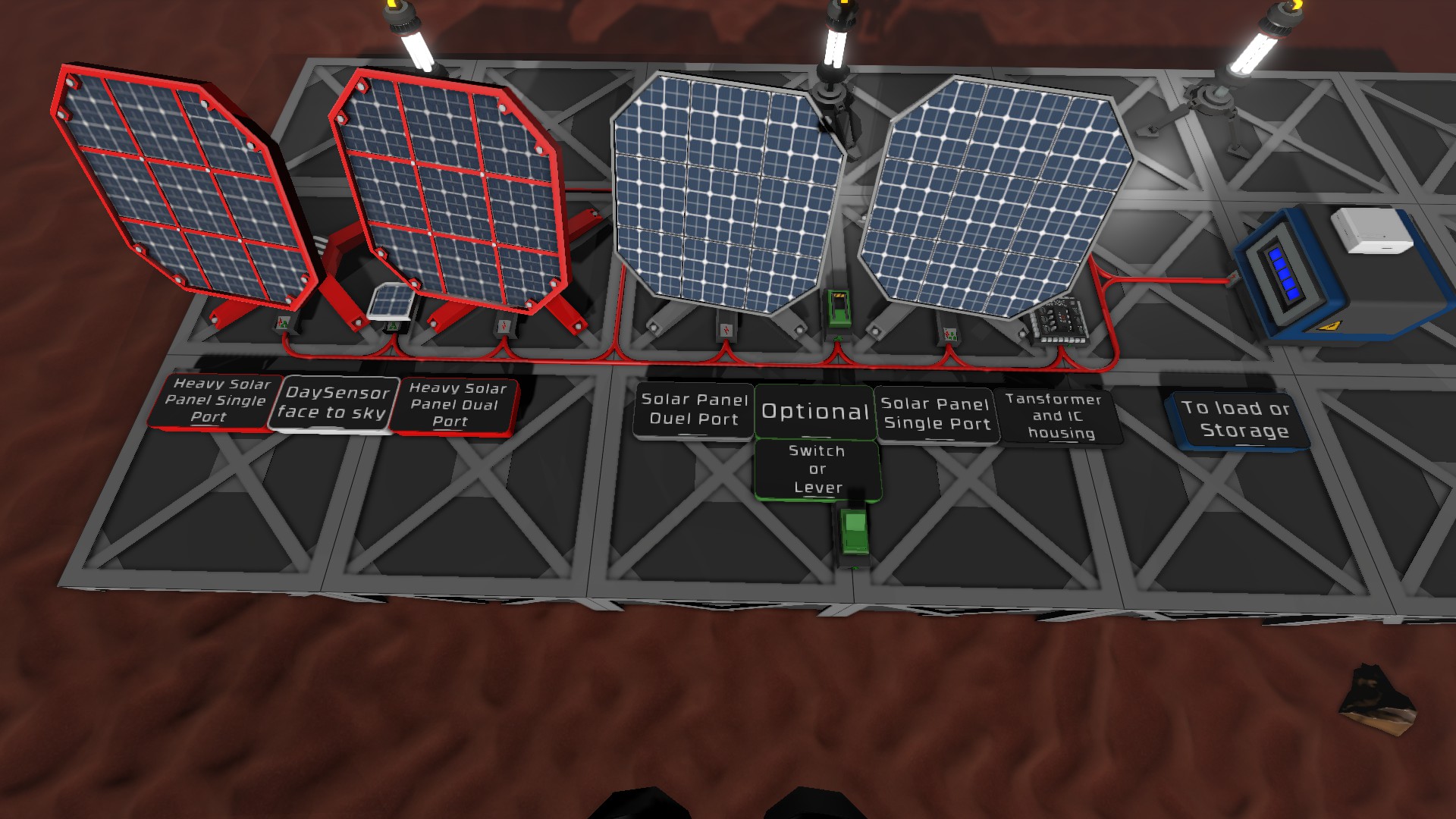
1+ solar panels (all power ports facing the same way) 1 × Daylight Sensor 1 × IC Housing 1 × Integrated Circuit (IC10 chip) Cables (type/length as needed)
Recommended
1 × Small Transformer
Optional
1 × Switch/Lever (to force park)
⚙️ Setup (Recommended)
1. Place panels with power ports all facing the same way; cable them. 2. Insert a Small Transformer in the panel output cable; set to 51 W. 3. Power the IC Housing from the transformer (data looped to panels). 4. Place the Daylight Sensor on the network data side of Housing; set D0 = Sensor in the IC Housing. 5. Load the code onto the Integrated Circuit (read config comments, set orientations). 6. Insert the IC into the Housing and power on. 7. (Optional) Wire a switch/lever to D1 on the IC Housing to force park.
Note: If parked using the lever and the IC Housing loses power, panels will remain parked until power is restored.
🔧 Tuning Parameters
LowOutPut (default: 20) % efficiency below which the system parks at dusk. Raise the number to park earlier. Set to 0 for always-tracking — panels will never auto-park and will continue to track even when no light/sun is available. LowSunAngle (default: 75) Defines the low-sun threshold (degrees). A higher value means the tracker will treat the sun as “lower,” extending tracking later into dusk or starting earlier at dawn. Adjust this if your panels stop tracking too early or move before sunrise on certain planets.
🧪 Quick Testing Guide
1. Set pMode = 1 → Panels swing to face sunrise (East). Confirms panel orientation is correct. 2. Set pMode = 2 → Panels face the sensor port. Confirms sensor orientation is correct. 3. Set pMode = 0 → Panels return to normal sun tracking. Confirms full system operation. 4.(Optional) Flip the lever/switch (if installed) → Panels should park.
✅ Final Notes
Enjoy! Like, share, and comment! — Max
Solar Tracker Maxi MK1 on Nxeon
From our catalogue- One-click install
- Not available. One-click install isn't available for this game's mods yet. Download it and upload it to your server in Files.
- Server load
- light
- Smallest plan we suggest
- Stationeers — 4 GB (4 GB RAM). This follows our own load rating above, not a benchmark.
Run Solar Tracker Maxi MK1 on a Stationeers server
Deploy a server above, then upload the file in Files.
What kind of mod it is
From the catalogWorld generation
Changes or adds to how new terrain, biomes and structures are created.
Compatibility
- Game
- Stationeers
- File size
- 460 KB
Verified at the source
- ✓Steam WorkshopOfficial listing, checked 2026-09-24Open ↗
- ✓AuthorMad Max, as published on Steam Workshop
- ✓LicenseNot published by the sourceFree









