







About Stationeers UI Ascended
From Steam WorkshopStationeers UI Ascended 1.0 A UI overhaul that rebuilds Stationeers' inventory and HUD around your two hands. Radial wheels instead of menu-diving, a curved suit visor you can redesign live, and a…
Stationeers UI Ascended 1.0
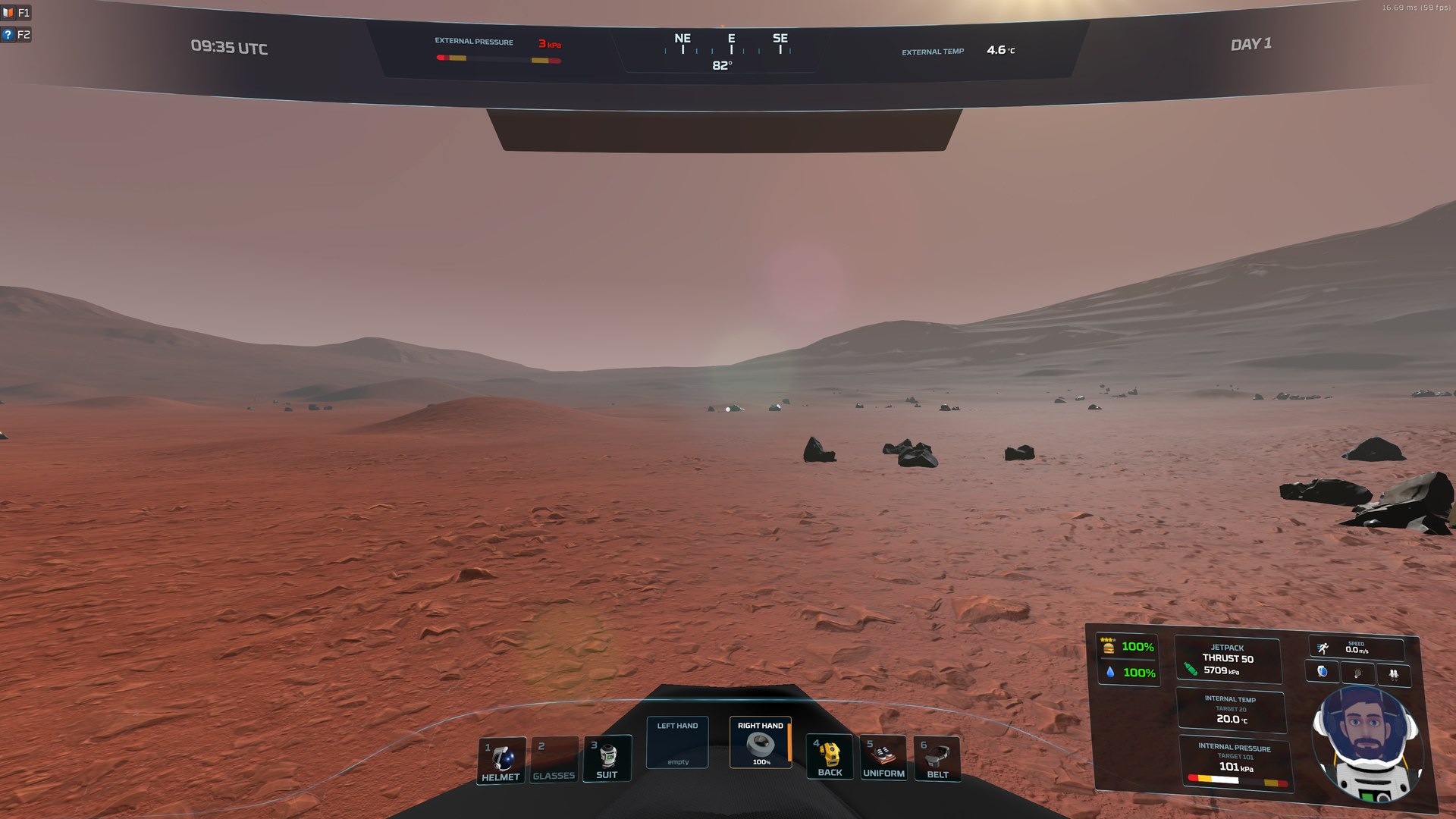
A UI overhaul that rebuilds Stationeers' inventory and HUD around your two hands. Radial wheels instead of menu-diving, a curved suit visor you can redesign live, and a Smart Stow that puts things back where they came from - all while keeping the game's own physical inventory rules.
REQUIRES BepInEx 5 + StationeersLaunchPad. This is a StationeersLaunchPad plugin mod: install those first, then subscribe here and launch the game through StationeersLaunchPad.
Radial wheels
- Belt Wheel (middle mouse) - hold, flick and release to grab a tool; tap to leave it open and click. Every tool keeps its own wedge, and an empty slot shows a ghost of the tool that belongs there.
- Inventory wheel (Tab) - your worn bags plus Search: type to find anything you carry, however deep it is buried.
- Device wheel (R) - every setting vanilla shows for the item in your hand: jetpack thrust, suit pressure and temperature, visor, lights, tank valves. Scroll to adjust; hold C for fine steps.
- Gear keys 1-6 - tap for that piece of gear's wheel (swap batteries, filters, canisters); hold to equip or unequip, like vanilla.
- The wheel names what a click will do (TAKE / EQUIP / SWAP / OPEN / STOW). Drag items out of any wheel onto a charger, into a locker or into a bag.
Two hands. No hotbar. Ever.
The bottom of your screen is exactly two hand boxes plus your worn gear (1-6), with live thumbnails and damage bars. The good friction - hands, batteries, real logistics - stays. The menu-diving goes.
Universal Inventory (B)
- One window with every bag you carry, nested bags included. Tap B to toggle it, hold B to peek.
- Drag and drop to move, swap and merge. Pin any bag out into its own window.
- Shift+drag moves every stack of a type at once - into and out of lockers too.
- Drag straight into chargers, lockers and other world containers.
- Shift+1-6 jumps straight to that worn bag.
Smart Stow (G) that remembers
Every item remembers the exact bag and slot you last put it in, in each world, and G sends it back there - even into a belt inside a backpack. Move something by hand and its home moves with it. Prefer rules? Complex mode gives you Storage Layouts and Bag Profiles you can share with a code.
A curved visor HUD
- Compass ribbon, status bar, a vitals card with a live hologram portrait, the game's real status moodlets and body damage.
- Diegetic: exact numbers need a powered suit - without one you get words like WARM, COLD and THIN AIR. The visor boots up, glitches as your suit battery runs down, and collapses when it dies.
- Four themes ship: Stationeers Blue, Stationeers Blue Minimalist, Zirillian Red and Pure HUD.
F9 HUD Designer
Click any part of the HUD to move, resize or restyle it live: frosted glass, glow, edge light, cut corners, your own labels and icons, and separate looks for suited and bare. Save it as your own theme and share it.
F10 Control Center
Every setting in one place, with search. Rebind every key. Turn the radial half or the HUD half off independently.
Report bugs from inside the game
F10 > Suggestions/Bugs: describe it, optionally attach your HUD layout or recent log lines, and it reaches the developers as a tracked report you can follow right in the menu. Anonymous unless you add a contact - your Steam ID and save name are never sent.
Learn it as you play
A 19-lesson in-game tutorial: the Welcome card offers a guided tour of the whole mod, or lessons that appear the first time you need them. Replay any lesson from F10 > Guide.
Multiplayer-friendly
Every inventory action goes through the game's own server-checked path, the same way vanilla does it. A few extras (choose-a-number splits, the pause buttons) are host or single-player only.
Getting started
- F10 - settings, themes, key bindings and the guide
- F9 - the HUD Designer
- Middle mouse, Tab, R, 1-6 - the wheels
- B - Universal Inventory. G - Smart Stow
- Full illustrated guide
Good to know
- Install only one copy - not this Workshop version and a manual copy at the same time.
- After an update, restart the game once so the new glass effects load.
- To start completely fresh, type uiareset in the F3 console. It shows what it would delete; uiareset confirm does it.
Thanks
Huge thanks to everyone who play-tested UI Ascended and reported bugs on our Discord: aproposmath, ConductorWon, Dipole, JoeDiertay, Ningy, PeteWasEre, StormCircuit, ViroMan, Wilhelm W. Walrus, Windsinger and WreckerRecreation. This release is built on your reports.
Special thanks to JacksonTheMaster (JXSN), who helped build UI Ascended and wrote Profilicus Universalis, the profiler built into the mod.
Made by FlorpyDorp. Found a bug or have an idea? F10 > Suggestions/Bugs in game.
Highlights
From source dataFootprint
Rated a light load on a server.
Last update
Its author last shipped an update 4d ago.
Stationeers UI Ascended on Nxeon
From our catalogue- One-click install
- Not available. One-click install isn't available for this game's mods yet. Download it and upload it to your server in Files.
- Server load
- light
- Smallest plan we suggest
- Stationeers — 4 GB (4 GB RAM). This follows our own load rating above, not a benchmark.
- Latest build
- 2026-10-12, released 2026-10-12
Game versions by loader
| Loader | Game versions | Newest |
|---|---|---|
| Workshop |
From 3 recorded builds of Stationeers UI Ascended.
Recent builds
| Build | Released | Game versions | Loaders |
|---|---|---|---|
| 2026-10-12 | 2026-10-12 | n/a | Workshop |
| 2026-10-07 | 2026-10-07 | n/a | Workshop |
| 2026-09-28 | 2026-09-28 | n/a | Workshop |
Run Stationeers UI Ascended on a Stationeers server
Deploy a server above, then upload the file in Files.
What kind of mod it is
From the catalogQuality of life & UI
Small conveniences, tweaks and interface improvements players notice straight away.
Compatibility
- Game
- Stationeers
Verified at the source
- ✓Steam WorkshopOfficial listing, checked 2026-10-16Open ↗
- ✓AuthorFlorpyDorp, as published on Steam Workshop
- ✓LicenseNot published by the sourceFree









