About SargamAutoStore
From ThunderstoreSmart auto-sorting. Built for performance.
SargamAutoStore
Automatically store dropped items in nearby chests. Quick-stack your inventory with one key, choose destinations for new loot, and see exactly where each transfer went.
Drop it. Sorted.
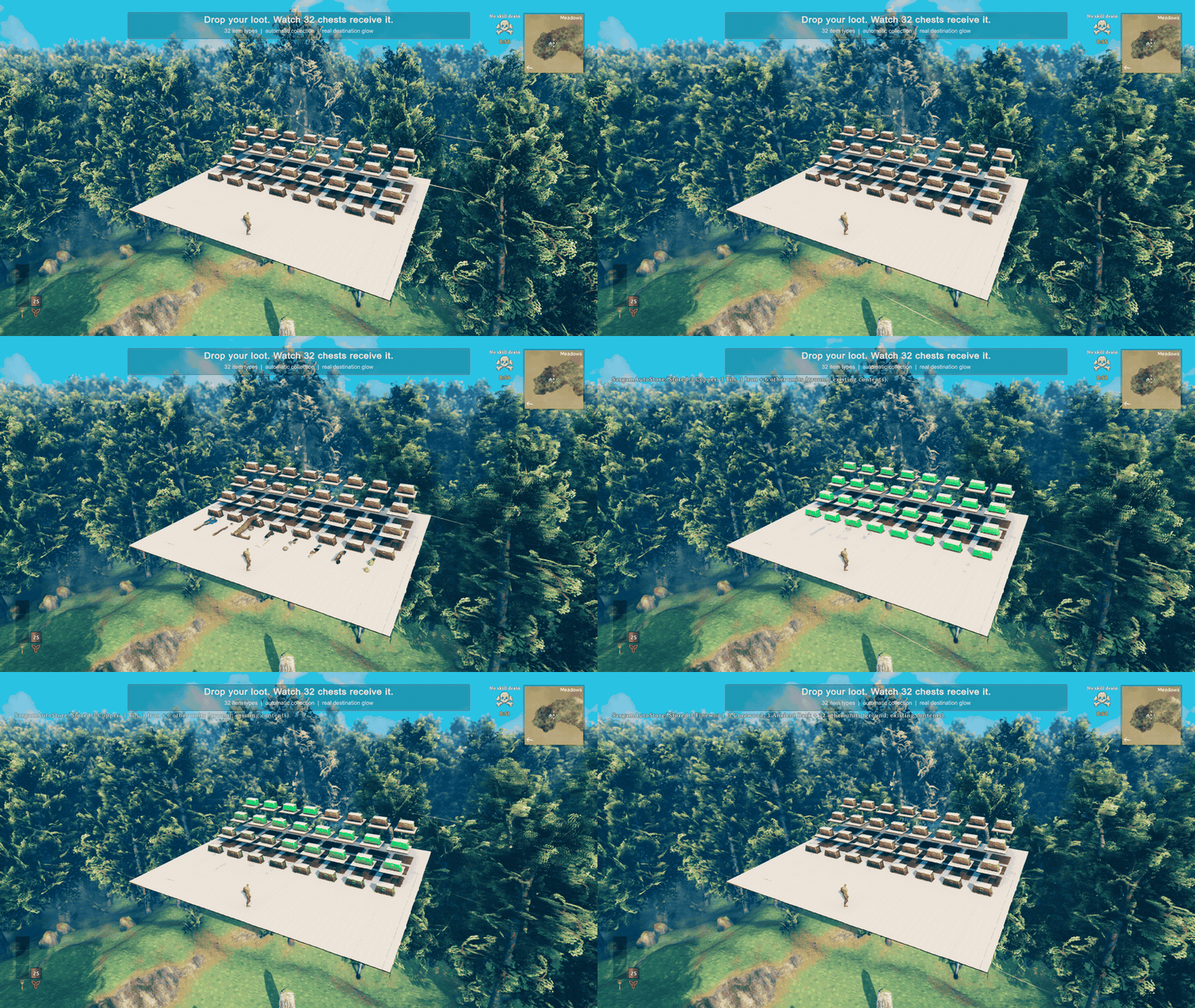
32 item types. 32 destinations. Dropped loot finds its home automatically, and receiving chests light up as it arrives.
Clear your inventory. Keep your essentials.
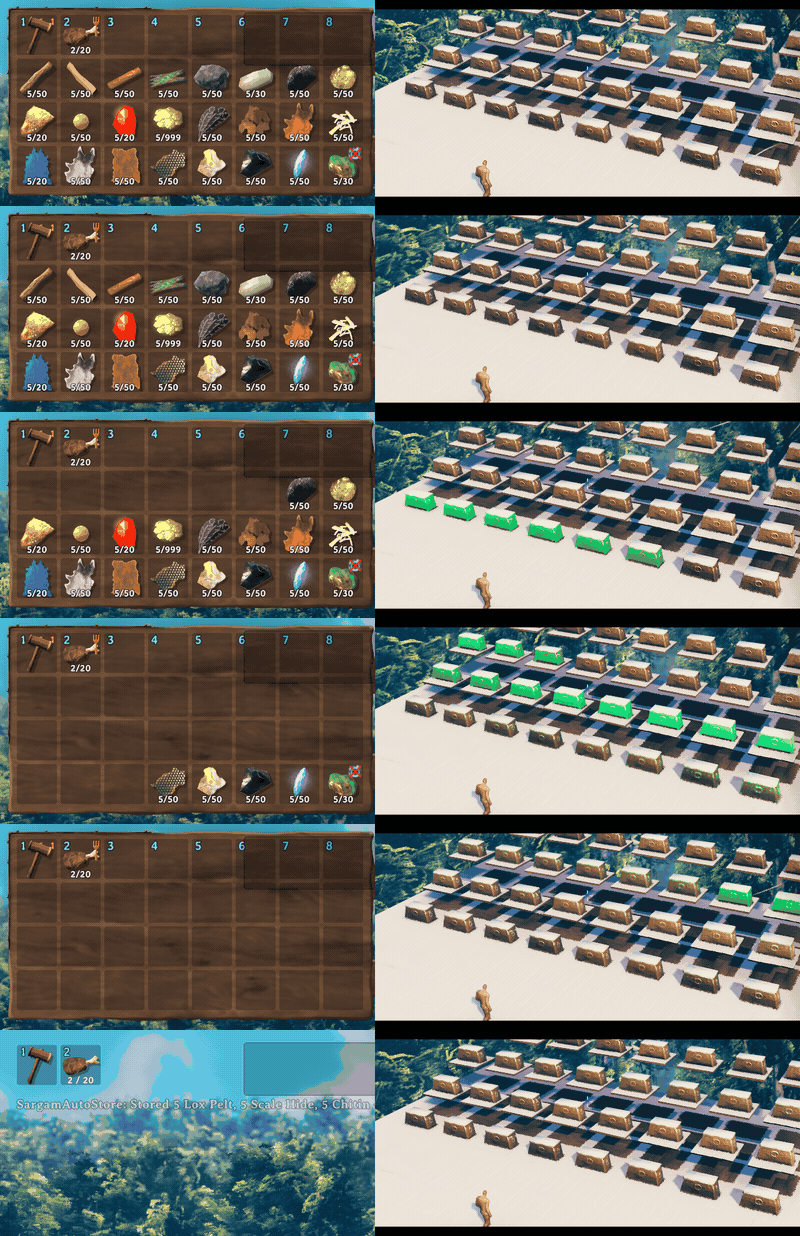
120 units stored across 24 item types. One inventory action sends eligible items to storage while the hammer and food remain protected. Left: inventory. Right: receiving chests, cropped from the same frames.
Real 1.0.0 gameplay in a staged local scene; normal transfer logic and receipt effects. The clips preserve elapsed time at reduced capture cadence; the inventory action is invoked through the same production entry point as F9. Videos and capture details.
Existing contents → matching signs → designated new-item chests.
- Keep your storage organized. Existing contents come first, then matching signs, then chests you designate for new item types.
- Keep essentials with you. Inventory deposits preserve food, potions, equipped items and your hotbar by default. Block any item type from all transfers.
- See it happen. Receiving chests glow; pickup-style messages show what was stored and where it came from.
- Handle busy storage. Automatic collection retries waiting items. F8 requests a ground sweep; F9 deposits eligible inventory items.
New in 1.0: up to 64 simultaneous destination highlights, a larger ground-and-inventory demonstration, and measured local workload results. The version-cache fix from 0.2.9 is included.
Built for busy storage
1,024 ground units sorted in 0.37–0.60 seconds across 32 chests in three local workloads on an Apple M3 Max. Counts and item types were checked against saved chest data after every run, with no additional production errors.
| Local workload | Mod Update mean per frame | Highest observed Update | | --- | ---: | ---: | | Idle with 32 chests | 0.034 ms | 0.164 ms | | Collecting 1,024 units, three runs | 1.71–1.91 ms | 5.714 ms |
Measured separately from recording, after drop creation and settling. Native drops may merge. These are plugin Update timings, not whole-game FPS; the default 1.5 ms work budget is cooperative. One Mac, local singleplayer, no other gameplay mods. Full results, settings, samples and limits.
Install and try it
Tested locally on macOS with Valheim 1.0.15 and BepInEx 5.4.23.5. Multiplayer and Windows/Linux runtime validation are still pending.
Install SargamAutoStore by Anatta_Labs with your Valheim mod manager, then launch the modded game. BepInEx is installed as a dependency. Restart Valheim after installing or updating.
Disable AzuAutoStore, aedenthorn's AutoStore and other automatic collectors first. SargamAutoStore declares the first two incompatible. Keep a backup of your world and character when changing your mod setup.
For your first transfer:
- Put some Wood in a player-built chest with free space, then close it.
- Stand beside that chest and drop more Wood. With default settings, automatic collection stores it; the receiving chest glows and a message confirms the transfer.
- For an item type with no existing destination, close an accessible chest, look at it within 8 m, and press Left Alt+N. That chest can now receive new types. Press again to remove the designation.
On Mac, Alt is Option. Close chat and menus before using the chest shortcut. If marking fails because another peer owns the chest, open and close it normally, then try again. For help, open normal chat with Enter and type /sas help. No F5 console needed.
Playing online: cooperative ownership requires the same SargamAutoStore version on the server and participating clients. Collection runs near players with the mod; a dedicated server only handles ownership requests. A missing remote component can leave items waiting. There is no global version handshake or automatic configuration sync. Coordinate any change with the server administrator; multiplayer validation remains pending.
Where does my loot go?
Among loaded, accessible chests with room:
- Existing contents. The exact item type is already there. Compatible partial stacks take priority over distance.
- Matching sign. The sign contains part of the item's name, such as
ore,helmorwood. - A designated new-item chest. The nearest eligible chest you marked with Alt+N.
Wood and FineWood are different types for existing-content matching. A wood sign can match both. Sign matching ignores case and accents; Wood, Stone provides alternative labels. By default, a chest uses the nearest valid sign above it within 3 m, so one sign can label a group below it. A nonmatching sign does not override existing contents or an explicit designation.
Highlights
From source dataLoaders
Runs on BepInEx.
Footprint
Rated a light load on a server.
Last update
Its author last shipped an update 41d ago.
SargamAutoStore on Nxeon
From our catalogue- One-click install
- Supported on Nxeon Valheim servers, for BepInEx servers. We download it from Thunderstore, place it, and restart the server.
- Server type needed
- BepInEx
- Server load
- light
- Smallest plan we suggest
- Valheim — 4 GB (4 GB RAM). This follows our own load rating above, not a benchmark.
- Latest build
- 1.0.0, released 2026-09-25
Game versions by loader
| Loader | Game versions | Newest |
|---|---|---|
| BepInEx |
From 7 recorded builds of SargamAutoStore.
Recent builds
| Build | Released | Game versions | Loaders |
|---|---|---|---|
| 1.0.0 | 2026-09-25 | n/a | BepInEx |
| 0.2.9 | 2026-09-25 | n/a | BepInEx |
| 0.2.8 | 2026-09-24 | n/a | BepInEx |
| 0.2.7 | 2026-09-24 | n/a | BepInEx |
| 0.2.6 | 2026-09-24 | n/a | BepInEx |
| 0.2.5 | 2026-09-23 | n/a | BepInEx |
Dependencies
- Required: BepInExPack Valheim
Declared by the newest build that lists any. Required ones are installed with it on one-click installs.
Run SargamAutoStore on a Valheim server
Pick a server or deploy a new one above; it is installed in one click.
What kind of mod it is
From the catalogQuality of life & UI
Small conveniences, tweaks and interface improvements players notice straight away.
Compatibility
- Game
- Valheim
- Loaders
- BepInEx
- Requires
- One-click install needs a BepInEx server.
Verified at the source
- ✓ThunderstoreOfficial listing, checked 2026-10-01Open ↗
- ✓AuthorAnatta_Labs, as published on Thunderstore
- ✓LicenseNot published by the sourceFree