






About WebMap
From ThunderstoreWeb Based Live map for a Valheim Dedicated Server
Valheim WebMap
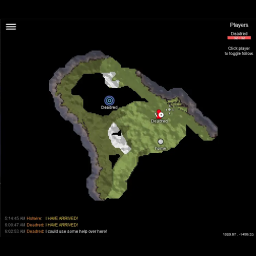
This server side mod creates a web based map that shows live players and allows shared exploration. After port forwarding the correct port, you can share http://your_ip:port to anyone else and they can see the map too. Clients do not need to have any mods installed!
For players to show up on the map, they must set visible to other players in the in-game map screen. Press m to bring up the map settings.
This has only been tested on a Valheim dedicated server. I'm not sure this will work with the built in server inclued with the base game.
Features
- A explorable map of your Valheim world in your browser that you can zoom with the mousewheel or pinch zoom on mobile.
- Players can place their own pins with chat commands (see below for more info)
- Map pings from in game players will show up on the web map as well.
- Connected players list.
- Auto follow player feature.
- Chat messages.
Installation
Assuming you have [BepInEx] installed and working, place the WebMap directory in:
Steam\steamapps\common\Valheim dedicated server\BepInEx\plugins\WebMap
After starting the server for the first time a default configuration file will be created in:
Steam\steamapps\common\Valheim dedicated server\BepInEx\config
Updating
If you are updating, one additional thing you and anyone else using the web map might need to do is clear your browser cache.
You may also be able to hold down the shift key and click the reload button in your browser.
Chat Commands
This mod supports placing pins with chat commands. Press Enter to start chatting in game. The commands are as follows:
!pin- Place a "dot" pin with no text on the map where you are currently standing.!pin my pin name- Place a "dot" pin with "my pin name" under it on the map where you are currently standing.!pin [pin-type] [text]- Place a pin of a certain type with optional text under it on the map where you are currently standing.- Pin types are:
dot,fire,mine,houseandcave. Example command:/pin house my awesome base !undoPin- Delete your most recent pin.!deletePin [text]- Delete the most recent pin that matches the text exactly.
If a player creates too many pins, their oldest pin will be removed. There is a setting to control how many pins a player can create in config.json.
Development
To get your environment working, you will need to find and place these .dll files in the WebMap/libs directory. Most of the libraries are found in:
Steam\steamapps\common\Valheim dedicated server\valheim_server_Data\Managed
- assembly_valheim.dll
- UnityEngine.CoreModule.dll
- UnityEngine.dll
- UnityEngine.UI.dll
You also need some Unity developer libraries (google for them).
- UnityEngine.ImageConversionModule.dll
- UnityEngine.JSONSerializeModule.dll
To get the fontend part building, you'll need [node] installed. After, just do npm install to install webpack. Then you can run npm run build to build main.js which should be included with the other web resources in WebMap/web.
I wanted to get this working as soon as possible, so apollogies for messy code.
Licence
Where applicable, assume stuff is under the MIT licence.
Credit
- Currently maintained by Jeff Clark
- Original work by Kyle Paulsen
- Background by [webtreats], released under the [CC BY 2.0] license.
[BepInEx]: https://github.com/BepInEx/BepInEx [node]: https://nodejs.org/en/download/ [webtreats]: https://www.flickr.com/photos/webtreatsetc/4081217254 [CC BY 2.0]: https://creativecommons.org/licenses/by/2.0/
Highlights
From source dataLoaders
Runs on BepInEx.
Footprint
Rated a light load on a server.
Dependencies
Needs 1 other project installed alongside it.
WebMap on Nxeon
From our catalogue- One-click install
- Supported on Nxeon Valheim servers, for BepInEx servers. We download it from Thunderstore, place it, and restart the server.
- Server side
- Required on the server
- Server type needed
- BepInEx
- Server load
- light
- Smallest plan we suggest
- Valheim — 4 GB (4 GB RAM). This follows our own load rating above, not a benchmark.
- Latest build
- 2.6.1, released 2025-01-07
Game versions by loader
| Loader | Game versions | Newest |
|---|---|---|
| BepInEx |
From 1 recorded build of WebMap.
Dependencies
- Required: BepInExPack Valheim
Declared by the newest build that lists any. Required ones are installed with it on one-click installs.
Run WebMap on a Valheim server
Pick a server or deploy a new one above; it is installed in one click.
What kind of mod it is
From the catalogAdmin & protection
Permissions, moderation, anti-cheat and land protection for the people running the server.
Runs on your server
From source side supportThunderstore lists WebMap as required on the server. Check its Thunderstore page to see whether players need it too.
Compatibility
- Game
- Valheim
- Loaders
- BepInEx
- Runs on
- Serverrequired on the server
- Requires
- One-click install needs a BepInEx server. 1 other project installed alongside it.
Verified at the source
- ✓ThunderstoreOfficial listing, checked 2026-10-02Open ↗
- ✓AuthorArmchairSavages, as published on Thunderstore
- ✓LicenseNot published by the sourceFree











