About TorvaldsAffordablePainters
From ThunderstoreA customizable painting tool for building pieces. Paint your builds with 13 colors using Torvald's painting mallet. Features configurable recipe for server progression and custom color support.
> Torvald's Affordable Painters has moved to Hexium. Version 1.4.0 is the last release on Thunderstore. > Get future updates at https://valheim.hexium.gg/mods/cebero/TorvaldsAffordablePainters
Torvald's Affordable Painters
"Hammer some paint onto your creations!"
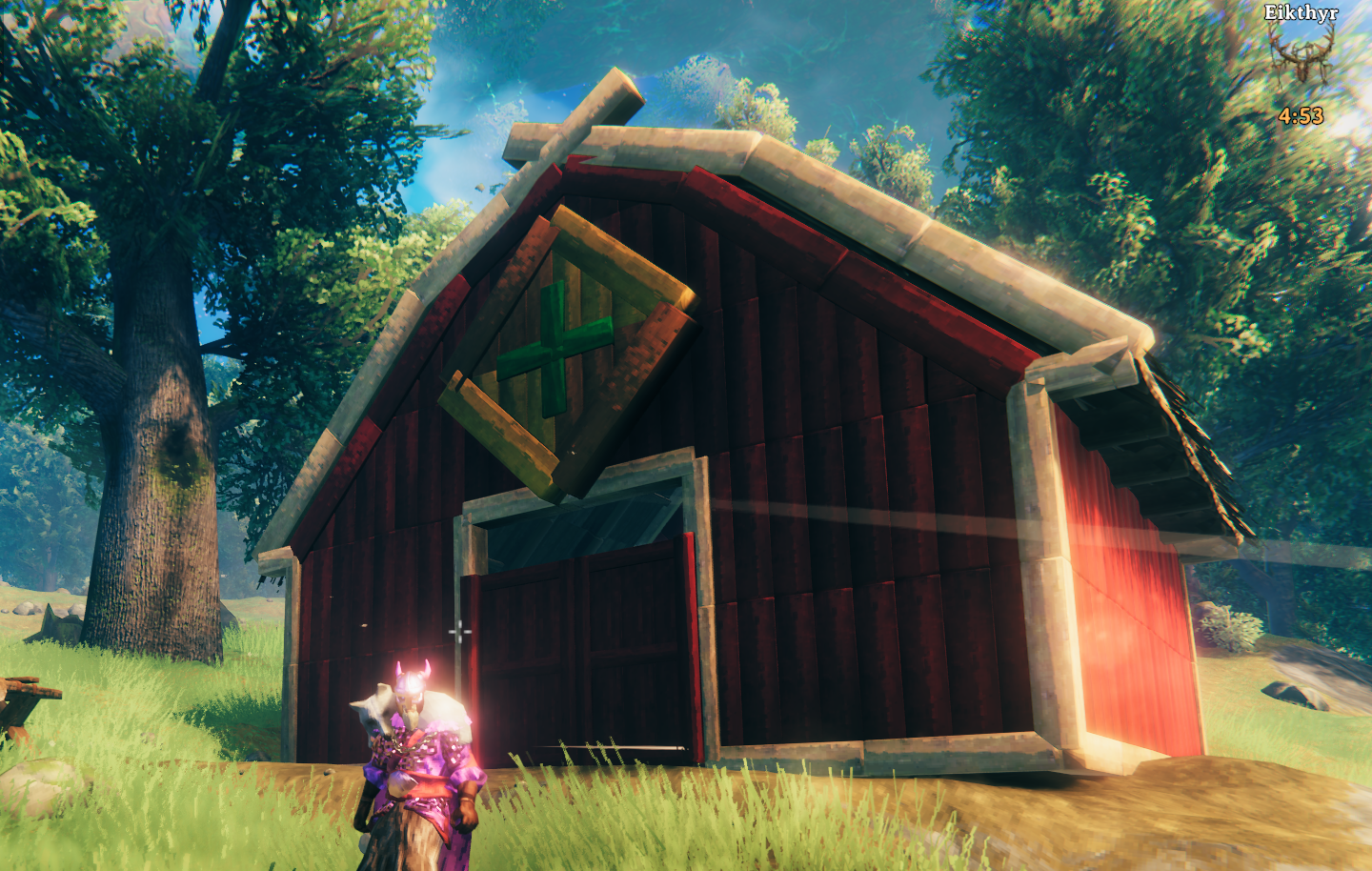
A Valheim mod that lets you paint building pieces with a variety of colors. Torvald's got you covered with his trusty painting mallet - craft it, equip it, and start adding some color to those drab wooden halls.
Now, before you start thinking old Torvald's going to let you paint your longhouse hot pink or neon green - think again! I'm a respectable craftsman, not some crazed alchemist. My colors are carefully chosen to complement what the gods have already blessed us with in this realm. You'll find wood tones that actually look like wood, and paint colors that won't make the neighbors think you've been sampling too much fermented honey. This isn't about turning Valheim into some garish carnival - it's about giving your builds the subtle character they deserve, using colors that actually belong in a Viking's world.
Features
- Paint building pieces with 13 different colors (5 wood tones, 8 paint colors)
- Custom paint-splattered mallet icon to easily distinguish from regular hammer
- Left-click to paint, right-click to open color selector
- Colors persist across game sessions and work in multiplayer
- Configurable recipe system - server admins can change what materials are required
- All colors can be customized through the config file
- Requires workbench by default (can be disabled in config)
How to Use
- Craft Torvald's Painting Mallet at a workbench (default recipe: 10 Wood, 5 Leather Scraps, 1 Coal)
- Equip it like any other tool - no more swinging swords at your walls
- Left-click on building pieces to give them a proper paint job
- Right-click to browse Torvald's color selection and pick your favorite
Configuration
After running the mod once, you'll find a config file at BepInEx/config/cebero.TorvaldsAffordablePainters.cfg.
Recipe Configuration
[Recipe]
# Materials needed to craft the painting mallet
Materials = Wood:10,LeatherScraps:5,Coal:1
# Whether the mallet requires a workbench to craft
RequireWorkbench = true
Recipe Examples:
# Early game (default)
Materials = Wood:10,LeatherScraps:5,Coal:1

# Mid-game progression
Materials = FineWood:8,Bronze:2,TrophyGreydwarf:1

# Late-game luxury
Materials = BlackMetal:1,Silver:2,LoxPelt:1

# Custom themed server
Materials = YggdrasilWood:5,Crystal:3,SurtlingCore:2
Color Customization
All 13 colors are individually configurable using RGB values (0.0 to 3.0):
[Colors.WoodTones]
DarkBrownRGBMultiplier = 0.45,0.25,0.15
MediumBrownRGBMultiplier = 1.2,0.8,0.4
NaturalWoodRGBMultiplier = 1.0,1.0,1.0
LightBrownRGBMultiplier = 1.3,1.1,0.8
PaleWoodRGBMultiplier = 1.1,1.4,1.9

[Colors.PaintColors]
BlackRGBMultiplier = 0.1,0.1,0.1
WhiteRGBMultiplier = 1.55,1.75,1.95
RedRGBMultiplier = 1.5,0.2,0.2
BlueRGBMultiplier = 0.2,0.3,1.5
GreenRGBMultiplier = 0.3,1.5,0.3
YellowRGBMultiplier = 1.8,1.6,0.2
OrangeRGBMultiplier = 1.5,0.9,0.25
PurpleRGBMultiplier = 1.2,0.5,1.4
How Torvald's Painting System Works
The Multiplicative Tinting System
This mod doesn't replace textures or apply solid colors - instead, it uses multiplicative color blending to tint the original wood and stone textures while preserving all their natural detail, grain, and weathering.
What Are RGB Multipliers?
When you paint a piece, the mod multiplies each color channel (Red, Green, Blue) of the original texture by your configured values:
Original_Color × Multiplier = Final_Color- 1.0 = No change (100% of original)
- 0.5 = Darker (50% of original)
- 2.0 = Brighter (200% of original)
Why This System?
This approach preserves the beautiful textures Iron Gate created while allowing color customization:
- Wood grain remains visible through paint
- Stone texture shows through tints
- Weathering and damage still display properly
- Shadows and lighting work naturally
Creating Custom Colors
Understanding the Values
Each color is defined by three numbers: Red,Green,Blue with ranges from 0.0 to 3.0
Basic Principles:
- Darken: Use values below 1.0
- No change: Use 1.0
- Brighten: Use values above 1.0
Color Creation Examples
Understanding Our Default Colors:
Let's examine how our tested defaults achieve their effects:
Dark Walnut Effect:
DarkBrownRGBMultiplier = 0.45,0.25,0.15
# Low values across all channels create deep brown
# Red highest, blue lowest = warm dark tone
Warm Golden Brown:
MediumBrownRGBMultiplier = 1.2,0.8,0.4
# Red boosted, green moderate, blue low = warm amber/honey
# This balances warmth without going too yellow
Cool Driftwood Gray:
PaleWoodRGBMultiplier = 1.1,1.4,1.9
# Progressive increase toward blue counters wood's natural warmth
# Creates weathered, gray appearance
Creating Your Own Colors:
Start with our working defaults and make small adjustments (±0.1 to ±0.3) to get variations. For example:
- Darker walnut: Reduce all values from Dark Brown
- Warmer honey: Increase red/green from Medium Brown
- Cooler gray: Increase blue further from Pale Wood
Important: Multiplicative blending means you're working with the existing wood texture, not creating colors from scratch. Experimentation required. After making changes, repaint pieces to apply the new setting.
Color Temperature and Tone Control
Understanding how each RGB channel affects the final appearance:
Red Channel (First Number):
- Higher Red = Warmer, more reddish (mahogany, cherry wood)
- Lower Red = Cooler tones
Highlights
From source dataLoaders
Runs on BepInEx.
Footprint
Rated a light load on a server.
Last update
Its author last shipped an update 31d ago.
TorvaldsAffordablePainters on Nxeon
From our catalogue- One-click install
- Supported on Nxeon Valheim servers, for BepInEx servers. We download it from Thunderstore, place it, and restart the server.
- Server type needed
- BepInEx
- Server load
- light
- Smallest plan we suggest
- Valheim — 4 GB (4 GB RAM). This follows our own load rating above, not a benchmark.
- Latest build
- 1.4.0, released 2026-09-14
Game versions by loader
| Loader | Game versions | Newest |
|---|---|---|
| BepInEx |
From 5 recorded builds of TorvaldsAffordablePainters.
Recent builds
| Build | Released | Game versions | Loaders |
|---|---|---|---|
| 1.4.0 | 2026-09-14 | n/a | BepInEx |
| 1.3.0 | 2025-09-30 | n/a | BepInEx |
| 1.2.2 | 2025-08-25 | n/a | BepInEx |
| 1.2.0 | 2025-08-14 | n/a | BepInEx |
| 1.1.0 | 2025-08-12 | n/a | BepInEx |
Dependencies
- Required: BepInExPack Valheim
- Required: Jotunn
Declared by the newest build that lists any. Required ones are installed with it on one-click installs.
Run TorvaldsAffordablePainters on a Valheim server
Pick a server or deploy a new one above; it is installed in one click.
What kind of mod it is
From the catalogBuilding & decoration
Blocks, furniture, decorations and building tools.
Compatibility
- Game
- Valheim
- Loaders
- BepInEx
- Requires
- One-click install needs a BepInEx server.
Verified at the source
- ✓ThunderstoreOfficial listing, checked 2026-10-01Open ↗
- ✓Authorcebero, as published on Thunderstore
- ✓LicenseNot published by the sourceFree