






About RoboticInbox
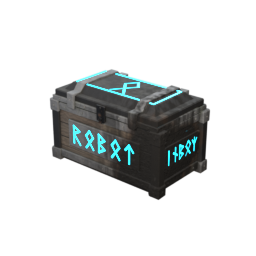
From ThunderstoreA glowing Viking Cybercrate that auto-sorts: dump items in and they fly into nearby chests that already hold the same item. Port of the 7 Days to Die Robotic Inbox. Server and all players need it.
Robotic Inbox
Stop sorting your loot by hand. Build a Robotic Inbox next to your chests, dump everything into it, close it, and each item flies into the nearby chest that already holds that kind of item.
It's a Valheim version of the Robotic Inbox mod for 7 Days to Die, created by Jonathan Robertson (Kanaverum). All credit for the idea goes to them. Valheim port by DarthJML.
How to build it
- Equip your Hammer.
- Open the Misc tab of the build menu.
- Pick Robotic Inbox. It costs 10 Wood + 10 Stone and doesn't need a workbench.
- Place it near your storage chests.
It looks like a Viking Cybercrate: an old timber-and-stone crate with iron fittings and glowing cyan runes.
How sorting works
- Put items in the inbox, then close it. Nothing moves while someone has it open.
- Every second the inbox checks the chests around it (20 meters by default, about 10 floor tiles).
- An item goes to the closest chest that already has at least one of that item, as long as there's room.
Got a chest with Wood in it? All your Wood goes there.
- Items no chest has yet stay in the inbox. To make a new "home" for an item, put one of it in a chest yourself.
- It never moves items into other inboxes, graves (tombstones), chests that are open, or private chests you can't open.
- A full chest is skipped and the next closest matching chest is tried.
Settings (optional)
You can change these in r2modman under Config editor, file com.darthjml.roboticinbox.cfg (or BepInEx/config/com.darthjml.roboticinbox.cfg).
| Setting | Default | What it does | |---|---|---| | General.Enabled | true | Turns sorting on or off. | | General.ScanRadius | 20 | How far (in meters) the inbox looks for chests. 1 floor tile = 2 m. Max 64. | | Inbox.Columns / Inbox.Rows | 8 / 4 | Size of the inbox (8 x 4 = 32 slots). Takes effect the next time you load the world. | | Visual.GlowIntensity | 3 | Brightness of the glowing runes (0 = off, max 10). Only changes how it looks for you. | | Server.RequireMod | true | Server only: kick players who don't have Robotic Inbox or have a different version. | | General.Debug | false | Writes extra lines to the log for troubleshooting. |
On a multiplayer server, the server's ScanRadius, Columns and Rows are used for everyone.
Multiplayer
Everyone needs it: the server and every player, all on the same version.
- If you join a server with Robotic Inbox but you don't have the mod, you'll be disconnected with
"Incompatible version". Install the mod (easiest: import the server's r2modman profile code) and join again.
- If you have a different version than the server, you'll get a message that tells you both versions.
- The server owner can turn this check off with
Server.RequireMod = false(not recommended:
players without the mod won't be able to see or use inboxes).
- Joining a server that doesn't have the mod is safe. Nothing breaks; you just play normally.
How to install with r2modman
From Thunderstore (easiest):
- Open r2modman, pick Valheim, and select your profile.
- Go to Online, search for RoboticInbox, and click Download. BepInEx is installed for you.
- Click Start modded.
From a zip file someone sent you:
- Open r2modman, pick Valheim, and select your profile.
- Go to Settings → Import local mod, choose the
DarthJML-RoboticInbox-1.2.0.zipfile, and confirm. - If you don't have BepInExPack_Valheim yet, install it from Online too.
- Click Start modded.
From a profile code (best for a group):
- The server owner exports their profile: Settings → Export profile as code, and shares the code.
- Everyone else: on the profile screen click Import / Update → Import new profile → From code, paste it, and give it a name.
- Select that profile and click Start modded. You now have exactly the same mods and versions as the server.
- If Robotic Inbox is missing from the imported profile (the code only carries mods published on Thunderstore),
add it with Import local mod as described above.
Credits
- Original idea and 7 Days to Die mod: Jonathan Robertson (Kanaverum), MIT license.
- Valheim port and Viking Cybercrate model: DarthJML.
Highlights
From source dataLoaders
Runs on BepInEx.
Footprint
Rated a light load on a server.
Last update
Its author last shipped an update 22d ago.
RoboticInbox on Nxeon
From our catalogue- One-click install
- Supported on Nxeon Valheim servers, for BepInEx servers. We download it from Thunderstore, place it, and restart the server.
- Server side
- Required on the server
- Server type needed
- BepInEx
- Server load
- light
- Smallest plan we suggest
- Valheim — 4 GB (4 GB RAM). This follows our own load rating above, not a benchmark.
- Latest build
- 1.2.0, released 2026-10-13
Game versions by loader
| Loader | Game versions | Newest |
|---|---|---|
| BepInEx |
From 1 recorded build of RoboticInbox.
Dependencies
- Required: BepInExPack Valheim
Declared by the newest build that lists any. Required ones are installed with it on one-click installs.
Run RoboticInbox on a Valheim server
Pick a server or deploy a new one above; it is installed in one click.
What kind of mod it is
From the catalogBuilding & decoration
Blocks, furniture, decorations and building tools.
Runs on your server
From source side supportThunderstore lists RoboticInbox as required on the server. Check its Thunderstore page to see whether players need it too.
Compatibility
- Game
- Valheim
- Loaders
- BepInEx
- Runs on
- Serverrequired on the server
- Requires
- One-click install needs a BepInEx server.
Verified at the source
- ✓ThunderstoreOfficial listing, checked 2026-10-14Open ↗
- ✓AuthorDarthJML, as published on Thunderstore
- ✓LicenseNot published by the sourceFree











