






About SafeHarbor
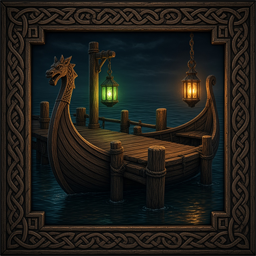
From ThunderstoreBuild a dry dock for longships and skiffs. Shift+D cradles the ship; the dock menu can deploy it, board it, or open its hold.
> Report a bug or buy us a coffee at dfgaming.net.
Safe Harbor
Buildable ship docks that do the seamanship for you. Steer a longship, karve, or raft up to an open berth, press a key at the rudder, and the ship eases into a cradle, lifts out of the water, and is dry-docked. Press the key again to slide it back out to the water. Docking persists across save and reload.
A Valheim BepInEx 5 plugin built on Jotunn.
Features
- Two buildable dock pieces (Hammer > DFG):
- Safe Harbor Dock (longships) — 40 Wood / 20 Fine Wood / 10 Iron. Uses the included
dock.glb. - Safe Harbor Skiff Dock (karves and rafts) — 20 Wood / 8 Fine Wood / 3 Iron.
- Shift+D at the rudder docks or undocks. The ship eases into the berth and lifts clear of the water.
- Dock controls on the dock: dock a nearby ship, deploy it, board it, or open its hold.
- Status lights on the dock: green when the berth is open, red when a ship is docked.
- The docked ship and its berth are saved with the world. The ship is repaired when it docks.
- Indestructible by default.
Requirements
- BepInEx 5 (
denikson-BepInExPack_Valheim) - Jotunn 2.30.x (
ValheimModding-Jotunn)
Installation
- Install through your mod manager (recommended).
- Manual: copy this folder to
BepInEx\plugins\DFG-SafeHarbor\. KeepSafeHarbor.dll,dock.glb, anddock_icon.jpgtogether. - Restart Valheim. The build pieces are registered at startup.
How to use
- Build Safe Harbor Dock from the Hammer under DFG and place it at the shore. The ghost sits the underside on the ground or the water.
- Steer a ship within range of the dock.
- At the rudder, press Shift+D to dock. Press it again to undock. The ship slides out to the water.
- Walk up to the dock and press E on the dock controls.
| Key | Action | |-----|--------| | Shift+D | Dock or undock while steering | | E | Open the dock menu | | 1 | Dock a nearby ship | | 2 | Deploy the docked ship | | 3 | Board the docked ship | | 4 | Open the docked ship's hold | | Esc | Close the menu | | Alt+L | Open the in-game tuner |
While a ship is docking, Deploy and Board stay unavailable until it has settled.
Configuration
Generated on first launch at BepInEx\config\com.safeharbor.safeharbor.cfg.
| Section | Key | Default | Description | |---------|-----|---------|-------------| | General | Enabled | true | Master toggle. | | General | AddBuildPiece | true | Add the docks to the Hammer. Restart. | | General | ShowHudPrompt | true | Show the dock hint while steering nearby. | | General | ShowMessages | true | Message when a ship docks or undocks. | | General | StatusLights | true | Green = open, red = occupied. Restart. | | General | DebugLogging | true | Write docking details to the BepInEx log. | | Controls | DockKey | Left Shift + D | Dock and undock at the rudder. | | Controls | GuiKey | Left Alt + L | Open the in-game tuner. | | Docking | DockRange | 50 | How far (meters) a ship can be and still dock. | | Docking | DockDuration | 2.5 | Seconds to ease into the berth. | | Docking | UndockDuration | 1.5 | Seconds to slide back out. | | Docking | LiftHeight | 1.8 | Meters the ship is raised above the water. | | Docking | UndockDistance | 20 | How far forward the ship is released. | | Docking | UndockSpeed | 4 | Push (m/s) when the ship is released. | | Docking | MaxDockSpeed | 3 | Ship must be slower than this to dock. 0 disables the check. | | Dock | Berths | 1 | Ships one large dock can hold. Restart. | | Dock | Indestructible | true | The dock takes no damage. | | Dock | AddPilings | true | Support posts under the dock. Restart. | | Dock | PilingLength | 20 | Piling length in meters. Restart. | | SmallDock | Enabled | true | Also add the skiff dock. Restart. | | Blueprint | WebTuner | true | Serve the local alignment page. | | Blueprint | WebPort | 8781 | Tuner address is http://127.0.0.1:8781/. |
Model alignment (position, berth, ship level, and the three status-light nudges) is stored in BepInEx\config\safeharbor_model.json. With the web tuner on, open http://127.0.0.1:8781/ while the game is running and save from that page.
The skiff dock can still use a PlanBuild blueprint (safeSkiff.blueprint or smallDock.blueprint) when one is found.
Changelog
See CHANGELOG.md.
Support
If this mod has made your journey through the Tenth World a little better, consider tossing a coin into my Ko-fi jar: https://ko-fi.com/draugrforgedgaming. Your support keeps the forge hot and the mead flowing! Skål!
Highlights
From source dataLoaders
Runs on BepInEx.
Footprint
Rated a light load on a server.
Last update
Its author last shipped an update 29d ago.
SafeHarbor on Nxeon
From our catalogue- One-click install
- Supported on Nxeon Valheim servers, for BepInEx servers. We download it from Thunderstore, place it, and restart the server.
- Server type needed
- BepInEx
- Server load
- light
- Smallest plan we suggest
- Valheim — 4 GB (4 GB RAM). This follows our own load rating above, not a benchmark.
- Latest build
- 1.0.29, released 2026-10-06
Game versions by loader
| Loader | Game versions | Newest |
|---|---|---|
| BepInEx |
From 5 recorded builds of SafeHarbor.
Recent builds
| Build | Released | Game versions | Loaders |
|---|---|---|---|
| 1.0.29 | 2026-10-06 | n/a | BepInEx |
| 1.0.4 | 2026-10-05 | n/a | BepInEx |
| 1.0.2 | 2026-10-05 | n/a | BepInEx |
| 1.0.1 | 2026-09-21 | n/a | BepInEx |
| 1.0.0 | 2026-09-21 | n/a | BepInEx |
Dependencies
- Required: BepInExPack Valheim
- Required: Jotunn
Declared by the newest build that lists any. Required ones are installed with it on one-click installs.
Run SafeHarbor on a Valheim server
Pick a server or deploy a new one above; it is installed in one click.
What kind of mod it is
From the catalogVehicles & ships
Cars, boats, aircraft, ships and other things to drive or fly.
Compatibility
- Game
- Valheim
- Loaders
- BepInEx
- Requires
- One-click install needs a BepInEx server.
Verified at the source
- ✓ThunderstoreOfficial listing, checked 2026-10-06Open ↗
- ✓AuthorDFG, as published on Thunderstore
- ✓LicenseNot published by the sourceFree















