







About SkillsPreview
From ThunderstoreCustom skills mod for Valheim. Extends and enhances the default skill system.
Skills Preview
 English |
 Polish |
 French |
 German |
 Ukrainian |
 Spanish |
 Portuguese |
 Italian
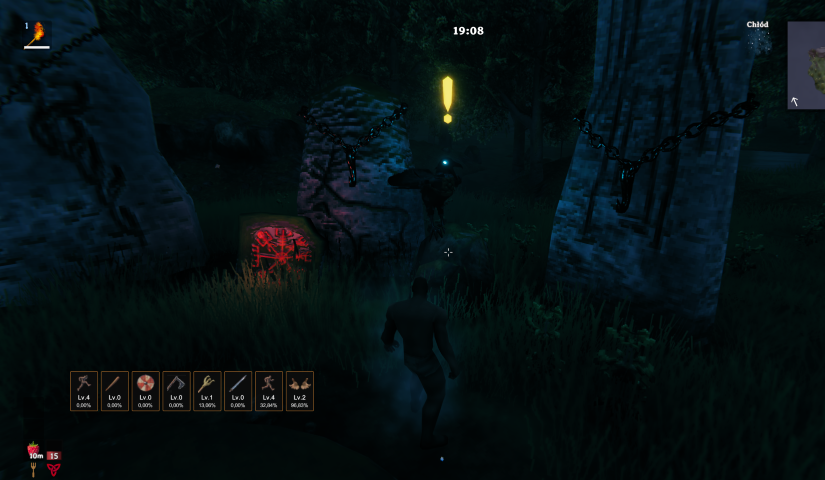
> Note: This plugin is currently under active development. Bugs may occur and features may change in future versions.
Skills Preview is a Valheim mod that adds compact HUD widgets for your chosen skills. It gives you a quick glance at each skill's level and progress without ever opening the character window.
Each widget shows:
- the skill icon,
- current level (e.g.
Lv.45), - percentage progress to the next level (e.g.
72.00%), - a thin progress bar at the bottom that fills with the current XP %,
- a flash animation when you level up.
On top of the widgets, the mod also pops a Valheim-style level-up banner in the centre-top area of the screen whenever one of your favourited skills gains a level — position, duration, font size, and colour are all configurable.
Table of Contents
Requirements
- Valheim — (current Steam version)
- BepInEx — Valheim modding framework (version 5.x required)
Installation
Manual
- Download the latest release from the Releases tab.
- Make sure BepInEx is installed. If it isn't, grab it from the project page and follow the setup instructions there.
- Copy
SkillsPreview.dllinto:
<game_directory>/BepInEx/plugins/- Launch the game — the plugin loads automatically.
- You can confirm it loaded by checking the BepInEx console.
Via mod manager (e.g. Thunderstore Mod Manager)
Search for Skills Preview in the manager and click "Install".
How to Use
- Open the skills window (
Lby default). - A star icon appears next to each skill — click a skill to mark it as a favourite. Skills are tracked in the order you select them.
- Your favourited skills show up as HUD widgets during gameplay.
- Widgets can be repositioned and resized through the settings panel (see Configuration).
Configuration
In-game settings panel
The plugin includes a built-in settings panel accessible directly from the skills window. You can change the following without leaving the game:
- Theme presets — one-click apply of a complete colour + size scheme: Valheim (default warm gold/brown), Dark, Minimal, High contrast,
- HUD panel position — where the widgets appear on screen (default: bottom-left corner near the player stats),
- HUD scale — uniform scale of the entire widget panel (50–150 %, default 100 %), without changing individual size values,
- Widget element colours — background, border, level text, progress text, "MAX" colour, level-up flash colour, progress bar track,
- Star colours — active (favourited) and inactive star colours,
- Widget size and appearance — width, height, icon size, font sizes, corner rounding, border thickness, spacing between widgets, progress bar visibility and height,
- Level-up banner — toggle the centre-top banner on/off, distance from the top of the screen (% of screen height), how long it stays visible, font size, and text colour.
Numeric settings (sizes, font sizes, spacing, scale, etc.) are adjusted with sliders directly in the panel; position X/Y still use text input fields.
Every option has a ↺ button to reset it individually, or you can hit Reset all to restore all defaults at once.
Config file
Settings are saved automatically to:
<game_directory>/BepInEx/config/godzki.skills_preview.cfgYou can edit this file in any text editor. Each option has a comment explaining what it does. Changes made manually take effect after restarting the game.
All configuration options
[1 - General]
| Key | Description | |-----|-------------| | DebugMode | Enables verbose logging in the BepInEx console | | HudWidgetsVisible | Shows or hides the HUD widgets (does not affect the skills panel) |
[2 - Skill Panel]
| Key | Description | |-----|-------------| | FavoriteStarColor | Star colour for a favourited skill | | UnfavoriteStarColor | Star colour for a non-favourited skill |
[3 - HUD Position]
| Key | Default | Description | |-----|---------|-------------| | PositionX | 150 | Horizontal position of the widget panel (px from the left edge of the screen) | | PositionY | 200 | Vertical position of the widget panel (px from the bottom edge of the screen) | | Scale | 100 | 50–150 | Uniform scale of the widget panel in percent; does not affect individual widget settings |
[4 - HUD Widget]
Highlights
From source dataLoaders
Runs on BepInEx.
Footprint
Rated a light load on a server.
Last update
Its author last shipped an update 6 mo ago.
SkillsPreview on Nxeon
From our catalogue- One-click install
- Supported on Nxeon Valheim servers, for BepInEx servers. We download it from Thunderstore, place it, and restart the server.
- Server side
- Optional on the server
- Server type needed
- BepInEx
- Server load
- light
- Smallest plan we suggest
- Valheim — 4 GB (4 GB RAM). This follows our own load rating above, not a benchmark.
- Latest build
- 0.5.2, released 2026-05-17
Game versions by loader
| Loader | Game versions | Newest |
|---|---|---|
| BepInEx |
From 12 recorded builds of SkillsPreview.
Recent builds
| Build | Released | Game versions | Loaders |
|---|---|---|---|
| 0.5.2 | 2026-05-17 | n/a | BepInEx |
| 0.5.1 | 2026-05-08 | n/a | BepInEx |
| 0.5.0 | 2026-05-08 | n/a | BepInEx |
| 0.4.2 | 2026-04-20 | n/a | BepInEx |
| 0.4.1 | 2026-04-19 | n/a | BepInEx |
| 0.4.0 | 2026-04-19 | n/a | BepInEx |
Dependencies
- Required: BepInExPack Valheim
Declared by the newest build that lists any. Required ones are installed with it on one-click installs.
Run SkillsPreview on a Valheim server
Pick a server or deploy a new one above; it is installed in one click.
What kind of mod it is
From the catalogAdmin & protection
Permissions, moderation, anti-cheat and land protection for the people running the server.
Works on a server
From source side supportThunderstore lists server-side support for SkillsPreview as optional: it can run on a server, but isn’t required there.
Compatibility
- Game
- Valheim
- Loaders
- BepInEx
- Runs on
- Serveroptional on the server
- Requires
- One-click install needs a BepInEx server.
Verified at the source
- ✓ThunderstoreOfficial listing, checked 2026-10-02Open ↗
- ✓Authorgodzki, as published on Thunderstore
- ✓LicenseNot published by the sourceFree











