







About FletchersForge
From ThunderstoreCraft arrow shafts and heads, reforge in the field with the Fletcher's knife, and carry ammo in a custom quiver.
Fletchers Forge
Disassemble vanilla arrows into shafts and arrowheads, craft components at vanilla stations, reforge ammunition in the field with the Fletcher's knife, and carry ammo in a Fletcher's quiver.
Current version: 1.0.1 Requires: Valheim 1.0+, BepInExPack (Unity 6), and Jötunn
Links
- Team Extreme Discord — setup help, bug reports, and updates
- GitHub — Fletchers Forge — source code and issues
Screenshots

What this mod does
| You can… | Where | |----------|--------| | Craft arrow shafts and heads (batches of 20) | Workbench / Forge / Black forge | | Split arrows into shaft + head | Field — Fletcher's bench | | Reforge shaft + head into arrows | Field — Fletcher's bench | | Rehead arrows (swap head type) | Field — Fletcher's bench | | Keep several ammo types in a quiver and pick which the bow/crossbow uses | Fletcher's quiver | | Store crossbow bolts in the quiver (as well as arrows) | Fletcher's quiver | | See the quiver on your back while it is equipped | Cosmetic only | | Carry finished ammo as normal vanilla arrows / bolts | Inventory / bow / crossbow |
There is no material salvage beyond shafts and heads (no wood/ore back from splitting).
Custom models
This release adds custom 3D models:
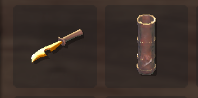
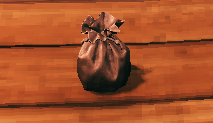
| Model | In game | |-------|---------| | Arrowhead bag | Dropped arrowheads appear as a leather pouch, not a crate. | | Fletcher's dagger | The Fletcher's knife uses this dagger mesh when held or dropped. | | Quiver | The Fletcher's quiver uses this model when held, dropped, or shown on the back while equipped. |
Quick start
- Install BepInEx and Jötunn.
- Install Fletchers Forge into
BepInEx/plugins/Hardwire99-FletchersForge/. - Craft a Fletcher's knife at the Forge (level 1).
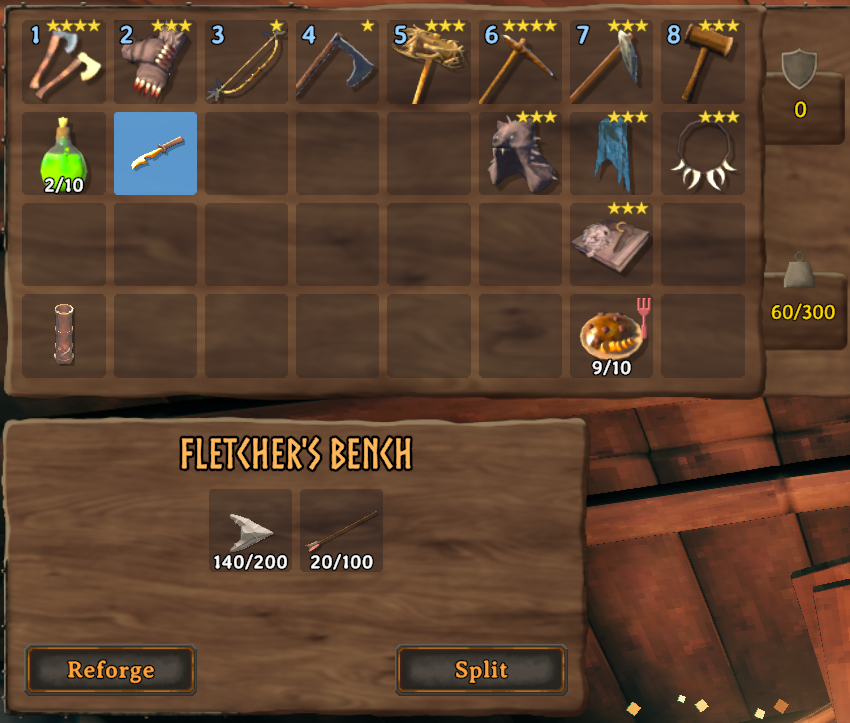
- Hold the knife in your hand — the Fletcher's bench opens automatically.
- Use Reforge or Split. Results go directly into your inventory.
- Craft a Fletcher's quiver, right-click it in inventory to equip, then drag arrows or crossbow bolts into its eight slots.
Fletcher's knife
| | | |--|--| | Recipe | Forge level 1 — Fine wood ×1, Copper ×1, Leather scraps ×1 | | Look | Custom dagger model | | Role | Opens the field bench; used for reforge / split | | Combat | No damage; does not wear out from normal use | | Bench | Auto-opens when the knife is in your hand; stays open while equipped |
Fletcher's quiver
Craft a Fletcher's quiver and right-click it in your inventory to equip or unequip. It does not use the cape/cloak slot. While equipped it unlocks the eight fletcher slots and shows a cosmetic quiver on your back. You can carry multiple quivers; only one can be equipped at a time (contents stay on each quiver).
| | | |--|--| | Recipe | Forge level 1 — Deer hide ×4, Bronze ×2, Fine wood ×4 | | Equip | Right-click the quiver in the backpack (toggle) | | Slots | 8, stored on the quiver item (they travel with that quiver) | | Accepts | Vanilla arrows, crossbow bolts, shafts, arrowheads, and the Fletcher's knife |
Loading the slots
With the quiver equipped, open your inventory. The eight quiver slots sit under the backpack. Drag arrows (or other accepted items) in and out like any other inventory. Ctrl-click a quiver slot to send that stack straight to the backpack.
Choosing ammo
The bow or crossbow shoots from the selected quiver slot.
- If that slot has matching ammo (arrows for bows, bolts for crossbows), those are used.
- If it is empty or the wrong ammo type, the next matching quiver slot is used (and becomes selected).
- If no quiver slot matches, the weapon uses ammo from your normal inventory as usual.
- Melee weapons and staffs do not use quiver ammo.
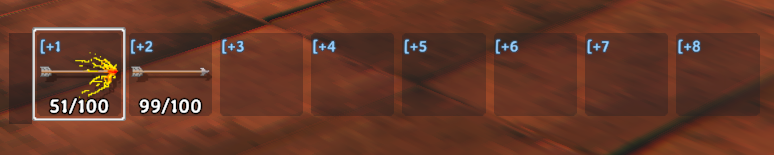
While inventory is closed, the quiver shows as a HUD bar under the hotbar.
| How | Default | |-----|---------| | Hold [+1 … [+8 | Hold [ and press 1–8 | | Click a HUD slot | Hold ~ (the key left of 1) to free the mouse, then click | | Unload a HUD slot | Hold ~, then right-click (or Shift/Ctrl-click) to dump that stack into the backpack |
Selecting a slot that holds the Fletcher's knife equips the knife.
Moving the HUD bar
The closed-inventory quiver bar can be moved.
- Hold ~ to free the mouse.
- Drag the left grip (the small handle on the left of the bar) to a new spot. The position is saved.
- Right-click that grip (still holding ~) to put the bar back in the default place.
Moving the inventory row
While inventory is open, the quiver row starts under the backpack. Drag the left grip to move it (clicking a slot still moves items). That spot is saved until you drag it again. Right-click the grip to put it back under the backpack.
Death and tombstone
Highlights
From source dataLoaders
Runs on BepInEx.
Footprint
Rated a light load on a server.
Last update
Its author last shipped an update 54d ago.
FletchersForge on Nxeon
From our catalogue- One-click install
- Supported on Nxeon Valheim servers, for BepInEx servers. We download it from Thunderstore, place it, and restart the server.
- Server side
- Optional on the server
- Server type needed
- BepInEx
- Server load
- light
- Smallest plan we suggest
- Valheim — 4 GB (4 GB RAM). This follows our own load rating above, not a benchmark.
- Latest build
- 1.0.1, released 2026-09-11
Game versions by loader
| Loader | Game versions | Newest |
|---|---|---|
| BepInEx |
From 12 recorded builds of FletchersForge.
Recent builds
| Build | Released | Game versions | Loaders |
|---|---|---|---|
| 1.0.1 | 2026-09-11 | n/a | BepInEx |
| 1.0.0 | 2026-09-11 | n/a | BepInEx |
| 0.2.10 | 2026-09-01 | n/a | BepInEx |
| 0.2.9 | 2026-08-22 | n/a | BepInEx |
| 0.2.8 | 2026-08-20 | n/a | BepInEx |
| 0.2.7 | 2026-08-20 | n/a | BepInEx |
Dependencies
- Required: BepInExPack Valheim
- Required: Jotunn
Declared by the newest build that lists any. Required ones are installed with it on one-click installs.
Run FletchersForge on a Valheim server
Pick a server or deploy a new one above; it is installed in one click.
What kind of mod it is
From the catalogQuality of life & UI
Small conveniences, tweaks and interface improvements players notice straight away.
Works on a server
From source side supportThunderstore lists server-side support for FletchersForge as optional: it can run on a server, but isn’t required there.
Compatibility
- Game
- Valheim
- Loaders
- BepInEx
- Runs on
- Serveroptional on the server
- Requires
- One-click install needs a BepInEx server.
Verified at the source
- ✓ThunderstoreOfficial listing, checked 2026-10-02Open ↗
- ✓AuthorHardwire99, as published on Thunderstore
- ✓LicenseNot published by the sourceFree












