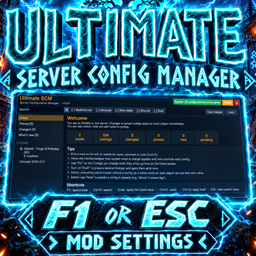
About Ultimate Server Configuration Manager
From Thunderstore✅ The LAST config mod you'll ever need. Edit ANY mod in-game with F1 — changes hit every player instantly. Admin-only controls, auto-translated descriptions, 15 languages, one-click undo. No more .cfg problems.
Ultimate Server Configuration Manager (Ultimate SCM) 1.0.4

Every mod's settings. One panel. Synced live with the server.
💬 Join the Discord




> 💡 Suggestions, bugs and questions: https://discord.gg/aMkN89Cuas — when reporting a bug, attach your BepInEx LogOutput.log and say what you expected to happen.
A universal settings panel for Valheim. It shows the configs of all installed BepInEx mods, explains each one using the mod's own comment (with a button to translate it into your Valheim language), and syncs everything with the server.
> Install on the server and on all clients.
Screenshots
Home screen — every mod, what changed, what is pending:

Editing a mod as admin — edit any config live, choose per config or per mod what players see (Hidden · View only · Can edit), draft several changes and apply them at once:

What a player sees — by default everything is hidden until the admin releases it:

Mod Integration (1.0.4)
Mods with their own configuration panel can add it to Mod Integration in Ultimate SCM.
How to add your mod panel
- Inside the Ultimate SCM mod folder, open:
Developer Integration/SCMPanel.cs
- Copy
SCMPanel.csinto your mod project, alongside your other.cssource files. If you use Visual Studio, you can also use Add → Existing Item and selectSCMPanel.cs.
- Make sure your mod already has a console command that opens its panel. Example:
new Terminal.ConsoleCommand(
    "yourmod_config",
    "Opens the mod settings panel.",
    new Terminal.ConsoleEvent(OnCommand),
    false, false, false, false, false, false, null, false, false, false
);- Immediately after registering that command, register it with Ultimate SCM:
SCMPanel.Register("yourmod_config");This makes the panel available to Player + Admin.
For a panel that should be visible only to admins:
SCMPanel.Register("yourmod_config", true);The first argument must be the exact console command that opens your mod's panel. The second argument is optional: false (default) means Player + Admin, while true means Admin only.
Ultimate SCM uses the registering mod's manifest.json and icon.png to build the card automatically. Mod Integration is always available in the sidebar: with zero integrations it appears like the standard menu items as Mod Integration (0) and shows an explanatory page; when at least one compatible panel is available, the entry receives the orange highlight and a count badge.
When you open the normal configuration page of a mod that has an accessible integrated panel, Ultimate SCM also shows a highlighted notice at the top of that mod's settings with an OPEN button. The notice is shown only for that matching mod and follows the same Player/Admin access rule as Mod Integration.
Complete example
new Terminal.ConsoleCommand(
    "yourmod_config",
    "Opens the mod settings panel.",
    new Terminal.ConsoleEvent(OnCommand),
    false, false, false, false, false, false, null, false, false, false
);

SCMPanel.Register("yourmod_config");
Installation
- Install through a mod manager (Thunderstore Mod Manager, r2modman, etc.), or copy the contents of
plugins/toBepInEx/plugins/Ultimate_SCM/. - It must be installed on the server AND all clients.
- Requires BepInExPack_Valheim.
How to open
- ESC → "Mod Settings" (a button added to the pause menu), or
- F1 (configurable in
Panel hotkey). ConfigurationManager also uses F1 by default: change the key of one of the two. - ESC closes the panel (if a search is typed, the first ESC press clears the search).
- The window remembers where you left off: position, size (drag the top to move it and the bottom-right corner to resize it), last opened mod, collapsed sections, and filters.
Center windowresets it to the default.
Shortcuts
| Key | Action | |---|---| | F1 | opens/closes | | Ctrl+F | jumps to search | | Enter | applies the typed value | | Ctrl+Z | undoes the last change (outside text fields) | | Ctrl+S | applies the draft | | ESC | closes the confirmation → cancels the note → clears the search → closes the panel |
Sync rules
Highlights
From source dataLoaders
Runs on BepInEx.
Footprint
Rated a light load on a server.
Last update
Its author last shipped an update 10d ago.
Ultimate Server Configuration Manager on Nxeon
From our catalogue- One-click install
- Supported on Nxeon Valheim servers, for BepInEx servers. We download it from Thunderstore, place it, and restart the server.
- Server side
- Optional on the server
- Server type needed
- BepInEx
- Server load
- light
- Smallest plan we suggest
- Valheim — 4 GB (4 GB RAM). This follows our own load rating above, not a benchmark.
- Latest build
- 1.0.4, released 2026-10-06
Game versions by loader
| Loader | Game versions | Newest |
|---|---|---|
| BepInEx |
From 5 recorded builds of Ultimate Server Configuration Manager.
Recent builds
| Build | Released | Game versions | Loaders |
|---|---|---|---|
| 1.0.4 | 2026-10-06 | n/a | BepInEx |
| 1.0.3 | 2026-10-03 | n/a | BepInEx |
| 1.0.2 | 2026-10-03 | n/a | BepInEx |
| 1.0.1 | 2026-10-02 | n/a | BepInEx |
| 1.0.0 | 2026-10-01 | n/a | BepInEx |
Dependencies
- Required: BepInExPack Valheim
Declared by the newest build that lists any. Required ones are installed with it on one-click installs.
Run Ultimate Server Configuration Manager on a Valheim server
Pick a server or deploy a new one above; it is installed in one click.
What kind of mod it is
From the catalogQuality of life & UI
Small conveniences, tweaks and interface improvements players notice straight away.
Works on a server
From source side supportThunderstore lists server-side support for Ultimate Server Configuration Manager as optional: it can run on a server, but isn’t required there.
Compatibility
- Game
- Valheim
- Loaders
- BepInEx
- Runs on
- Serveroptional on the server
- Requires
- One-click install needs a BepInEx server.
Verified at the source
- ✓ThunderstoreOfficial listing, checked 2026-10-07Open ↗
- ✓AuthorIgao, as published on Thunderstore
- ✓LicenseNot published by the sourceFree